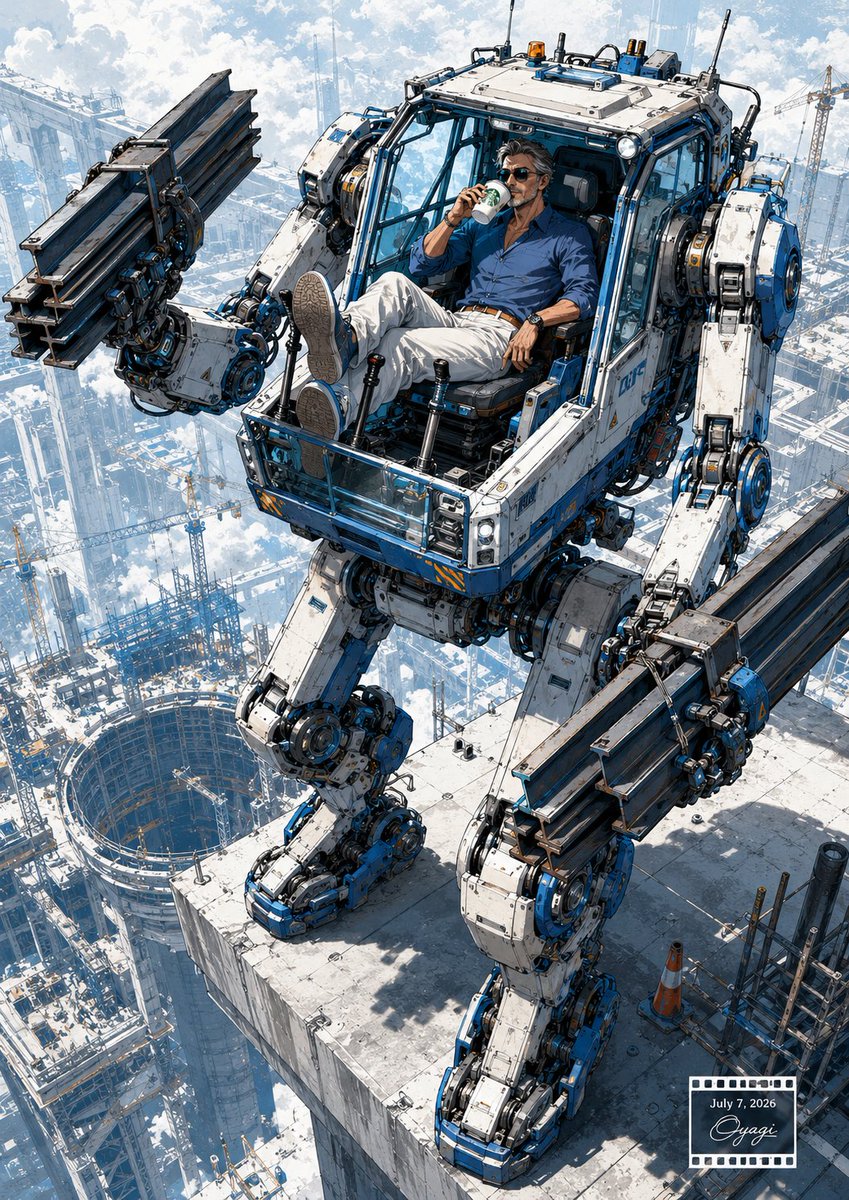
Relaxed Pilot in Construction Mech
Generates a detailed sci-fi construction illustration of a man casually piloting a massive rooftop mech above a futuristic city worksite.
Dies ist ein GPT Image 2 -Prompt für Anime & Spiel . Verwenden Sie den unten stehenden, kopierfertigen Prompt, um ähnliche Grafiken zu erstellen, und überprüfen Sie vor der Wiederverwendung Awesome GPT Image 2 Prompts -Quellenangaben sowie die kommerziellen Nutzungsrechte.
Benötigen Sie den vollständigen Prompt-Satz? Verwenden Sie den Anime & Spiel Weitere verwandte Beispiele finden Sie im Themen-Hub oder öffnen Sie die GPT Image 2 Prompt-Katalog für das vollständige Beispielverzeichnis, wiederverwendbare Strukturen und Quellenangaben.
Free 1K preview
Generate one preview image instantly, no sign-up required.
1738/4000
Eingabeaufforderung
Kopierfertige Eingabeaufforderung
Create a highly detailed cinematic sci-fi construction scene in a vertical 3:4 composition. A massive white-and-blue humanoid construction mech stands on the edge of a skyscraper rooftop high above a futuristic city construction site, viewed from a dramatic elevated three-quarter angle. The mech has exactly 2 long mechanical arms, 2 heavy mechanical legs, an open cockpit cabin with glass framing, exposed hydraulic pistons, cables, circular joints, bolts, warning stripes, antennae, roof lights, and weathered industrial paint. Each arm grips one bundle of dark steel I-beams, for exactly 2 visible steel beam bundles total, held horizontally like oversized construction tools. Inside the cockpit, a relaxed middle-aged man with wavy dark hair, stubble, sunglasses, a blue button-up shirt, white trousers, brown belt, wristwatch, and casual shoes reclines with both feet up, calmly drinking from a small cup as if on a break; use {argument name="character mood" default="calm, confident, slightly smug"}. The rooftop is a pale concrete slab with construction clutter, including exactly 1 orange traffic cone and scaffolding pipes near the lower right. Far below, show a vast city full of cranes, skeletal high-rise frames, platforms, and one large circular excavation pit, fading into clouds and bright haze. Lighting is crisp daylight with blue sky, white clouds, strong shadows, high altitude atmosphere, intricate manga/anime-inspired mechanical linework, realistic industrial textures, and epic scale. Add a small film-strip style date/signature stamp in the bottom-right corner containing {argument name="date text" default="July 7, 2026"} and a cursive signature-like mark. No extra characters, no logos, no readable brand names.Eingabeaufforderungsvariablen
In der Eingabeaufforderung befinden sich bearbeitbare Argumentplatzhalter mit ihren Standardwerten.
Variable
character mood
Standard
calm, confident, slightly smug
Variable
date text
Standard
July 7, 2026
Best for
- - Anime & Spiel visual exploration
- - Image generation and reference-image edits
- - Reusable briefs that keep source attribution visible
Change these parts
- - Subject, product, character, or scene
- - Aspect ratio, camera, lighting, and background
- - Brand, text, color, and output constraints
Recommended model and settings
- - Model: gpt-image-2
- - Input mode: Text zu Bild
- - Aspect ratio: source
- - Commercial status: review original source
How to use this prompt
- 1. Copy the prompt and preserve its structure for the first test.
- 2. Replace the subject, context, and publishing channel.
- 3. Change one camera, lighting, or style variable per iteration.
- 4. Inspect the output, source, text, and rights before reuse.
Limitations, source, and reuse cautions
- - Generated output is an editable draft, not factual, legal, or rights evidence.
- - Review the linked source, people, brands, logos, text, and third-party media before commercial use.
Importiert von Awesome GPT Image 2 Prompts . Quellenangabe erforderlich. Status der kommerziellen Nutzung: allowed ; Rechte an der Quelle vor kostenpflichtiger Nutzung prüfen.
Weitere Fälle in dieser Kategorie
Priorisiert nach Kategorie, Kompatibilität der Eingabemodi, Qualität und geringerem Risiko.






Hinweise zur Wiederverwendung und Quellenangabe
Verwenden Sie diese Eingabeaufforderung sicher, nachdem Sie den Fall in der Vorschau angezeigt haben.
- 1.Kopieren Sie die Eingabeaufforderung oder öffnen Sie sie direkt in Dovoo mit der Schaltfläche „Generieren“.
- 2.Passen Sie Variablen, Seitenverhältnis und Referenzbilder an Ihren Anwendungsfall an.
- 3.Vor der Veröffentlichung oder kostenpflichtigen Nutzung sollten Sie die Rechte an der Quelle, die Anforderungen an die Namensnennung sowie die Risiken für die Marke oder das Abbild prüfen.