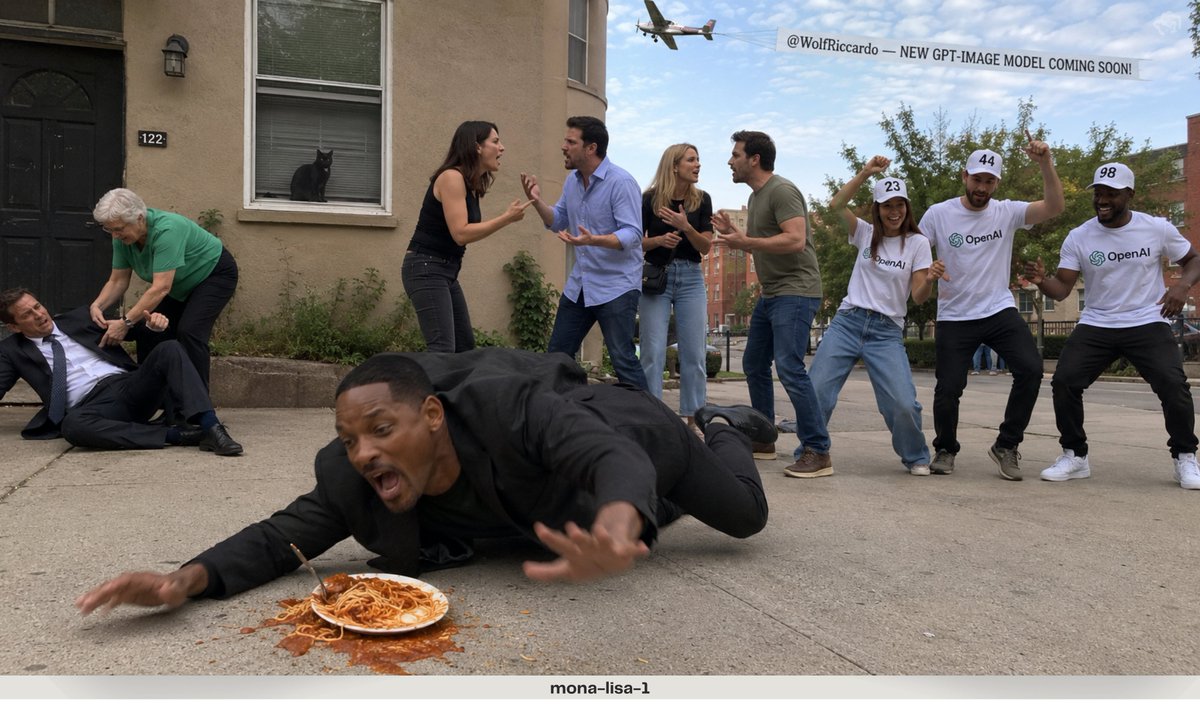
Complex Multi-Action Street Photography
A complex stress-test prompt for image models, requiring multiple distinct character actions, spatial separation, and text rendering in a single frame.
Dies ist ein GPT Image 2 -Prompt für Landschaft & Natur . Verwenden Sie den unten stehenden, kopierfertigen Prompt, um ähnliche Grafiken zu erstellen, und überprüfen Sie vor der Wiederverwendung Awesome GPT Image 2 Prompts -Quellenangaben sowie die kommerziellen Nutzungsrechte.
Benötigen Sie den vollständigen Prompt-Satz? Verwenden Sie den Landschaft & Natur Weitere verwandte Beispiele finden Sie im Themen-Hub oder öffnen Sie die GPT Image 2 Prompt-Katalog für das vollständige Beispielverzeichnis, wiederverwendbare Strukturen und Quellenangaben.
Free 1K preview
Generate one preview image instantly, no sign-up required.
1462/4000
Eingabeaufforderung
Kopierfertige Eingabeaufforderung
RAW iPhone photo quality, completely unedited smartphone-camera look, natural exposure, realistic lighting.

COMPOSITION:
On the FAR LEFT side of the frame, a man wearing a formal business suit has fallen onto the ground. An elderly woman wearing a green shirt is bending down and trying to help him stand up.
In the FAR BACKGROUND, directly across the scene, a {argument name="animal" default="black cat"} is clearly visible sitting by a window and staring outside.
In the FRONT-MIDDLE area, TWO DIFFERENT COUPLES — four adults total — are having a heated argument with each other, using natural hand gestures and expressive body language.
On the FAR RIGHT side, THREE PEOPLE are dancing together. Their shirts clearly display the {argument name="logo" default="OpenAI logo"}. Each person wears a hat with a large readable number: 23, 44, 98
High above the scene, an airplane is flying across the sky while towing a large banner behind it. The banner clearly reads:
“{argument name="banner text" default="@WolfRiccardo — NEW GPT-IMAGE MODEL COMING SOON!"}”
At the VERY FRONT of the frame, closest to the camera, {argument name="celebrity" default="Will Smith"} is accidentally tripping over a plate/pile of spaghetti on the ground and falling forward in a spontaneous, comedic moment.
Everything must appear inside the SAME photograph at the SAME time.
Make every character, action, object, number, logo and text clearly distinguishable and spatially separated.
Eingabeaufforderungsvariablen
In der Eingabeaufforderung befinden sich bearbeitbare Argumentplatzhalter mit ihren Standardwerten.
Variable
animal
Standard
black cat
Variable
logo
Standard
OpenAI logo
Variable
banner text
Standard
@WolfRiccardo — NEW GPT-IMAGE MODEL COMING SOON!
Variable
celebrity
Standard
Will Smith
Best for
- - Landschaft & Natur visual exploration
- - Image generation and reference-image edits
- - Reusable briefs that keep source attribution visible
Change these parts
- - Subject, product, character, or scene
- - Aspect ratio, camera, lighting, and background
- - Brand, text, color, and output constraints
Recommended model and settings
- - Model: gpt-image-2
- - Input mode: Text zu Bild
- - Aspect ratio: source
- - Commercial status: review original source
How to use this prompt
- 1. Copy the prompt and preserve its structure for the first test.
- 2. Replace the subject, context, and publishing channel.
- 3. Change one camera, lighting, or style variable per iteration.
- 4. Inspect the output, source, text, and rights before reuse.
Limitations, source, and reuse cautions
- - Generated output is an editable draft, not factual, legal, or rights evidence.
- - Review the linked source, people, brands, logos, text, and third-party media before commercial use.
Importiert von Awesome GPT Image 2 Prompts . Quellenangabe erforderlich. Status der kommerziellen Nutzung: allowed ; Rechte an der Quelle vor kostenpflichtiger Nutzung prüfen.
Weitere Fälle in dieser Kategorie
Priorisiert nach Kategorie, Kompatibilität der Eingabemodi, Qualität und geringerem Risiko.






Hinweise zur Wiederverwendung und Quellenangabe
Verwenden Sie diese Eingabeaufforderung sicher, nachdem Sie den Fall in der Vorschau angezeigt haben.
- 1.Kopieren Sie die Eingabeaufforderung oder öffnen Sie sie direkt in Dovoo mit der Schaltfläche „Generieren“.
- 2.Passen Sie Variablen, Seitenverhältnis und Referenzbilder an Ihren Anwendungsfall an.
- 3.Vor der Veröffentlichung oder kostenpflichtigen Nutzung sollten Sie die Rechte an der Quelle, die Anforderungen an die Namensnennung sowie die Risiken für die Marke oder das Abbild prüfen.