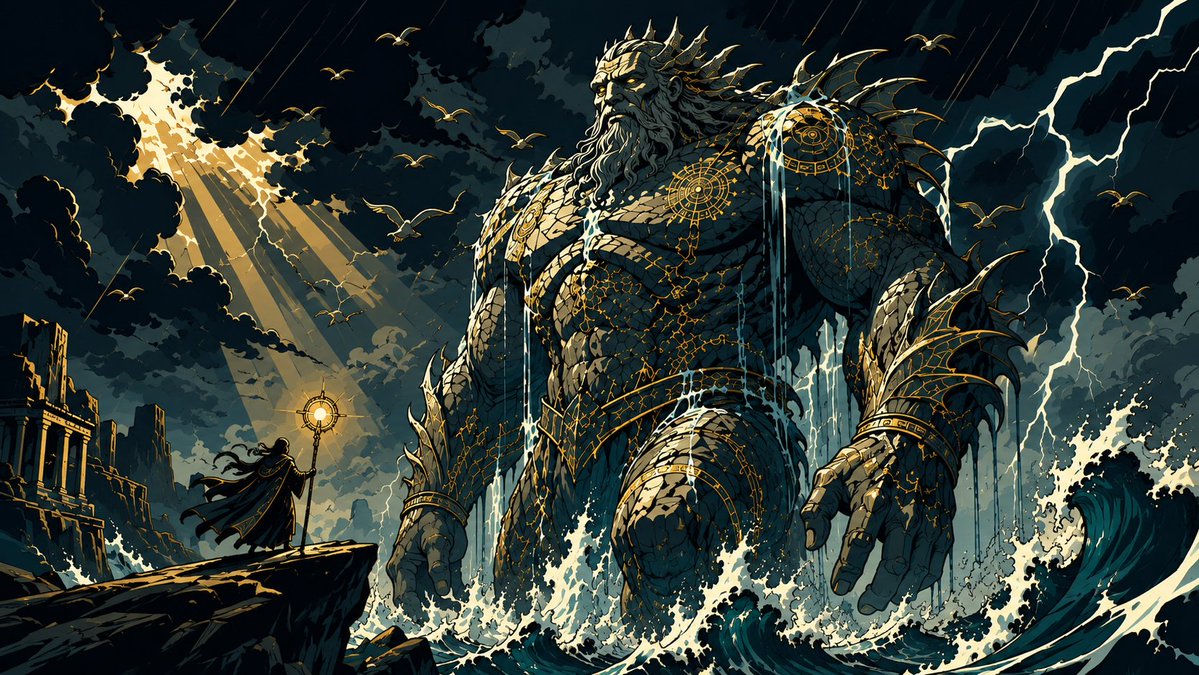
Colossal Ocean Titan and Messenger
A cinematic dark-fantasy prompt for generating an epic sea titan confrontation with a lone messenger in a stormy mythic ocean scene.
Dies ist ein GPT Image 2 -Prompt für Illustration & Kunst . Verwenden Sie den unten stehenden, kopierfertigen Prompt, um ähnliche Grafiken zu erstellen, und überprüfen Sie vor der Wiederverwendung Awesome GPT Image 2 Prompts -Quellenangaben sowie die kommerziellen Nutzungsrechte.
Benötigen Sie den vollständigen Prompt-Satz? Verwenden Sie den Illustration & Kunst Weitere verwandte Beispiele finden Sie im Themen-Hub oder öffnen Sie die GPT Image 2 Prompt-Katalog für das vollständige Beispielverzeichnis, wiederverwendbare Strukturen und Quellenangaben.
Free 1K preview
Generate one preview image instantly, no sign-up required.
1543/4000
Eingabeaufforderung
Kopierfertige Eingabeaufforderung
Create a dramatic widescreen dark-fantasy illustration of {argument name="character name" default="The Colossal Ocean Titan and Messenger"}: an immense ancient ocean titan rising from a stormy sea, facing a tiny hooded messenger standing on a jagged cliff at the lower left. The titan is a gigantic muscular humanoid sea god made of weathered stone and scale-like armor plates, with a stern bearded face, glowing eyes, horned or coral-like crown ridges, spines along the shoulders and back, and intricate glowing gold runic/celestial patterns across the chest, shoulders, arms, belt, and wrists. Streams of seawater pour from the titan’s shoulders, arms, beard, and torso while violent white-capped waves crash around his waist and hands. The messenger is a small black-cloaked silhouette with long windblown hair and cape, holding up a bright circular golden staff or beacon toward the titan. Set the scene amid ancient ruined coastal temples and broken columns on the far left, with a dark teal-black thunderstorm sky, dense layered clouds, diagonal rain streaks, bright lightning bolts on the right, and a dramatic opening in the clouds on the upper left where golden sun rays break through. Include exactly 15 visible birds or gull silhouettes scattered across the sky. Use a cinematic 16:9 composition, low-angle epic scale, high contrast chiaroscuro, deep navy and teal shadows, warm gold highlights, foaming turquoise waves, ornate linework, graphic-novel fantasy concept art style, highly detailed but painterly, no text, no watermark.Eingabeaufforderungsvariablen
In der Eingabeaufforderung befinden sich bearbeitbare Argumentplatzhalter mit ihren Standardwerten.
Variable
character name
Standard
The Colossal Ocean Titan and Messenger
Best for
- - Illustration & Kunst visual exploration
- - Image generation and reference-image edits
- - Reusable briefs that keep source attribution visible
Change these parts
- - Subject, product, character, or scene
- - Aspect ratio, camera, lighting, and background
- - Brand, text, color, and output constraints
Recommended model and settings
- - Model: gpt-image-2
- - Input mode: Text zu Bild
- - Aspect ratio: source
- - Commercial status: review original source
How to use this prompt
- 1. Copy the prompt and preserve its structure for the first test.
- 2. Replace the subject, context, and publishing channel.
- 3. Change one camera, lighting, or style variable per iteration.
- 4. Inspect the output, source, text, and rights before reuse.
Limitations, source, and reuse cautions
- - Generated output is an editable draft, not factual, legal, or rights evidence.
- - Review the linked source, people, brands, logos, text, and third-party media before commercial use.
Importiert von Awesome GPT Image 2 Prompts . Quellenangabe erforderlich. Status der kommerziellen Nutzung: allowed ; Rechte an der Quelle vor kostenpflichtiger Nutzung prüfen.
Weitere Fälle in dieser Kategorie
Priorisiert nach Kategorie, Kompatibilität der Eingabemodi, Qualität und geringerem Risiko.






Hinweise zur Wiederverwendung und Quellenangabe
Verwenden Sie diese Eingabeaufforderung sicher, nachdem Sie den Fall in der Vorschau angezeigt haben.
- 1.Kopieren Sie die Eingabeaufforderung oder öffnen Sie sie direkt in Dovoo mit der Schaltfläche „Generieren“.
- 2.Passen Sie Variablen, Seitenverhältnis und Referenzbilder an Ihren Anwendungsfall an.
- 3.Vor der Veröffentlichung oder kostenpflichtigen Nutzung sollten Sie die Rechte an der Quelle, die Anforderungen an die Namensnennung sowie die Risiken für die Marke oder das Abbild prüfen.