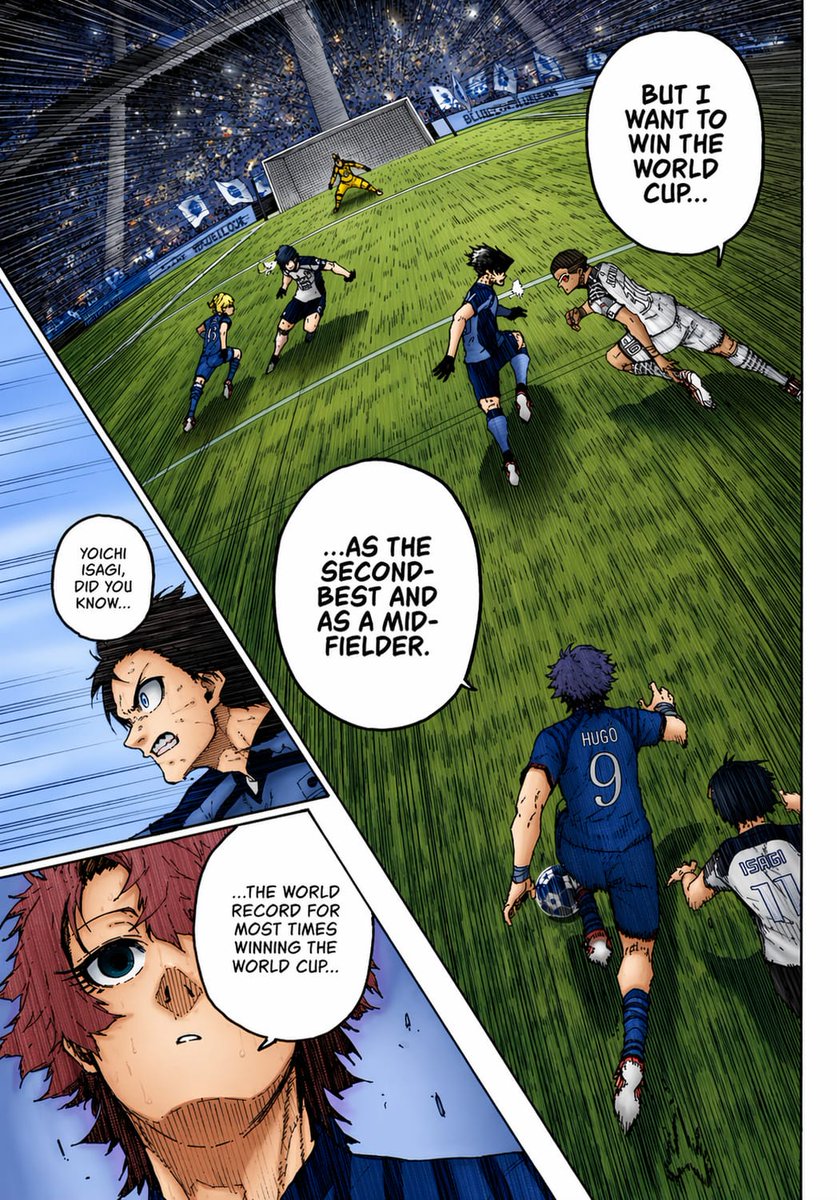
Kolorierte Fußball-Manga-Seite
So entsteht eine ausdrucksstarke, farbenprächtige Sport-Manga-Seite mit einer schrägen Fußballstadion-Szene, eingefügten Nahaufnahmen und markanten Dialogen, ideal für Manga-Kolorierungstests oder Comic-Zeichnungen im Anime-Stil.
Dies ist ein GPT Image 2 -Prompt für Anime & Spiel . Verwenden Sie den unten stehenden, kopierfertigen Prompt, um ähnliche Grafiken zu erstellen, und überprüfen Sie vor der Wiederverwendung Awesome GPT Image 2 Prompts -Quellenangaben sowie die kommerziellen Nutzungsrechte.
Benötigen Sie den vollständigen Prompt-Satz? Verwenden Sie den Anime & Spiel Weitere verwandte Beispiele finden Sie im Themen-Hub oder öffnen Sie die GPT Image 2 Prompt-Katalog für das vollständige Beispielverzeichnis, wiederverwendbare Strukturen und Quellenangaben.
Free 1K preview
Generate one preview image instantly, no sign-up required.
2358/4000
Eingabeaufforderung
Kopierfertige Eingabeaufforderung
A full-color manga page in the style of a dramatic sports manga, showing an intense soccer match inside a huge domed stadium packed with a blue-and-white crowd. Use sharp ink lines, dense crosshatching, screentone texture, dynamic speed lines, and vivid anime coloring as if a black-and-white manga page has been professionally colorized. The composition is a single page with 3 panels: 1 large main panel covering most of the page, plus 2 narrow diagonal inset panels stacked along the left side. In the main panel, show a steeply tilted wide-angle view of the penalty area and goal from an elevated sideline perspective, with the green grass stretched by perspective and filled with directional hatching. Count 6 visible players in the main panel: 4 blue-uniform players and 2 white-uniform players, plus 1 goalkeeper in yellow at the goal. The most prominent player is seen from behind in the lower center-right wearing a blue jersey with “HUGO” and the number 9, running toward the play with one arm extended. Near him on the lower right edge, show another player in a white jersey labeled “ISAGI” with the number 11, also running forward. In the midground, show 4 more field players contesting the ball: 3 in blue and 1 in white, with one white-uniform player diving or lunging horizontally from the right toward the center. The goal stands near the top center-left, with the yellow goalkeeper bracing in front of the net. Add 3 speech bubbles in the main panel, large white manga balloons with hand-lettered uppercase English text: “BUT I WANT TO WIN THE WORLD CUP...”, “...AS THE SECOND-BEST AND AS A MID-FIELDER.”, and “...THE WORLD RECORD FOR MOST TIMES WINNING THE WORLD CUP...”. In the left-side inset area, create 2 diagonal panels. The upper inset panel shows a close-up of a dark-haired character in blue, partly obscured by a soft rectangular blur over the center of the face and torso area, with a small speech bubble that says, “YOICHI ISAGI, DID YOU KNOW...”. The lower inset panel shows a close-up of a reddish-haired character with a wide blue eye, sweat on the face, and a pale blue background, looking surprised or stunned. Maintain bold black panel borders, dramatic foreshortening, and a high-energy tournament atmosphere. Use a blue, green, white, and yellow palette with strong contrast and authentic manga-page coloring aesthetics.
Best for
- - Anime & Spiel visual exploration
- - Image generation and reference-image edits
- - Reusable briefs that keep source attribution visible
Change these parts
- - Subject, product, character, or scene
- - Aspect ratio, camera, lighting, and background
- - Brand, text, color, and output constraints
Recommended model and settings
- - Model: gpt-image-2
- - Input mode: Text zu Bild
- - Aspect ratio: source
- - Commercial status: review original source
How to use this prompt
- 1. Copy the prompt and preserve its structure for the first test.
- 2. Replace the subject, context, and publishing channel.
- 3. Change one camera, lighting, or style variable per iteration.
- 4. Inspect the output, source, text, and rights before reuse.
Limitations, source, and reuse cautions
- - Generated output is an editable draft, not factual, legal, or rights evidence.
- - Review the linked source, people, brands, logos, text, and third-party media before commercial use.
Importiert von Awesome GPT Image 2 Prompts . Quellenangabe erforderlich. Status der kommerziellen Nutzung: allowed ; Rechte an der Quelle vor kostenpflichtiger Nutzung prüfen.
Weitere Fälle in dieser Kategorie
Priorisiert nach Kategorie, Kompatibilität der Eingabemodi, Qualität und geringerem Risiko.






Hinweise zur Wiederverwendung und Quellenangabe
Verwenden Sie diese Eingabeaufforderung sicher, nachdem Sie den Fall in der Vorschau angezeigt haben.
- 1.Kopieren Sie die Eingabeaufforderung oder öffnen Sie sie direkt in Dovoo mit der Schaltfläche „Generieren“.
- 2.Passen Sie Variablen, Seitenverhältnis und Referenzbilder an Ihren Anwendungsfall an.
- 3.Vor der Veröffentlichung oder kostenpflichtigen Nutzung sollten Sie die Rechte an der Quelle, die Anforderungen an die Namensnennung sowie die Risiken für die Marke oder das Abbild prüfen.