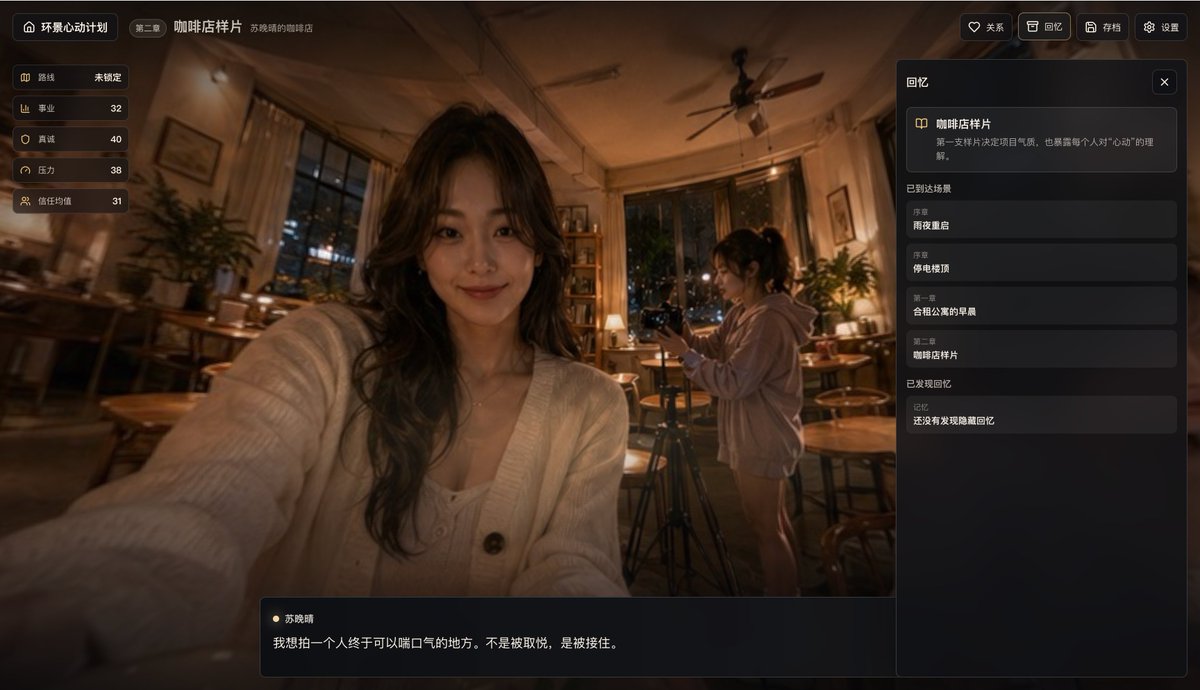
Cinematic Coffee Shop VN UI Mockup
Dadurch wird ein realistischer, romantischer Visual-Novel-Spiel-Screenshot generiert, der in einem gemütlichen Nachtcafé spielt und sich für Webspiel-Mockups, interaktive Drama-Konzepte und Produktdemos eignet.
Dies ist ein GPT Image 2 -Prompt für Anime-Spiele . Verwenden Sie den unten stehenden, kopierfertigen Prompt, um ähnliche Grafiken zu erstellen, und überprüfen Sie vor der Wiederverwendung Awesome GPT Image 2 Prompts -Quellenangaben sowie die kommerziellen Nutzungsrechte.
Free 1K preview
Generate one preview image instantly, no sign-up required.
Eingabeaufforderung
Kopierfertige Eingabeaufforderung
{
  "color_palette": {
    "accent": "Soft gold",
    "highlights": "Warm creamy skin tone and cardigan color",
    "primary": "Dark brown and amber",
    "secondary": "Charcoal Black UI"
  },
  "environment": {
    "furniture": [
      "Multiple round wooden coffee tables",
      "Wooden stools and chairs",
      "long bench on the left",
      "Back bookshelf",
      "Potted plants",
      "Large curtains and windows",
      "ceiling fan"
    ],
    "furniture_count": 7,
    "props": [
      "tripod",
      "Camera",
      "desk lamp",
      "Cups on the table"
    ],
    "props_count": 4
  },
  "parameters": {
    "chapter title": "{argument name=\"chapter title\" default=\"Coffee shop sample\"}",
    "character name": "{argument name=\"character name\" default=\"Su Xiaoqing\"}",
    "dialogue": "{argument name=\"quote\" default=\"I want to film a place where someone can finally catch their breath. Not to be pleased, but to be caught.\"}",
    "location": "{argument name=\"location\" default=\"The cozy interior of a coffee shop at night\"}",
    "ui language": "{argument name=\"interface language\" default=\"Chinese\"}"
  },
  "quality": "A highly detailed, cinematic, immersive, and exquisitely crafted early game prototype, featuring realistic depth of field, subtle lighting effects, and excellent screenshot composition.",
  "scene": {
    "camera": "First-person selfie perspective, the main character is seated, slightly wide-angle lens, foreground arm extends towards the lens.",
    "lighting": "Soft amber-colored practical lighting, warm tungsten filament light, dim corners, cinematic shadows, window reflections.",
    "location": "The cozy interior of a coffee shop at night",
    "style": "Realistic backgrounds paired with exquisite game UI overlays: Modern Chinese interactive drama aesthetics",
    "weather": "City night view outside the window"
  },
  "subjects": {
    "characters": [
      {
        "appearance": "A young woman with long, dark, wavy hair, wearing a beige knitted cardigan over a light-colored top and a delicate necklace, poses for a selfie with her upper body close to the camera.",
        "face_visibility": "Show every face clearly with natural, detailed facial features.",
        "position": "Left center foreground",
        "role": "Foreground female lead"
      },
      {
        "action": "Adjusting or monitoring camera equipment",
        "appearance": "A young woman, with her hair in a dark ponytail, wearing a loose light-colored hoodie and shorts, stands next to a tripod and camera.",
        "face_visibility": "Show every face clearly with natural, detailed facial features.",
        "position": "Right center background",
        "role": "Background photography of women"
      }
    ],
    "count": 2
  },
  "theme": "A warm, intimate, and slightly emotional dating simulation UI is overlaid on a realistic coffee shop scene.",
  "type": "Screenshots of a cinematic visual novel game interface",
  "ui": {
    "language": "Chinese",
    "layout": {
      "right_panel_card": {
        "description": "The first sample video sets the tone for the project and also reveals everyone's understanding of \"being moved\".",
        "title": "Coffee shop sample"
      },
      "sections": [
        {
          "count": 7,
          "labels": [
            "Huanjing Heartbeat Project",
            "Chapter Two",
            "Coffee shop sample",
            "relation",
            "remember",
            "Archive",
            "set up"
          ],
          "position": "Top edge",
          "title": "Top navigation bar"
        },
        {
          "count": 5,
          "labels": [
            "Route not locked",
            "Career 32",
            "Sincerity 40",
            "Pressure 38",
            "Trust value 31"
          ],
          "position": "Top left vertical stacking",
          "title": "Left side property panel"
        },
        {
          "count": 3,
          "labels": [
            "remember",
            "Scene arrived",
            "Memories have been discovered"
          ],
          "position": "Right sidebar",
          "title": "Right side memory panel"
        },
        {
          "count": 4,
          "labels": [
            "Restarting on a rainy night",
            "Power outage search",
            "Morning in a shared apartment",
            "Coffee shop sample"
          ],
          "position": "Middle of the right sidebar",
          "title": "Items in the scene have been reached."
        },
        {
          "count": 2,
          "labels": [
            "Su Xiaoqing",
            "I want to film a place where someone can finally catch their breath. Not to be pleased, but to be caught."
          ],
          "position": "Centered at the bottom",
          "title": "Bottom dialog box"
        }
      ]
    },
    "visual_design": "Dark, semi-transparent panel with rounded corners, a thin gold border and icons, and elegant sans-serif Chinese fonts; a high-end mobile/web interactive drama game HUD."
  }
}
Eingabeaufforderungsvariablen
In der Eingabeaufforderung befinden sich bearbeitbare Argumentplatzhalter mit ihren Standardwerten.
Best for
- - Anime-Spiele visual exploration
- - Image generation and reference-image edits
- - Reusable briefs that keep source attribution visible
Change these parts
- - Subject, product, character, or scene
- - Aspect ratio, camera, lighting, and background
- - Brand, text, color, and output constraints
Recommended model and settings
- - Model: gpt-image-2
- - Input mode: Text zu Bild
- - Aspect ratio: source
- - Commercial status: review original source
How to use this prompt
- 1. Copy the prompt and preserve its structure for the first test.
- 2. Replace the subject, context, and publishing channel.
- 3. Change one camera, lighting, or style variable per iteration.
- 4. Inspect the output, source, text, and rights before reuse.
Limitations, source, and reuse cautions
- - Generated output is an editable draft, not factual, legal, or rights evidence.
- - Review the linked source, people, brands, logos, text, and third-party media before commercial use.
Weitere Fälle in dieser Kategorie
Priorisiert nach Kategorie, Kompatibilität der Eingabemodi, Qualität und geringerem Risiko.






Hinweise zur Wiederverwendung und Quellenangabe
Verwenden Sie diese Eingabeaufforderung sicher, nachdem Sie den Fall in der Vorschau angezeigt haben.
- 1.Kopieren Sie die Eingabeaufforderung oder öffnen Sie sie direkt in Dovoo mit der Schaltfläche „Generieren“.
- 2.Passen Sie Variablen, Seitenverhältnis und Referenzbilder an Ihren Anwendungsfall an.
- 3.Vor der Veröffentlichung oder kostenpflichtigen Nutzung sollten Sie die Rechte an der Quelle, die Anforderungen an die Namensnennung sowie die Risiken für die Marke oder das Abbild prüfen.