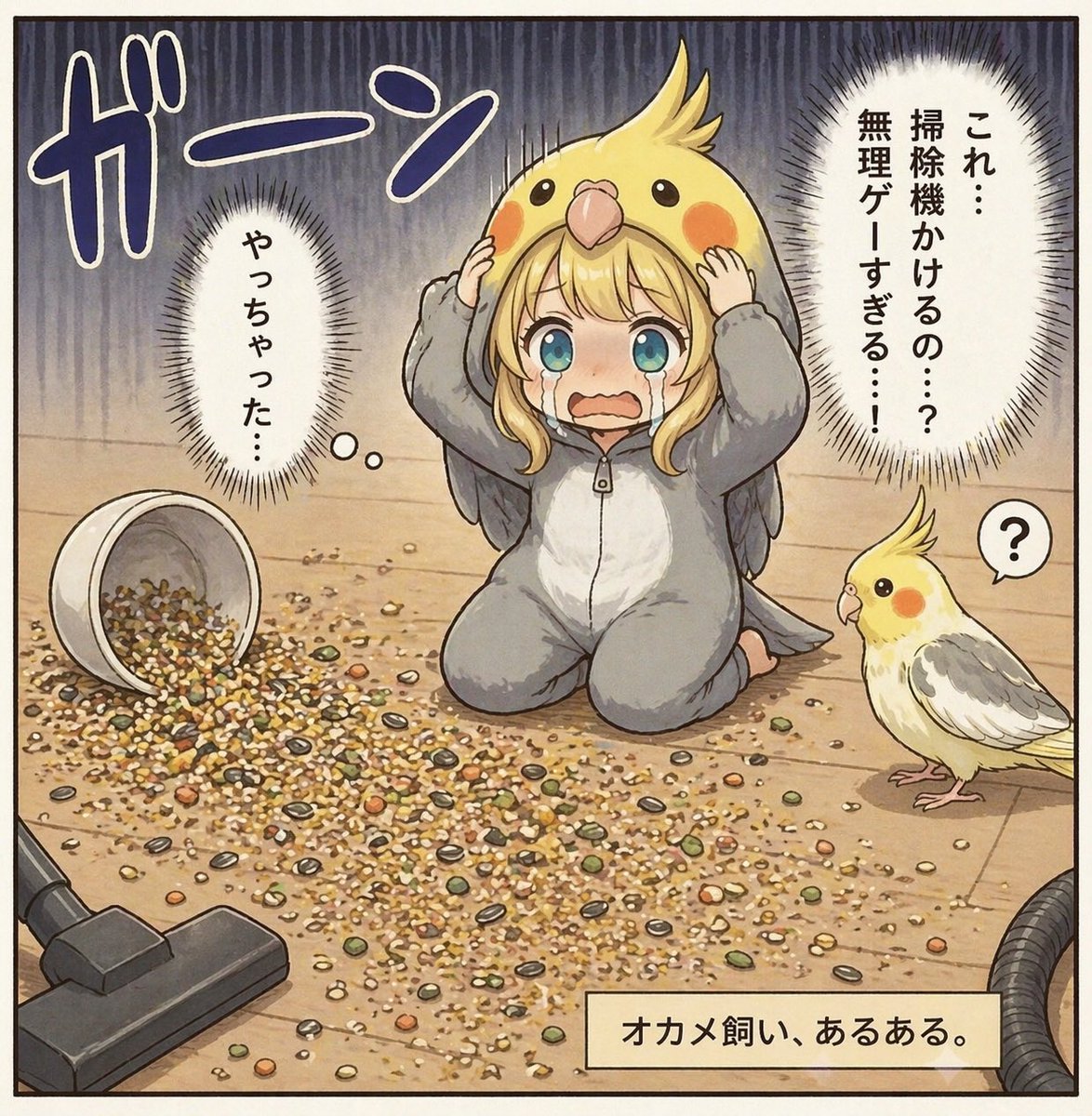
Nymphensittichbesitzer-Samen-Verschütten-Comic
Diese Vorgabe erzeugt eine humorvolle Szene im Manga-Stil mit einem einzigen Bild, in der ein Vogelbesitzer von einer riesigen, verschütteten Samenlache völlig überfordert ist – ideal für Comic-Beiträge, mit denen sich Tierbesitzer identifizieren können.
Dies ist ein GPT Image 2 -Prompt für Anime & Spiel . Verwenden Sie den unten stehenden, kopierfertigen Prompt, um ähnliche Grafiken zu erstellen, und überprüfen Sie vor der Wiederverwendung Awesome GPT Image 2 Prompts -Quellenangaben sowie die kommerziellen Nutzungsrechte.
Benötigen Sie den vollständigen Prompt-Satz? Verwenden Sie den Anime & Spiel Weitere verwandte Beispiele finden Sie im Themen-Hub oder öffnen Sie die GPT Image 2 Prompt-Katalog für das vollständige Beispielverzeichnis, wiederverwendbare Strukturen und Quellenangaben.
Free 1K preview
Generate one preview image instantly, no sign-up required.
1772/4000
Eingabeaufforderung
Kopierfertige Eingabeaufforderung
A single-panel Japanese comic-style illustration on a light wooden floor, drawn in a soft, detailed, slightly vintage manga-anime style with clean ink outlines and muted warm colors. In the center, a young woman kneels on the floor in a gray cockatiel kigurumi pajama suit with a white belly panel and small gray wings, while wearing an oversized yellow cockatiel hood shaped like a bird’s head with crest, round black eyes, orange cheek patches, and a beak above her forehead. She holds both sides of the hood in shock, her posture frozen and guilty, with a large rectangular censor block covering the center of her face. Across the floor in front of her is a huge mess of spilled birdseed: mixed grains, pellets, shells, and seeds scattered widely in a dense irregular pile. On the left lies 1 overturned white seed cup spilling its contents, and in the lower left corner 1 vacuum cleaner floor head points toward the mess, with part of the hose visible at the lower right edge. On the right stands 1 real cockatiel, small and curious, with a yellow face, orange cheeks, pale body, gray wings, and a raised crest, looking toward the kneeling woman; next to the bird is 1 small speech bubble containing a question mark. The background is simple indoor flooring with dramatic dark vertical stress lines filling the upper half to heighten panic. Add 4 Japanese text elements integrated like manga lettering: a huge sound effect 「ガーン」 at the upper left, 1 vertical thought bubble on the left reading 「やっちゃった…」, 1 large vertical spiky speech bubble on the upper right reading 「これ…掃除機かけるの…?無理ゲーすぎる…!」, and 1 beige caption box at the bottom right reading 「オカメ飼い、あるある。」. The mood is comedic embarrassment and domestic disaster, as if illustrating a relatable bird-owner mistake.
Best for
- - Anime & Spiel visual exploration
- - Image generation and reference-image edits
- - Reusable briefs that keep source attribution visible
Change these parts
- - Subject, product, character, or scene
- - Aspect ratio, camera, lighting, and background
- - Brand, text, color, and output constraints
Recommended model and settings
- - Model: gpt-image-2
- - Input mode: Text zu Bild
- - Aspect ratio: source
- - Commercial status: review original source
How to use this prompt
- 1. Copy the prompt and preserve its structure for the first test.
- 2. Replace the subject, context, and publishing channel.
- 3. Change one camera, lighting, or style variable per iteration.
- 4. Inspect the output, source, text, and rights before reuse.
Limitations, source, and reuse cautions
- - Generated output is an editable draft, not factual, legal, or rights evidence.
- - Review the linked source, people, brands, logos, text, and third-party media before commercial use.
Importiert von Awesome GPT Image 2 Prompts . Quellenangabe erforderlich. Status der kommerziellen Nutzung: allowed ; Rechte an der Quelle vor kostenpflichtiger Nutzung prüfen.
Weitere Fälle in dieser Kategorie
Priorisiert nach Kategorie, Kompatibilität der Eingabemodi, Qualität und geringerem Risiko.






Hinweise zur Wiederverwendung und Quellenangabe
Verwenden Sie diese Eingabeaufforderung sicher, nachdem Sie den Fall in der Vorschau angezeigt haben.
- 1.Kopieren Sie die Eingabeaufforderung oder öffnen Sie sie direkt in Dovoo mit der Schaltfläche „Generieren“.
- 2.Passen Sie Variablen, Seitenverhältnis und Referenzbilder an Ihren Anwendungsfall an.
- 3.Vor der Veröffentlichung oder kostenpflichtigen Nutzung sollten Sie die Rechte an der Quelle, die Anforderungen an die Namensnennung sowie die Risiken für die Marke oder das Abbild prüfen.