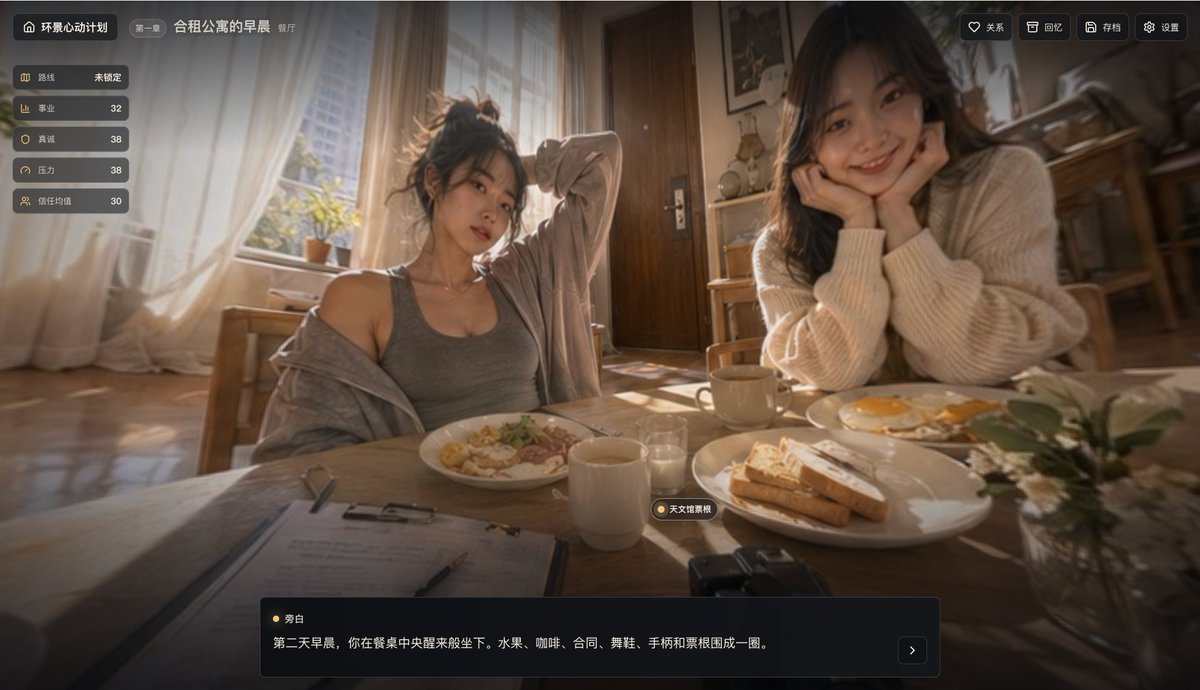
Filmische Morgen-Apartment-Spiel-UI
Ein warmer, fotorealistischer Screenshot aus einem interaktiven Erzählspiel, der zwei junge Frauen beim Frühstück in einer gemeinsamen Wohnung zeigt; geeignet für Mockups von Visual Novels, Lebenssimulationen oder Story-Spielen.
Dies ist ein GPT Image 2 -Prompt für Anime & Spiel . Verwenden Sie den unten stehenden, kopierfertigen Prompt, um ähnliche Grafiken zu erstellen, und überprüfen Sie vor der Wiederverwendung Awesome GPT Image 2 Prompts -Quellenangaben sowie die kommerziellen Nutzungsrechte.
Free 1K preview
Generate one preview image instantly, no sign-up required.
Eingabeaufforderung
Kopierfertige Eingabeaufforderung
{
  "type": "cinematic interactive game screenshot",
  "genre": "life-simulation narrative interface",
  "scene": {
    "setting": "shared apartment dining room in the morning",
    "chapter": "Kapitel 1",
    "title": "Morning in a shared apartment",
    "subtitle": "Restaurant",
    "time": "golden sunlit early morning",
    "mood": "warm, intimate, slightly dreamy, slice-of-life",
    "camera": "first-person seated at the dining table, wide-angle lens, shallow depth of field, soft bloom, realistic photographic look"
  },
  "subjects": {
    "count": 2,
    "people": [
      {
        "position": "center-left",
        "description": "junge Frau sitzt lässig am Tisch, unordentlich hochgebundenes Haar, graues Tanktop mit einem lockeren hellen Hoodie, der von einer Schulter rutscht, ein Arm hinter dem Kopf erhoben, entspannte schläfrige Morgenhaltung"
      },
      {
        "position": "right",
        "description": "junge Frau in einem übergroßen cremefarbenen Strickpullover, langes dunkles Haar, Ellbogen auf dem Tisch, Gesicht in beiden Händen ruhend, lehnt sich sanft und aufmerksam dem Betrachter zu"
      }
    ]
  },
  "table": {
    "items": {
      "count": 10,
      "list": [
        "weißer Teller mit Pasta oder Frühstücksessen vor der linken Frau",
        "weißer Teller mit 3 Scheiben Toast im Vordergrund rechts",
        "weißer Teller mit 2 Spiegeleiern hinter dem Toast",
        "1 weiße Tasse in der Mitte im Vordergrund",
        "1 beige Tasse in der Nähe der rechten Frau",
        "1 kleines klares Glas in der Mitte",
        "1 Zwischenablage mit Papieren im unteren linken Vordergrund",
        "1 Stift, der auf der Zwischenablage liegt",
        "1 kompakte schwarze Kamera am unteren Rand in der Mitte rechts",
        "1 kleine Vase mit weißen Blumen und grünen Blättern am unteren rechten Rand"
      ]
    }
  },
  "room": {
    "background_elements": {
      "count": 9,
      "list": [
        "großes helles Fenster auf der linken Seite mit transparenten weißen Vorhängen",
        "Sonnenlicht, das über den Holzboden scheint",
        "kleine Topfpflanzen auf der Fensterbank",
        "Holzstühle",
        "Holztür in der Mitte im Hintergrund",
        "gerahmte Wandkunst",
        "kleines Regal oder Schrank in der Nähe der Tür",
        "Küchen- oder Esszimmermöbel im Hintergrund rechts",
        "gemütliches Apartment-Interieur mit warmen Holzfarben"
      ]
    }
  },
  "ui": {
    "style": "modernes chinesisches Spiel-HUD mit dunklen transparenten abgerundeten Panels und goldfarbenen Akzent-Icons",
    "components": [
      {
        "position": "top-left",
        "label": "Panoramic Heartbeat Project"
      },
      {
        "position": "top-left beside title",
        "label": "Kapitel 1"
      },
      {
        "position": "top-center-left",
        "label": "Morning in a shared apartment"
      },
      {
        "position": "top-center-left secondary",
        "label": "Restaurant"
      },
      {
        "position": "left vertical stats panel",
        "count": 5,
        "labels": [
          "route",
          "career",
          "sincerity",
          "pressure",
          "trust average"
        ],
        "values": [
          "Not locked",
          "32",
          "38",
          "38",
          "30"
        ]
      },
      {
        "position": "top-right actions",
        "count": 4,
        "labels": [
          "Relationships",
          "Memories",
          "Archive",
          "Settings"
        ]
      },
      {
        "position": "small floating tag above bottom dialogue box",
        "count": 1,
        "labels": [
          "Planetarium Fantasies"
        ]
      },
      {
        "position": "bottom dialogue box speaker",
        "count": 1,
        "labels": [
          "Narration"
        ]
      },
      {
        "position": "bottom dialogue text",
        "count": 1,
        "labels": [
          "The next morning, you sit down as if waking up at the center of the dining table. Fruit, coffee, a contract, dancing shoes, a controller, and ticket stubs are arranged in a circle."
        ]
      },
      {
        "position": "bottom-right of dialogue box",
        "count": 1,
        "labels": [
          ">"
        ]
      }
    ]
  },
  "visual_style": {
    "lighting": "strong natural morning backlight, volumetric glow, warm highlights, soft shadows",
    "color_palette": "amber sunlight, cream, beige, brown wood, muted gray",
    "rendering": "photo-realistic with slight cinematic blur and vignette",
    "composition": "two women framed across the breakfast table, immersive domestic atmosphere, UI overlay integrated like a narrative choice game screenshot"
  },
  "parameters": {
    "scene title": "{argument name=\"scene title\" default=\"Morning in a shared apartment\"}",
    "chapter label": "{argument name=\"chapter label\" default=\"Chapter 1\"}",
    "location label": "{argument name=\"location label\" default=\"Restaurant\"}",
    "game title": "{argument name=\"game title\" default=\"Panoramic Heartbeat Project\"}",
    "dialogue text": "{argument name=\"dialogue text\" default=\"The next morning, you sit down as if waking up at the center of the dining table. Fruit, coffee, a contract, dancing shoes, a controller, and ticket stubs are arranged in a circle.\"}"
  }
}
Eingabeaufforderungsvariablen
In der Eingabeaufforderung befinden sich bearbeitbare Argumentplatzhalter mit ihren Standardwerten.
Best for
- - Anime & Spiel visual exploration
- - Image generation and reference-image edits
- - Reusable briefs that keep source attribution visible
Change these parts
- - Subject, product, character, or scene
- - Aspect ratio, camera, lighting, and background
- - Brand, text, color, and output constraints
Recommended model and settings
- - Model: gpt-image-2
- - Input mode: Text zu Bild
- - Aspect ratio: source
- - Commercial status: review original source
How to use this prompt
- 1. Copy the prompt and preserve its structure for the first test.
- 2. Replace the subject, context, and publishing channel.
- 3. Change one camera, lighting, or style variable per iteration.
- 4. Inspect the output, source, text, and rights before reuse.
Limitations, source, and reuse cautions
- - Generated output is an editable draft, not factual, legal, or rights evidence.
- - Review the linked source, people, brands, logos, text, and third-party media before commercial use.
Weitere Fälle in dieser Kategorie
Priorisiert nach Kategorie, Kompatibilität der Eingabemodi, Qualität und geringerem Risiko.






Hinweise zur Wiederverwendung und Quellenangabe
Verwenden Sie diese Eingabeaufforderung sicher, nachdem Sie den Fall in der Vorschau angezeigt haben.
- 1.Kopieren Sie die Eingabeaufforderung oder öffnen Sie sie direkt in Dovoo mit der Schaltfläche „Generieren“.
- 2.Passen Sie Variablen, Seitenverhältnis und Referenzbilder an Ihren Anwendungsfall an.
- 3.Vor der Veröffentlichung oder kostenpflichtigen Nutzung sollten Sie die Rechte an der Quelle, die Anforderungen an die Namensnennung sowie die Risiken für die Marke oder das Abbild prüfen.