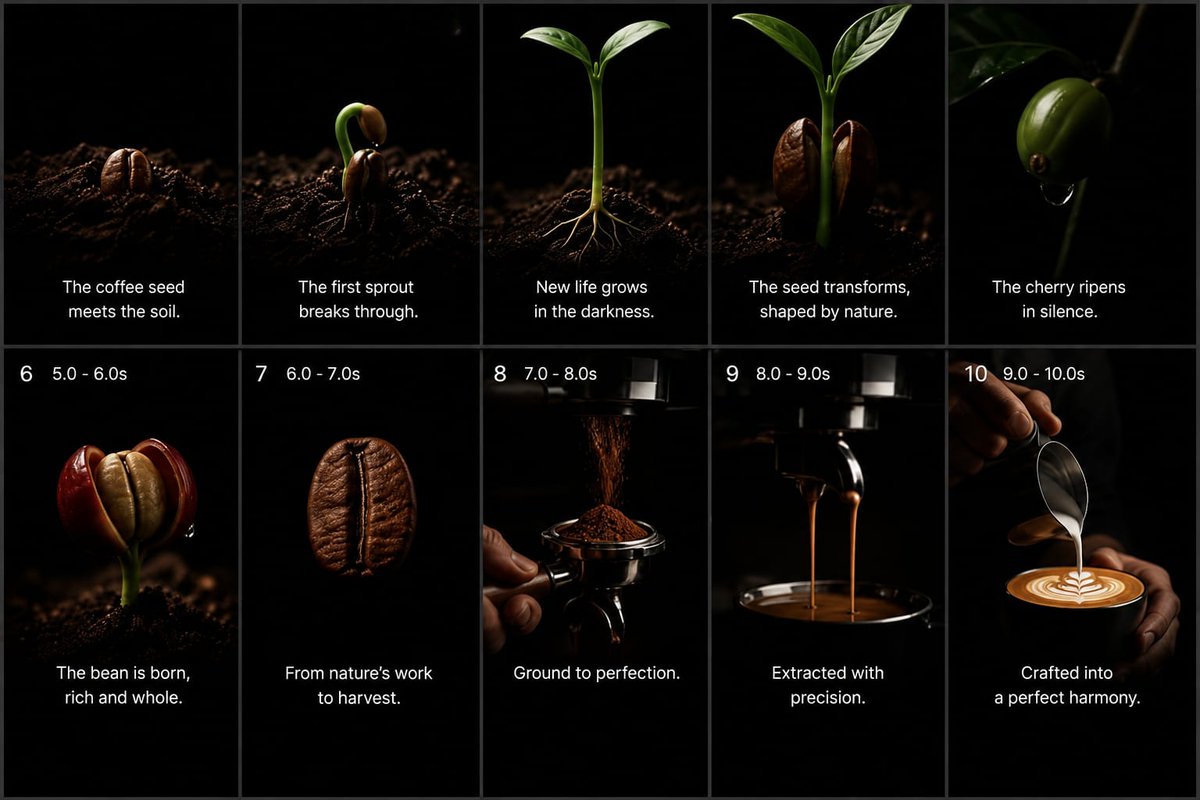
Cinematic Coffee Journey Storyboard
A 10-panel widescreen storyboard visualizing the premium coffee journey from seed and sprout to espresso extraction and latte art.
Dies ist ein GPT Image 2 -Prompt für Speisen und Getränke . Verwenden Sie den unten stehenden, kopierfertigen Prompt, um ähnliche Grafiken zu erstellen, und überprüfen Sie vor der Wiederverwendung Awesome GPT Image 2 Prompts -Quellenangaben sowie die kommerziellen Nutzungsrechte.
Benötigen Sie den vollständigen Prompt-Satz? Verwenden Sie den Speisen und Getränke Weitere verwandte Beispiele finden Sie im Themen-Hub oder öffnen Sie die GPT Image 2 Prompt-Katalog für das vollständige Beispielverzeichnis, wiederverwendbare Strukturen und Quellenangaben.
Free 1K preview
Generate one preview image instantly, no sign-up required.
3251/4000
Eingabeaufforderung
Kopierfertige Eingabeaufforderung
Goal: Create a premium cinematic coffee commercial storyboard as a single static image, showing the full journey from coffee seed to finished latte. Use a dark minimalist studio look with pure black backgrounds, dramatic low-key lighting, shallow depth of field, macro photography realism, rich brown coffee tones, glossy highlights, and elegant white captions.

Canvas: 16:9 widescreen storyboard sheet, divided into exactly 10 vertical panels arranged in a 2-row by 5-column grid. Use thin dark gray dividers between panels. Each panel should feel like a high-end commercial still frame, with black negative space and a subject lit by a narrow soft spotlight.

Layout: Top row contains panels 1–5 with centered white caption text near the lower third but no visible numbers. Bottom row contains panels 6–10 with small white timing labels at the top left of each panel and centered white caption text near the bottom. Keep all typography clean, modern, sans-serif, white, and unobtrusive.

Storyboard panels, exactly 10:
1. A roasted-looking coffee seed partly embedded in dark soil, lit from the side, caption: “The coffee seed meets the soil.”
2. A coffee seed cracking open with a curved green sprout emerging upward from dark soil, caption: “The first sprout breaks through.”
3. A young coffee seedling with two fresh green leaves and thin pale roots visible in the soil, caption: “New life grows in the darkness.”
4. A taller green coffee sprout flanked by two split brown seed halves, caption: “The seed transforms, shaped by nature.”
5. A glossy green coffee cherry hanging from a thin branch in darkness, with a small droplet beneath it, caption: “The cherry ripens in silence.”
6. Bottom-left panel with top-left label “6   5.0 - 6.0s”; show a ripe red coffee cherry split open to reveal a pale bean inside, growing from dark soil, caption: “The bean is born, rich and whole.”
7. Top-left label “7   6.0 - 7.0s”; show a single roasted coffee bean floating or isolated against black, very close macro detail, caption: “From nature’s work to harvest.”
8. Top-left label “8   7.0 - 8.0s”; show finely ground coffee falling from a grinder into a portafilter held by a hand, caption: “Ground to perfection.”
9. Top-left label “9   8.0 - 9.0s”; show espresso extraction with two thin streams pouring from a portafilter into a dark cup below, caption: “Extracted with precision.”
10. Top-left label “10   9.0 - 10.0s”; show a barista hand pouring steamed milk from a metal pitcher into a cup of espresso, forming clean latte art, caption: “Crafted into a perfect harmony.”

Text customization: Use {argument name="brand mood" default="premium cinematic coffee commercial"} styling. The main caption tone should be poetic and minimal. Optionally replace the final caption with {argument name="final caption" default="Crafted into a perfect harmony."} while preserving the same placement.

Visual constraints: Keep exactly 10 panels, exactly 5 panels per row, and preserve the numbered timing labels only on panels 6 through 10. Do not add logos, watermarks, extra icons, extra panels, decorative borders, or unrelated text. Maintain realistic coffee textures, dark soil particles, deep blacks, warm highlights, and a luxurious commercial atmosphere.
Eingabeaufforderungsvariablen
In der Eingabeaufforderung befinden sich bearbeitbare Argumentplatzhalter mit ihren Standardwerten.
Variable
brand mood
Standard
premium cinematic coffee commercial
Variable
final caption
Standard
Crafted into a perfect harmony.
Best for
- - Speisen und Getränke visual exploration
- - Image generation and reference-image edits
- - Reusable briefs that keep source attribution visible
Change these parts
- - Subject, product, character, or scene
- - Aspect ratio, camera, lighting, and background
- - Brand, text, color, and output constraints
Recommended model and settings
- - Model: gpt-image-2
- - Input mode: Text zu Bild
- - Aspect ratio: source
- - Commercial status: review original source
How to use this prompt
- 1. Copy the prompt and preserve its structure for the first test.
- 2. Replace the subject, context, and publishing channel.
- 3. Change one camera, lighting, or style variable per iteration.
- 4. Inspect the output, source, text, and rights before reuse.
Limitations, source, and reuse cautions
- - Generated output is an editable draft, not factual, legal, or rights evidence.
- - Review the linked source, people, brands, logos, text, and third-party media before commercial use.
Importiert von Awesome GPT Image 2 Prompts . Quellenangabe erforderlich. Status der kommerziellen Nutzung: allowed ; Rechte an der Quelle vor kostenpflichtiger Nutzung prüfen.
Weitere Fälle in dieser Kategorie
Priorisiert nach Kategorie, Kompatibilität der Eingabemodi, Qualität und geringerem Risiko.






Hinweise zur Wiederverwendung und Quellenangabe
Verwenden Sie diese Eingabeaufforderung sicher, nachdem Sie den Fall in der Vorschau angezeigt haben.
- 1.Kopieren Sie die Eingabeaufforderung oder öffnen Sie sie direkt in Dovoo mit der Schaltfläche „Generieren“.
- 2.Passen Sie Variablen, Seitenverhältnis und Referenzbilder an Ihren Anwendungsfall an.
- 3.Vor der Veröffentlichung oder kostenpflichtigen Nutzung sollten Sie die Rechte an der Quelle, die Anforderungen an die Namensnennung sowie die Risiken für die Marke oder das Abbild prüfen.