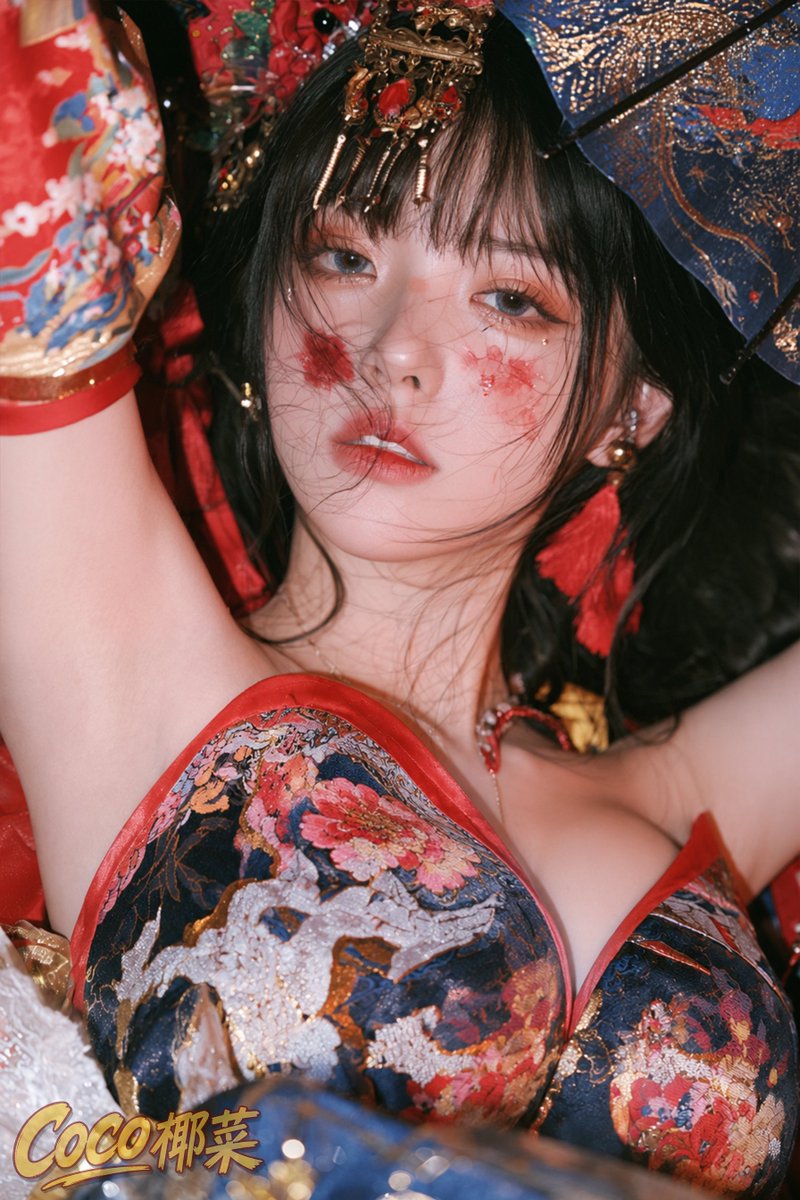
Ornate Chinese Festival Portrait
Generates a glamorous close-up portrait of an adult woman in richly embroidered Chinese-inspired festival styling with parasol, jewels, and dramatic flash lighting.
Dies ist ein GPT Image 2 -Prompt für Porträt & Charakter . Verwenden Sie den unten stehenden, kopierfertigen Prompt, um ähnliche Grafiken zu erstellen, und überprüfen Sie vor der Wiederverwendung Awesome GPT Image 2 Prompts -Quellenangaben sowie die kommerziellen Nutzungsrechte.
Free 1K preview
Generate one preview image instantly, no sign-up required.
Eingabeaufforderung
Kopierfertige Eingabeaufforderung
Create a highly polished vertical close-up fashion portrait of an adult East Asian woman in ornate Chinese opera / fantasy festival styling, viewed from slightly below with her face centered and her two arms raised above her head. She has {argument name="hair color" default="long black hair"} with loose windblown strands crossing her face, pale luminous skin, soft blue-gray eyes, glossy red lips slightly parted, and a dreamy calm expression. Add exactly two red painterly floral smudges on her cheeks, one on each cheek, with tiny rhinestone-like highlights near the eyes. She wears one elaborate gold-and-red jeweled headpiece with dangling tassels across her bangs, red tassel earrings, and a richly embroidered navy, red, and gold floral bodice with red trim. Include one ornate blue parasol in the upper right background with gold speckled patterning, plus red embroidered fabric and floral brocade filling the left and rear background. Use dramatic flash photography, shallow depth of field, high-fashion editorial realism, crisp facial detail, glossy textures, saturated reds and deep blues, cinematic close crop, soft skin retouching, and a luxurious festive atmosphere. Add one stylized logo watermark at the bottom left reading {argument name="logo text" default="Coco Cabbage"} in gold-yellow script with a dark outline. Keep the image vertical, intimate, glamorous, and photorealistic; avoid distorted anatomy, extra fingers, duplicated faces, or messy unreadable ornamentation.Eingabeaufforderungsvariablen
In der Eingabeaufforderung befinden sich bearbeitbare Argumentplatzhalter mit ihren Standardwerten.
Best for
- - Porträt & Charakter visual exploration
- - Image generation and reference-image edits
- - Reusable briefs that keep source attribution visible
Change these parts
- - Subject, product, character, or scene
- - Aspect ratio, camera, lighting, and background
- - Brand, text, color, and output constraints
Recommended model and settings
- - Model: gpt-image-2
- - Input mode: Text zu Bild
- - Aspect ratio: source
- - Commercial status: review original source
How to use this prompt
- 1. Copy the prompt and preserve its structure for the first test.
- 2. Replace the subject, context, and publishing channel.
- 3. Change one camera, lighting, or style variable per iteration.
- 4. Inspect the output, source, text, and rights before reuse.
Limitations, source, and reuse cautions
- - Generated output is an editable draft, not factual, legal, or rights evidence.
- - Review the linked source, people, brands, logos, text, and third-party media before commercial use.
Weitere Fälle in dieser Kategorie
Priorisiert nach Kategorie, Kompatibilität der Eingabemodi, Qualität und geringerem Risiko.






Hinweise zur Wiederverwendung und Quellenangabe
Verwenden Sie diese Eingabeaufforderung sicher, nachdem Sie den Fall in der Vorschau angezeigt haben.
- 1.Kopieren Sie die Eingabeaufforderung oder öffnen Sie sie direkt in Dovoo mit der Schaltfläche „Generieren“.
- 2.Passen Sie Variablen, Seitenverhältnis und Referenzbilder an Ihren Anwendungsfall an.
- 3.Vor der Veröffentlichung oder kostenpflichtigen Nutzung sollten Sie die Rechte an der Quelle, die Anforderungen an die Namensnennung sowie die Risiken für die Marke oder das Abbild prüfen.