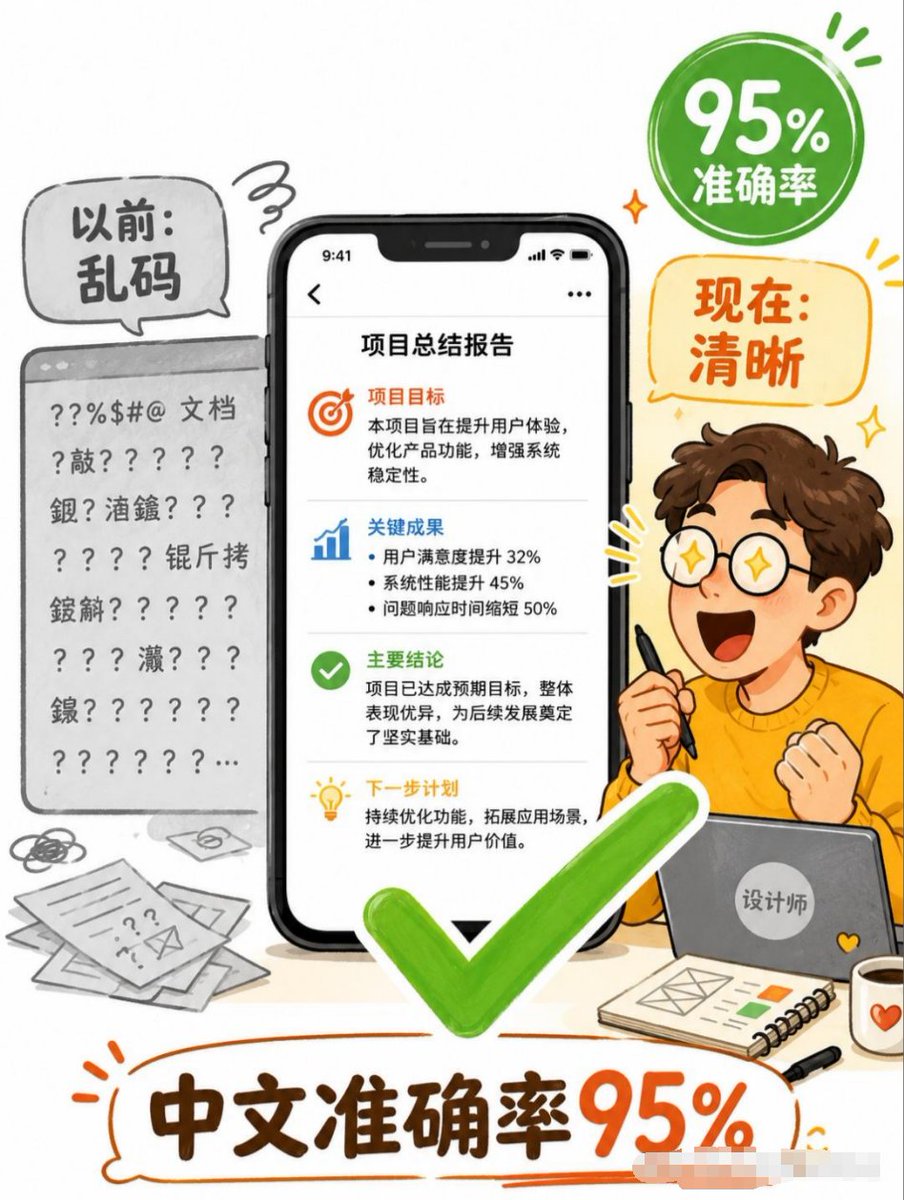
Chinese Text Accuracy Infographic
Creates a vertical Chinese social-media infographic showing AI-generated Chinese text improving from garbled output to 95% accuracy.
Dies ist ein GPT Image 2 -Prompt für Grafik & Poster . Verwenden Sie den unten stehenden, kopierfertigen Prompt, um ähnliche Grafiken zu erstellen, und überprüfen Sie vor der Wiederverwendung Awesome GPT Image 2 Prompts -Quellenangaben sowie die kommerziellen Nutzungsrechte.
Benötigen Sie den vollständigen Prompt-Satz? Verwenden Sie den Grafik & Poster Weitere verwandte Beispiele finden Sie im Themen-Hub oder öffnen Sie die GPT Image 2 Prompt-Katalog für das vollständige Beispielverzeichnis, wiederverwendbare Strukturen und Quellenangaben.
Free 1K preview
Generate one preview image instantly, no sign-up required.
3766/4000
Eingabeaufforderung
Kopierfertige Eingabeaufforderung
Objective: Create a vertical Chinese commercial infographic poster explaining that AI image generation has achieved high accuracy in Chinese text, transforming messy text into clear deliverables.

Canvas: 3:4 vertical poster, simple white background, using a fun hand-drawn editorial style, accented with orange, green, black, and gray. Use bold outline sketches, circular speech bubbles, and vibrant doodle marks to create a friendly tech explanation style.

Layout: The composition centers on a large smartphone model displaying a clear Chinese report page. On the left, show a gray “Before” document panel filled with garbled symbols and unidentifiable pseudo-Chinese text. On the right, show a cute cartoon designer sitting behind a laptop, holding a stylus, making an excited fist-pumping gesture. Add a large bright green checkmark centered and in the foreground below the phone. Add a green circular badge in the upper right corner and an orange speech bubble below it. The large bottom title is placed within an orange hand-drawn outline bubble.

Text Content: Use 5 main text areas. 1) Left gray bubble: “Before: Gibberish.” 2) Upper right green badge: “95% Accuracy.” 3) Right orange bubble: “Now: Clear.” 4) Phone screen title: “Project Summary Report.” 5) Large bottom title: “Chinese Accuracy 95%.”

Phone Screen Details: Display a black iPhone-style smartphone with a notch and a status bar time of 9:41. The report page contains 4 stacked content areas separated by thin gray dividing lines. Part 1 contains an orange target icon and the title “Project Goals,” followed by brief Chinese text about improving user experience, optimizing product functionality, and strengthening system stability. Part 2 contains a blue bar chart icon and the title “Key Results,” followed by 3 bullet points: User satisfaction increased by 32%, system performance increased by 45%, and problem response time decreased by 50%. Part 3 contains a green checkmark icon and the title “Key Conclusions,” followed by text stating that the project achieved its expected goals and laid a solid foundation. Part 4 contains a yellow light bulb icon and the title “Next Steps,” followed by text about continuous optimization and expanding application scenarios.

Left “Before” Area: Render a gray browser/document card with a top bar, containing multiple lines of corrupted characters, question marks, punctuation, and scattered Chinese characters, clearly visible and unreadable. Add messy paper, doodles, and envelope icons in the lower left corner to emphasize the document’s disordered state.

Right Character Details: Create a cute young male cartoon designer with brown curly hair, fair skin, and an orange sweater, with a simple and lively pose; the face can be left blank or softened. He is holding a black stylus in one hand and sitting behind a gray laptop with a circular sticker that says “Designer.” Add 3 foreground accessories on the desk: a spiral notebook with a simple layout sketch and color blocks, a black pen, and a white mug with an orange heart.

Visual Style: A friendly Chinese social media explanation poster, combining semi-flat vector illustrations with marker-style hand-drawn lines, soft shadows, rounded shapes, high readability, emphasizing a vibrant green checkmark and orange titles. The composition is rich but clear and easy to read, without using photographic realism.

Constraints: Strictly preserve the specified Chinese text, maintain the clarity and readability of the phone report text, and use only one central phone, one messy document card on the left, one designer character, one green checkmark, one green badge, one orange speech bubble, and one large bottom title. Do not add watermarks, logos, QR codes, or additional core claims.
Best for
- - Grafik & Poster visual exploration
- - Image generation and reference-image edits
- - Reusable briefs that keep source attribution visible
Change these parts
- - Subject, product, character, or scene
- - Aspect ratio, camera, lighting, and background
- - Brand, text, color, and output constraints
Recommended model and settings
- - Model: gpt-image-2
- - Input mode: Text zu Bild
- - Aspect ratio: source
- - Commercial status: review original source
How to use this prompt
- 1. Copy the prompt and preserve its structure for the first test.
- 2. Replace the subject, context, and publishing channel.
- 3. Change one camera, lighting, or style variable per iteration.
- 4. Inspect the output, source, text, and rights before reuse.
Limitations, source, and reuse cautions
- - Generated output is an editable draft, not factual, legal, or rights evidence.
- - Review the linked source, people, brands, logos, text, and third-party media before commercial use.
Importiert von Awesome GPT Image 2 Prompts . Quellenangabe erforderlich. Status der kommerziellen Nutzung: allowed ; Rechte an der Quelle vor kostenpflichtiger Nutzung prüfen.
Weitere Fälle in dieser Kategorie
Priorisiert nach Kategorie, Kompatibilität der Eingabemodi, Qualität und geringerem Risiko.






Hinweise zur Wiederverwendung und Quellenangabe
Verwenden Sie diese Eingabeaufforderung sicher, nachdem Sie den Fall in der Vorschau angezeigt haben.
- 1.Kopieren Sie die Eingabeaufforderung oder öffnen Sie sie direkt in Dovoo mit der Schaltfläche „Generieren“.
- 2.Passen Sie Variablen, Seitenverhältnis und Referenzbilder an Ihren Anwendungsfall an.
- 3.Vor der Veröffentlichung oder kostenpflichtigen Nutzung sollten Sie die Rechte an der Quelle, die Anforderungen an die Namensnennung sowie die Risiken für die Marke oder das Abbild prüfen.