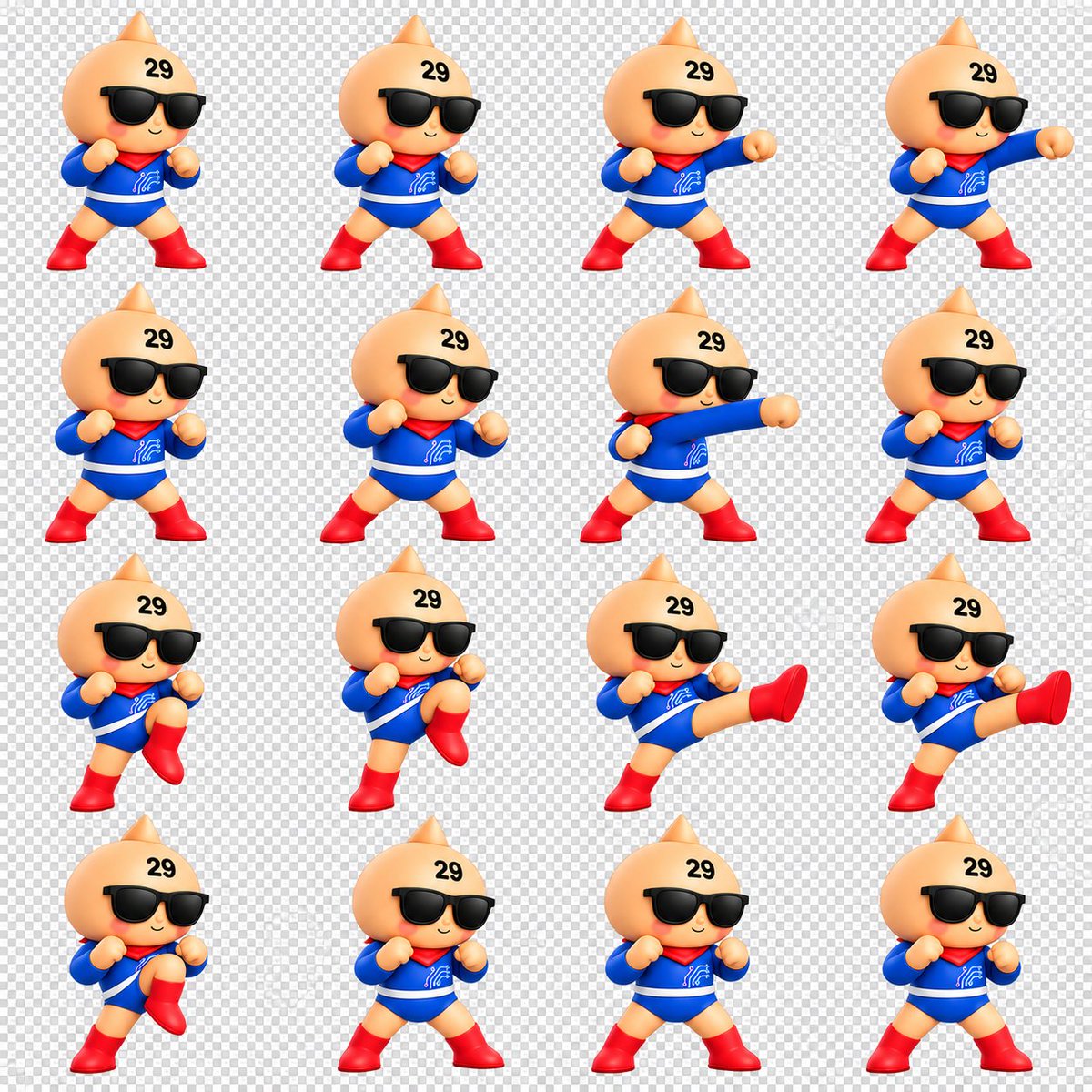
Chibi Mascot Fighting Sprite Sheet
Creates a 16-frame 3D chibi mascot battle animation sprite sheet for GIFs, games, or character motion studies.
Dies ist ein GPT Image 2 -Prompt für Anime & Spiel . Verwenden Sie den unten stehenden, kopierfertigen Prompt, um ähnliche Grafiken zu erstellen, und überprüfen Sie vor der Wiederverwendung Awesome GPT Image 2 Prompts -Quellenangaben sowie die kommerziellen Nutzungsrechte.
Benötigen Sie den vollständigen Prompt-Satz? Verwenden Sie den Anime & Spiel Weitere verwandte Beispiele finden Sie im Themen-Hub oder öffnen Sie die GPT Image 2 Prompt-Katalog für das vollständige Beispielverzeichnis, wiederverwendbare Strukturen und Quellenangaben.
Free 1K preview
Generate one preview image instantly, no sign-up required.
2279/4000
Eingabeaufforderung
Kopierfertige Eingabeaufforderung
Goal: Create a clean 3D chibi fighting animation sprite sheet for a cute mascot character, suitable for making a looping GIF.

Canvas: Square 1:1 canvas, about 1200 x 1200 px, with a transparent-background preview shown as a light gray checkerboard. Arrange the sprites in an evenly spaced 4 columns by 4 rows grid, for exactly 16 separate animation frames. Leave generous padding around each character and keep all frames at a consistent scale.

Character: A toy-like glossy 3D chibi mascot with a peach-colored round onion/droplet-shaped head and a small pointed top, tiny smiling mouth, rosy cheeks, oversized black sunglasses, and the black number {argument name="forehead number" default="29"} printed on the upper forehead. The body is small and heroic, wearing a bright {argument name="suit color" default="blue"} long-sleeve bodysuit with a white belt stripe, a red scarf/capelet at the neck, a small white circuit-like emblem on the chest, red gloves or rounded fists, and shiny red boots. Use soft studio lighting, smooth plastic/vinyl toy material, rounded proportions, and a cheerful confident expression.

Sprite actions: Depict exactly 16 frames of a simple battle motion sequence, all facing mostly forward with slight 3/4 turns. Count and show these frames in order from left to right, top to bottom: 1 neutral guard stance with both fists raised; 2 wider guard stance; 3 right-arm straight punch beginning; 4 right-arm punch fully extended; 5 reset guard stance; 6 guard stance leaning slightly; 7 long straight punch across the body; 8 return to guard; 9 left knee lift preparation; 10 higher knee lift; 11 side kick fully extended to the right; 12 second extended side kick frame; 13 knee lift recovery; 14 neutral guard stance; 15 neutral guard stance variation; 16 final neutral guard stance.

Visual style: High-quality cute 3D render, Nintendo-like mascot toy aesthetic, crisp edges, saturated primary colors, soft shadows, consistent camera angle, consistent character size, no motion blur, no outlines except natural 3D shading.

Constraints: No text labels other than the forehead number. Do not add weapons, backgrounds, UI elements, frame borders, watermarks, or extra characters. Keep the checkerboard transparency preview visible behind every frame.
Eingabeaufforderungsvariablen
In der Eingabeaufforderung befinden sich bearbeitbare Argumentplatzhalter mit ihren Standardwerten.
Variable
forehead number
Standard
29
Variable
suit color
Standard
blue
Best for
- - Anime & Spiel visual exploration
- - Image generation and reference-image edits
- - Reusable briefs that keep source attribution visible
Change these parts
- - Subject, product, character, or scene
- - Aspect ratio, camera, lighting, and background
- - Brand, text, color, and output constraints
Recommended model and settings
- - Model: gpt-image-2
- - Input mode: Text zu Bild
- - Aspect ratio: source
- - Commercial status: review original source
How to use this prompt
- 1. Copy the prompt and preserve its structure for the first test.
- 2. Replace the subject, context, and publishing channel.
- 3. Change one camera, lighting, or style variable per iteration.
- 4. Inspect the output, source, text, and rights before reuse.
Limitations, source, and reuse cautions
- - Generated output is an editable draft, not factual, legal, or rights evidence.
- - Review the linked source, people, brands, logos, text, and third-party media before commercial use.
Importiert von Awesome GPT Image 2 Prompts . Quellenangabe erforderlich. Status der kommerziellen Nutzung: allowed ; Rechte an der Quelle vor kostenpflichtiger Nutzung prüfen.
Weitere Fälle in dieser Kategorie
Priorisiert nach Kategorie, Kompatibilität der Eingabemodi, Qualität und geringerem Risiko.

Anime Girl Heterochromia Portrait
Text zu Bild

Cute Speech Bubble Mascot Profile Icon
Text zu Bild

Autumn Cozy Casual Outfit Prompt
Text zu Bild

Cute Focus Desk Flat Lay and Kawaii Illustration
Text zu Bild

Studio Portrait of Woman with Sunglasses
Text zu Bild

Street Selfie with Cat in Matching Cap
Text zu Bild
Hinweise zur Wiederverwendung und Quellenangabe
Verwenden Sie diese Eingabeaufforderung sicher, nachdem Sie den Fall in der Vorschau angezeigt haben.
- 1.Kopieren Sie die Eingabeaufforderung oder öffnen Sie sie direkt in Dovoo mit der Schaltfläche „Generieren“.
- 2.Passen Sie Variablen, Seitenverhältnis und Referenzbilder an Ihren Anwendungsfall an.
- 3.Vor der Veröffentlichung oder kostenpflichtigen Nutzung sollten Sie die Rechte an der Quelle, die Anforderungen an die Namensnennung sowie die Risiken für die Marke oder das Abbild prüfen.