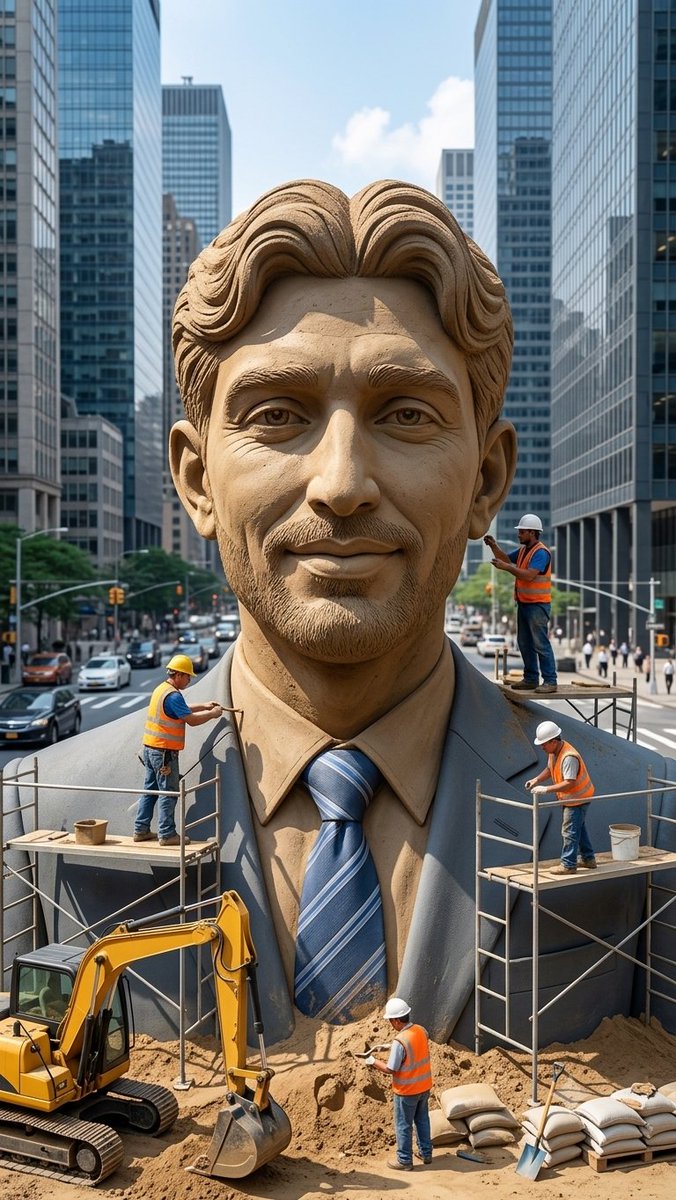
Censored Sand Businessman Statue
A photorealistic city-street construction scene featuring workers sculpting a giant sand businessman statue with its face obscured by a censor block.
Dies ist ein GPT Image 2 -Prompt für Landschaft & Natur . Verwenden Sie den unten stehenden, kopierfertigen Prompt, um ähnliche Grafiken zu erstellen, und überprüfen Sie vor der Wiederverwendung Awesome GPT Image 2 Prompts -Quellenangaben sowie die kommerziellen Nutzungsrechte.
Benötigen Sie den vollständigen Prompt-Satz? Verwenden Sie den Landschaft & Natur Weitere verwandte Beispiele finden Sie im Themen-Hub oder öffnen Sie die GPT Image 2 Prompt-Katalog für das vollständige Beispielverzeichnis, wiederverwendbare Strukturen und Quellenangaben.
Free 1K preview
Generate one preview image instantly, no sign-up required.
1743/4000
Eingabeaufforderung
Kopierfertige Eingabeaufforderung
Create a vertical photorealistic urban scene of a colossal hyper-realistic sand sculpture of a smiling businessman wearing a formal suit, dress shirt, and blue striped tie, placed in the middle of a busy modern city street between tall glass skyscrapers. The statue should fill most of the frame from chest to head, with detailed carved sand hair, ears, collar, lapels, tie texture, and realistic granular sand shading. Cover the entire face area with a large plain rectangular censor block in {argument name="censor block color" default="medium warm brown"}, centered over the face from forehead to chin, Show every face clearly with natural, detailed facial features, ears, neck, shirt, and suit visible. Include exactly 4 construction workers wearing orange safety vests, jeans, and hard hats: one worker on the left scaffold carving the left shoulder with a hand tool, one worker standing on a small platform at the right side near the head holding a tool, one worker on the right scaffold working near the suit lapel while bending forward, and one worker on the ground in front of the statue shoveling or smoothing sand. Add exactly 2 scaffold platforms, one on each side of the statue, with metal rails and wooden planks. Add exactly 1 yellow excavator at the lower left foreground with its bucket resting in sand, plus piles of sand, sandbags, buckets, and a shovel in the lower foreground. The background should show a busy city avenue with cars, crosswalks, traffic lights, pedestrians, and tall reflective office towers on both sides, under bright daytime sky with a few clouds. Use realistic perspective, sharp details, natural daylight, cinematic depth, and a documentary construction-site feeling. No text, no logos, no watermark.Eingabeaufforderungsvariablen
In der Eingabeaufforderung befinden sich bearbeitbare Argumentplatzhalter mit ihren Standardwerten.
Variable
censor block color
Standard
medium warm brown
Best for
- - Landschaft & Natur visual exploration
- - Image generation and reference-image edits
- - Reusable briefs that keep source attribution visible
Change these parts
- - Subject, product, character, or scene
- - Aspect ratio, camera, lighting, and background
- - Brand, text, color, and output constraints
Recommended model and settings
- - Model: gpt-image-2
- - Input mode: Text zu Bild
- - Aspect ratio: source
- - Commercial status: review original source
How to use this prompt
- 1. Copy the prompt and preserve its structure for the first test.
- 2. Replace the subject, context, and publishing channel.
- 3. Change one camera, lighting, or style variable per iteration.
- 4. Inspect the output, source, text, and rights before reuse.
Limitations, source, and reuse cautions
- - Generated output is an editable draft, not factual, legal, or rights evidence.
- - Review the linked source, people, brands, logos, text, and third-party media before commercial use.
Importiert von Awesome GPT Image 2 Prompts . Quellenangabe erforderlich. Status der kommerziellen Nutzung: allowed ; Rechte an der Quelle vor kostenpflichtiger Nutzung prüfen.
Weitere Fälle in dieser Kategorie
Priorisiert nach Kategorie, Kompatibilität der Eingabemodi, Qualität und geringerem Risiko.






Hinweise zur Wiederverwendung und Quellenangabe
Verwenden Sie diese Eingabeaufforderung sicher, nachdem Sie den Fall in der Vorschau angezeigt haben.
- 1.Kopieren Sie die Eingabeaufforderung oder öffnen Sie sie direkt in Dovoo mit der Schaltfläche „Generieren“.
- 2.Passen Sie Variablen, Seitenverhältnis und Referenzbilder an Ihren Anwendungsfall an.
- 3.Vor der Veröffentlichung oder kostenpflichtigen Nutzung sollten Sie die Rechte an der Quelle, die Anforderungen an die Namensnennung sowie die Risiken für die Marke oder das Abbild prüfen.