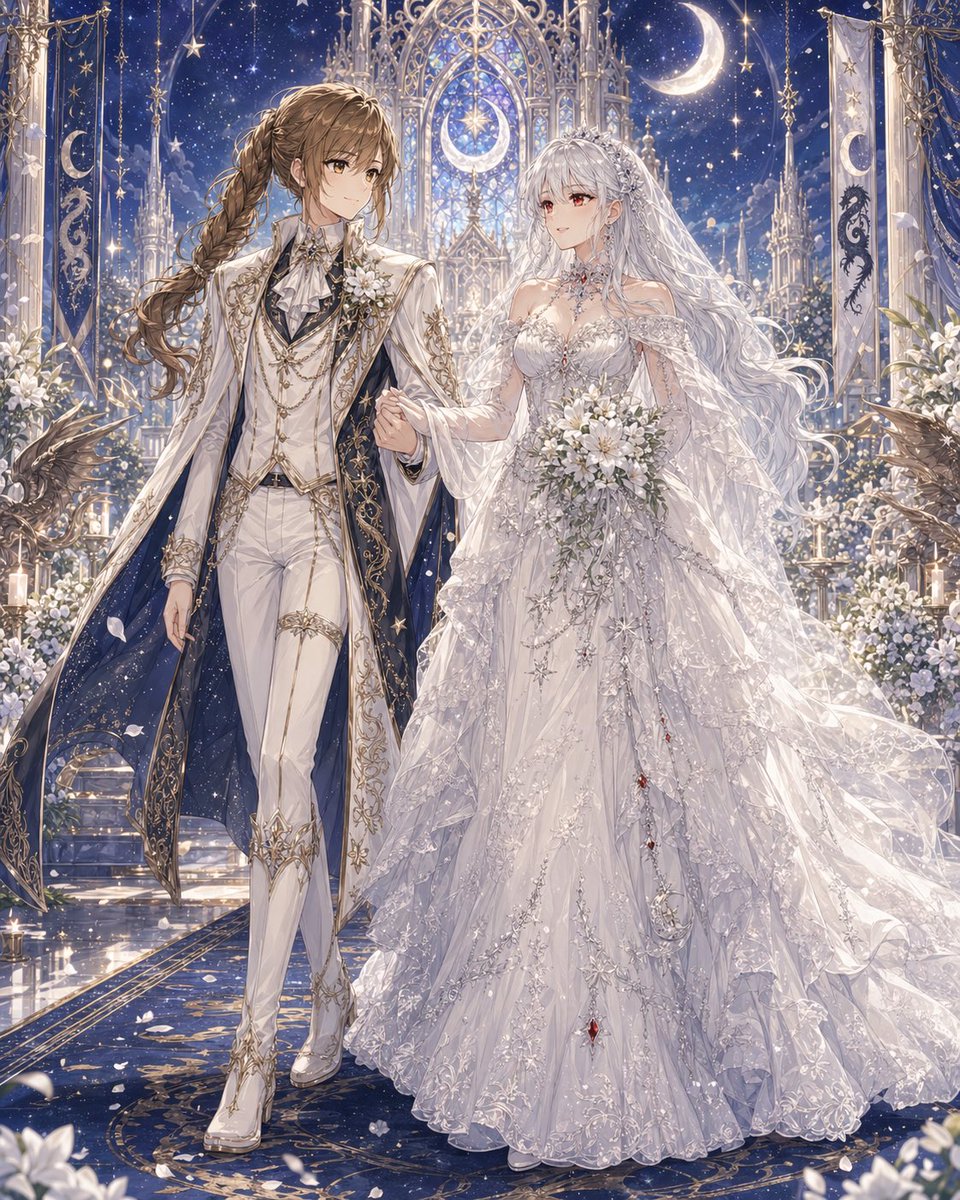
Himmlische Yuri-Hochzeit in der mondbeschienenen Kathedrale
Diese Eingabeaufforderung erzeugt ein äußerst kunstvolles Fantasy-Hochzeitsporträt im Anime-Stil von zwei Bräuten in himmlischer Festkleidung, ideal für romantische Originalcharakterzeichnungen und dramatische Zeremonienszenen.
Dies ist ein GPT Image 2 -Prompt für Porträt & Charakter . Verwenden Sie den unten stehenden, kopierfertigen Prompt, um ähnliche Grafiken zu erstellen, und überprüfen Sie vor der Wiederverwendung Awesome GPT Image 2 Prompts -Quellenangaben sowie die kommerziellen Nutzungsrechte.
Free 1K preview
Generate one preview image instantly, no sign-up required.
Eingabeaufforderung
Kopierfertige Eingabeaufforderung
A lavish fantasy yuri wedding illustration in a highly detailed anime style, full-body portrait of two brides walking arm in arm down the aisle in a celestial cathedral at night. The left bride is a tall, elegant androgynous woman with {argument name="left character hair color" default="warm brown"} hair in a long thick side braid over one shoulder, wearing an aristocratic white wedding suit with fitted trousers, heeled white boots, a ruffled cravat, layered gold chains, embroidered gold filigree, floral corsage, and a dramatic long white coat lined in deep midnight blue like a starry sky. The right bride is a graceful woman with {argument name="right character hair color" default="silver white"} very long flowing wavy hair, a jeweled tiara, and a sheer veil, wearing an opulent {argument name="wedding dress style" default="voluminous white celestial lace ball gown"} with translucent layered sleeves, intricate silver embroidery, star and moon motifs, sparkling beadwork, and tiny red gemstone accents cascading down the skirt. She holds a {argument name="bouquet flowers" default="white lily and rose bouquet"}. Their expressions are serene and romantic, posed close together as if proceeding during the ceremony. The setting is a glowing moonlit gothic chapel with towering ornate arches, stained-glass-like tracery, hanging banners, candles, white floral arrangements, and celestial decorations. Count 2 large crescent moons visible in the architecture and sky, 2 vertical ceremonial banners, and 2 dark winged bird or griffin statues near the foreground sides. The background is a rich {argument name="sky color" default="deep sapphire blue"} star-filled sky with glittering particles, soft petals drifting through the air, and polished reflective flooring with gold patterns. Use ultra-detailed fabrics, luminous highlights, delicate lace, shimmering jewelry, elegant composition, dreamy fantasy romance, majestic wedding atmosphere, soft ethereal lighting, and a refined luxurious color palette of white, silver, gold, and midnight blue.Eingabeaufforderungsvariablen
In der Eingabeaufforderung befinden sich bearbeitbare Argumentplatzhalter mit ihren Standardwerten.
Best for
- - Porträt & Charakter visual exploration
- - Image generation and reference-image edits
- - Reusable briefs that keep source attribution visible
Change these parts
- - Subject, product, character, or scene
- - Aspect ratio, camera, lighting, and background
- - Brand, text, color, and output constraints
Recommended model and settings
- - Model: gpt-image-2
- - Input mode: Text zu Bild
- - Aspect ratio: source
- - Commercial status: review original source
How to use this prompt
- 1. Copy the prompt and preserve its structure for the first test.
- 2. Replace the subject, context, and publishing channel.
- 3. Change one camera, lighting, or style variable per iteration.
- 4. Inspect the output, source, text, and rights before reuse.
Limitations, source, and reuse cautions
- - Generated output is an editable draft, not factual, legal, or rights evidence.
- - Review the linked source, people, brands, logos, text, and third-party media before commercial use.
Weitere Fälle in dieser Kategorie
Priorisiert nach Kategorie, Kompatibilität der Eingabemodi, Qualität und geringerem Risiko.






Hinweise zur Wiederverwendung und Quellenangabe
Verwenden Sie diese Eingabeaufforderung sicher, nachdem Sie den Fall in der Vorschau angezeigt haben.
- 1.Kopieren Sie die Eingabeaufforderung oder öffnen Sie sie direkt in Dovoo mit der Schaltfläche „Generieren“.
- 2.Passen Sie Variablen, Seitenverhältnis und Referenzbilder an Ihren Anwendungsfall an.
- 3.Vor der Veröffentlichung oder kostenpflichtigen Nutzung sollten Sie die Rechte an der Quelle, die Anforderungen an die Namensnennung sowie die Risiken für die Marke oder das Abbild prüfen.