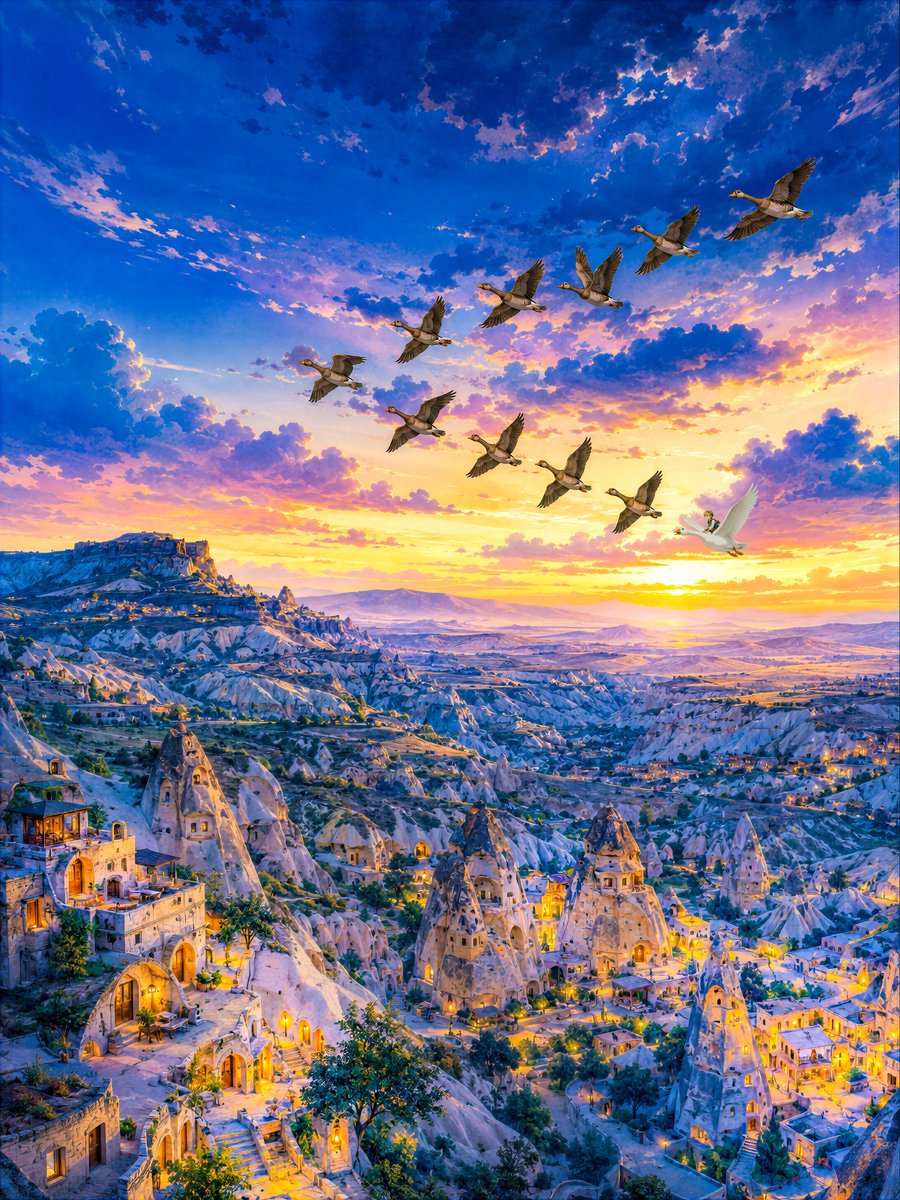
Twilight Geese Over Cappadocia
A vertical cinematic landscape of illuminated Cappadocia cave houses at sunset with a migrating flock of geese and a hidden tiny figure.
Dies ist ein GPT Image 2 -Prompt für Landschaft & Natur . Verwenden Sie den unten stehenden, kopierfertigen Prompt, um ähnliche Grafiken zu erstellen, und überprüfen Sie vor der Wiederverwendung Awesome GPT Image 2 Prompts -Quellenangaben sowie die kommerziellen Nutzungsrechte.
Benötigen Sie den vollständigen Prompt-Satz? Verwenden Sie den Landschaft & Natur Weitere verwandte Beispiele finden Sie im Themen-Hub oder öffnen Sie die GPT Image 2 Prompt-Katalog für das vollständige Beispielverzeichnis, wiederverwendbare Strukturen und Quellenangaben.
Free 1K preview
Generate one preview image instantly, no sign-up required.
1425/4000
Eingabeaufforderung
Kopierfertige Eingabeaufforderung
Create a richly detailed vertical 3:4 fantasy-realistic landscape painting of {argument name="location" default="Cappadocia, Turkey"} at twilight, seen from a high panoramic viewpoint over a vast valley of pale volcanic rock formations and cave dwellings. The lower half is filled with fairy-chimney stone towers, carved rock houses, arched doorways, terraces, stairways, small trees, and warm golden window lights beginning to glow throughout the town; the left foreground has larger cave-house facades and balconies, while the middle and right distance recede into a maze of illuminated rock villages, ridges, and distant mountains. The upper half is a dramatic sunset sky with deep cobalt blue at the top, scattered textured clouds, and glowing gold, peach, pink, and violet light near the horizon. Across the sky, include exactly 10 flying geese in a loose diagonal migration formation: 9 gray-brown geese with dark wings and 1 bright white goose at the lower right of the flock; add a tiny hidden small figure beside the white goose, subtle but discoverable. Use {argument name="sky color palette" default="deep blue, violet, peach, and golden sunset"} and {argument name="town lighting" default="warm amber lantern and window lights"}. Style should be highly detailed, painterly yet luminous, cinematic, whimsical, serene, and awe-inspiring, with crisp architecture, atmospheric depth, no text, no border, no watermark.Eingabeaufforderungsvariablen
In der Eingabeaufforderung befinden sich bearbeitbare Argumentplatzhalter mit ihren Standardwerten.
Variable
location
Standard
Cappadocia, Turkey
Variable
sky color palette
Standard
deep blue, violet, peach, and golden sunset
Variable
town lighting
Standard
warm amber lantern and window lights
Best for
- - Landschaft & Natur visual exploration
- - Image generation and reference-image edits
- - Reusable briefs that keep source attribution visible
Change these parts
- - Subject, product, character, or scene
- - Aspect ratio, camera, lighting, and background
- - Brand, text, color, and output constraints
Recommended model and settings
- - Model: gpt-image-2
- - Input mode: Text zu Bild
- - Aspect ratio: source
- - Commercial status: review original source
How to use this prompt
- 1. Copy the prompt and preserve its structure for the first test.
- 2. Replace the subject, context, and publishing channel.
- 3. Change one camera, lighting, or style variable per iteration.
- 4. Inspect the output, source, text, and rights before reuse.
Limitations, source, and reuse cautions
- - Generated output is an editable draft, not factual, legal, or rights evidence.
- - Review the linked source, people, brands, logos, text, and third-party media before commercial use.
Importiert von Awesome GPT Image 2 Prompts . Quellenangabe erforderlich. Status der kommerziellen Nutzung: allowed ; Rechte an der Quelle vor kostenpflichtiger Nutzung prüfen.
Weitere Fälle in dieser Kategorie
Priorisiert nach Kategorie, Kompatibilität der Eingabemodi, Qualität und geringerem Risiko.






Hinweise zur Wiederverwendung und Quellenangabe
Verwenden Sie diese Eingabeaufforderung sicher, nachdem Sie den Fall in der Vorschau angezeigt haben.
- 1.Kopieren Sie die Eingabeaufforderung oder öffnen Sie sie direkt in Dovoo mit der Schaltfläche „Generieren“.
- 2.Passen Sie Variablen, Seitenverhältnis und Referenzbilder an Ihren Anwendungsfall an.
- 3.Vor der Veröffentlichung oder kostenpflichtigen Nutzung sollten Sie die Rechte an der Quelle, die Anforderungen an die Namensnennung sowie die Risiken für die Marke oder das Abbild prüfen.