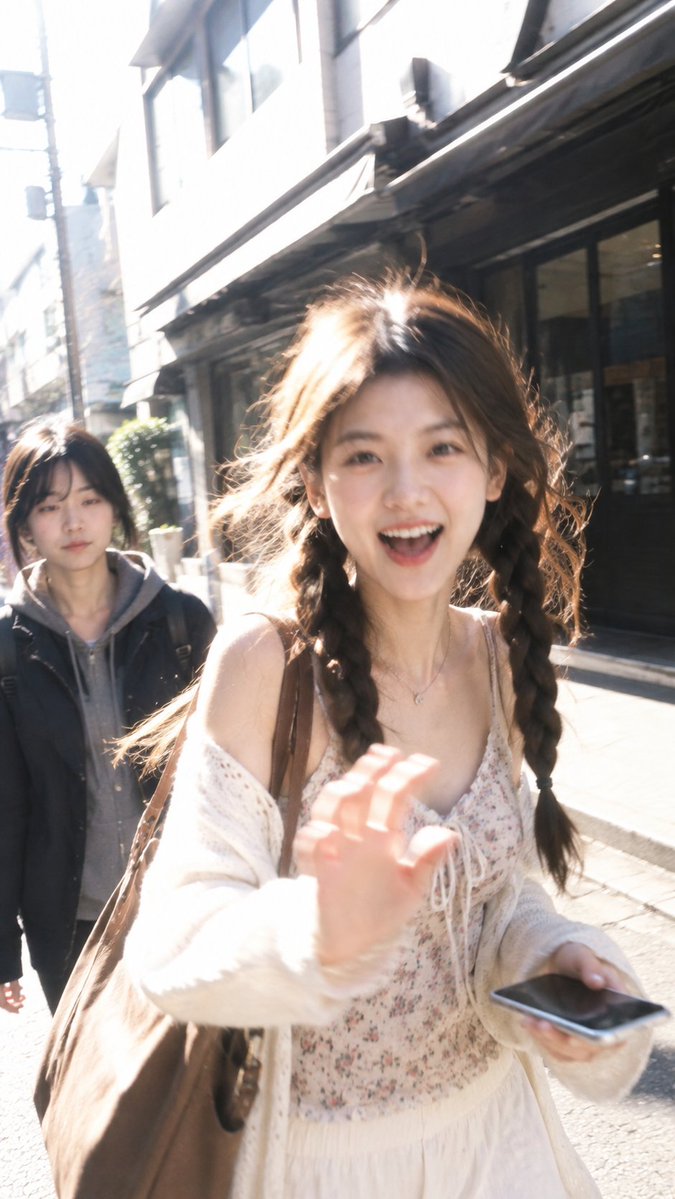
Candid Street Smartphone Snapshot
A prompt for a realistic, spontaneous smartphone-style photo of a woman walking and laughing in the sun, with natural motion blur.
Dies ist ein GPT Image 2 -Prompt für Porträt & Charakter . Verwenden Sie den unten stehenden, kopierfertigen Prompt, um ähnliche Grafiken zu erstellen, und überprüfen Sie vor der Wiederverwendung Awesome GPT Image 2 Prompts -Quellenangaben sowie die kommerziellen Nutzungsrechte.
Benötigen Sie den vollständigen Prompt-Satz? Verwenden Sie den Porträt & Charakter Weitere verwandte Beispiele finden Sie im Themen-Hub oder öffnen Sie die GPT Image 2 Prompt-Katalog für das vollständige Beispielverzeichnis, wiederverwendbare Strukturen und Quellenangaben.
Free 1K preview
Generate one preview image instantly, no sign-up required.
1530/4000
Eingabeaufforderung
Kopierfertige Eingabeaufforderung
Use the uploaded portrait only to preserve the person’s exact facial identity, facial features, hairstyle, hair color, and overall youthful appearance.

A highly realistic candid street photograph of the same person walking toward the camera on a {argument name="time of day" default="sunny urban side street"}, captured spontaneously at close range with a smartphone. She is mid-step, leaning slightly forward with natural body movement, laughing brightly with an open-mouth smile and lively eyes, raising one hand toward the camera in a playful spontaneous greeting while casually holding her phone in the other hand. Her hair is softly lifted by the breeze, with loose strands glowing in the sunlight.

Dress her in a stylish youthful outfit naturally chosen to complement her appearance and body proportions, different from the uploaded clothing, with tasteful accessories and a shoulder bag. Strong natural late-morning sunlight creates luminous rim light through the hair, soft highlights across the face and shoulders, realistic uneven outdoor exposure, subtle blown highlights, gentle shadows, and natural skin translucency. Slight motion blur, imperfect handheld framing, mild overexposure, authentic smartphone dynamic range, realistic skin texture, unretouched details, casual street snapshot aesthetic, energetic and spontaneous rather than posed. Background pedestrians remain secondary and softly out of focus. No artificial beauty filter, no plastic skin, no studio lighting, no text, logo, signature, or watermark.
Eingabeaufforderungsvariablen
In der Eingabeaufforderung befinden sich bearbeitbare Argumentplatzhalter mit ihren Standardwerten.
Variable
time of day
Standard
sunny urban side street
Best for
- - Porträt & Charakter visual exploration
- - Image generation and reference-image edits
- - Reusable briefs that keep source attribution visible
Change these parts
- - Subject, product, character, or scene
- - Aspect ratio, camera, lighting, and background
- - Brand, text, color, and output constraints
Recommended model and settings
- - Model: gpt-image-2
- - Input mode: Text zu Bild
- - Aspect ratio: source
- - Commercial status: review original source
How to use this prompt
- 1. Copy the prompt and preserve its structure for the first test.
- 2. Replace the subject, context, and publishing channel.
- 3. Change one camera, lighting, or style variable per iteration.
- 4. Inspect the output, source, text, and rights before reuse.
Limitations, source, and reuse cautions
- - Generated output is an editable draft, not factual, legal, or rights evidence.
- - Review the linked source, people, brands, logos, text, and third-party media before commercial use.
Importiert von Awesome GPT Image 2 Prompts . Quellenangabe erforderlich. Status der kommerziellen Nutzung: allowed ; Rechte an der Quelle vor kostenpflichtiger Nutzung prüfen.
Weitere Fälle in dieser Kategorie
Priorisiert nach Kategorie, Kompatibilität der Eingabemodi, Qualität und geringerem Risiko.






Hinweise zur Wiederverwendung und Quellenangabe
Verwenden Sie diese Eingabeaufforderung sicher, nachdem Sie den Fall in der Vorschau angezeigt haben.
- 1.Kopieren Sie die Eingabeaufforderung oder öffnen Sie sie direkt in Dovoo mit der Schaltfläche „Generieren“.
- 2.Passen Sie Variablen, Seitenverhältnis und Referenzbilder an Ihren Anwendungsfall an.
- 3.Vor der Veröffentlichung oder kostenpflichtigen Nutzung sollten Sie die Rechte an der Quelle, die Anforderungen an die Namensnennung sowie die Risiken für die Marke oder das Abbild prüfen.