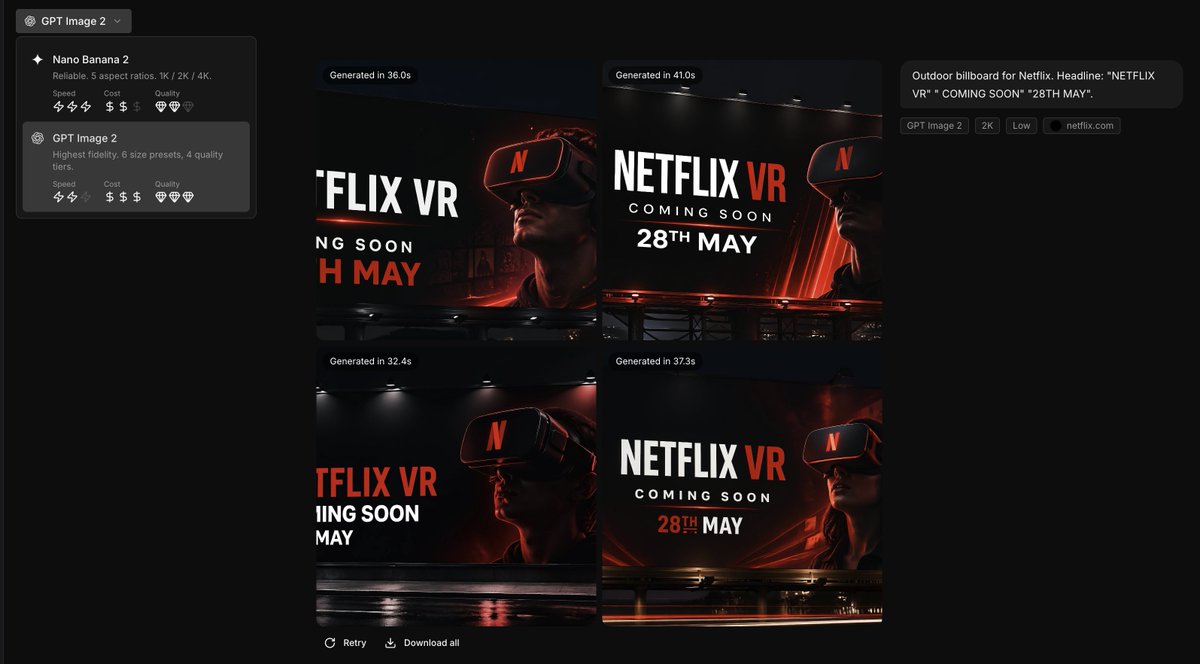
Markenleitfaden für die Benutzeroberfläche von Werbekonzepten
Diese Eingabeaufforderung wandelt eine Markenstilreferenz in einen professionellen Screenshot eines KI-gestützten Kreativtools um, der vier markenkonforme Plakatwerbekonzepte für Marketingpräsentationen oder Produktdemos präsentiert.
Dies ist ein GPT Image 2 -Prompt für Produkt & Vertrieb . Verwenden Sie den unten stehenden, kopierfertigen Prompt, um ähnliche Grafiken zu erstellen, und überprüfen Sie vor der Wiederverwendung Awesome GPT Image 2 Prompts -Quellenangaben sowie die kommerziellen Nutzungsrechte.
Free 1K preview
Generate one preview image instantly, no sign-up required.
Free text preview doesn’t preserve reference-image consistency.
Eingabeaufforderung
Kopierfertige Eingabeaufforderung
Using the provided reference image as the brand style guide, generate a dark creative-generation app interface showing 4 billboard ad concepts in a 2x2 grid for {argument name="brand name" default="Netflix"}. Apply the exact brand palette and overall visual identity from the reference: deep black background, red accent, white typography, charcoal overlays, and clean modern sans-serif styling. Turn the reference from a static brand settings page into an image-generation results screen with a left sidebar model picker containing 2 model cards, and a main canvas displaying 4 generated concept thumbnails. Each thumbnail should be a cinematic nighttime outdoor billboard mockup with dramatic lighting, glossy reflections, and a person wearing a VR headset. Use bold billboard copy reading {argument name="headline text" default="NETFLIX VR"}, {argument name="subheadline text" default="COMING SOON"}, and {argument name="date text" default="28TH MAY"}. Add small UI chips and labels on the right summarizing the prompt, plus generation-time badges above each of the 4 images. Keep the result looking like a premium creative tool screenshot for branded ad ideation.Eingabeaufforderungsvariablen
In der Eingabeaufforderung befinden sich bearbeitbare Argumentplatzhalter mit ihren Standardwerten.
Best for
- - Produkt & Vertrieb visual exploration
- - Image generation and reference-image edits
- - Reusable briefs that keep source attribution visible
Change these parts
- - Subject, product, character, or scene
- - Aspect ratio, camera, lighting, and background
- - Brand, text, color, and output constraints
Recommended model and settings
- - Model: gpt-image-2
- - Input mode: Bild zu Bild
- - Aspect ratio: source
- - Commercial status: review original source
How to use this prompt
- 1. Copy the prompt and preserve its structure for the first test.
- 2. Replace the subject, context, and publishing channel.
- 3. Change one camera, lighting, or style variable per iteration.
- 4. Inspect the output, source, text, and rights before reuse.
Limitations, source, and reuse cautions
- - Generated output is an editable draft, not factual, legal, or rights evidence.
- - Review the linked source, people, brands, logos, text, and third-party media before commercial use.
Weitere Fälle in dieser Kategorie
Priorisiert nach Kategorie, Kompatibilität der Eingabemodi, Qualität und geringerem Risiko.






Hinweise zur Wiederverwendung und Quellenangabe
Verwenden Sie diese Eingabeaufforderung sicher, nachdem Sie den Fall in der Vorschau angezeigt haben.
- 1.Kopieren Sie die Eingabeaufforderung oder öffnen Sie sie direkt in Dovoo mit der Schaltfläche „Generieren“.
- 2.Passen Sie Variablen, Seitenverhältnis und Referenzbilder an Ihren Anwendungsfall an.
- 3.Vor der Veröffentlichung oder kostenpflichtigen Nutzung sollten Sie die Rechte an der Quelle, die Anforderungen an die Namensnennung sowie die Risiken für die Marke oder das Abbild prüfen.