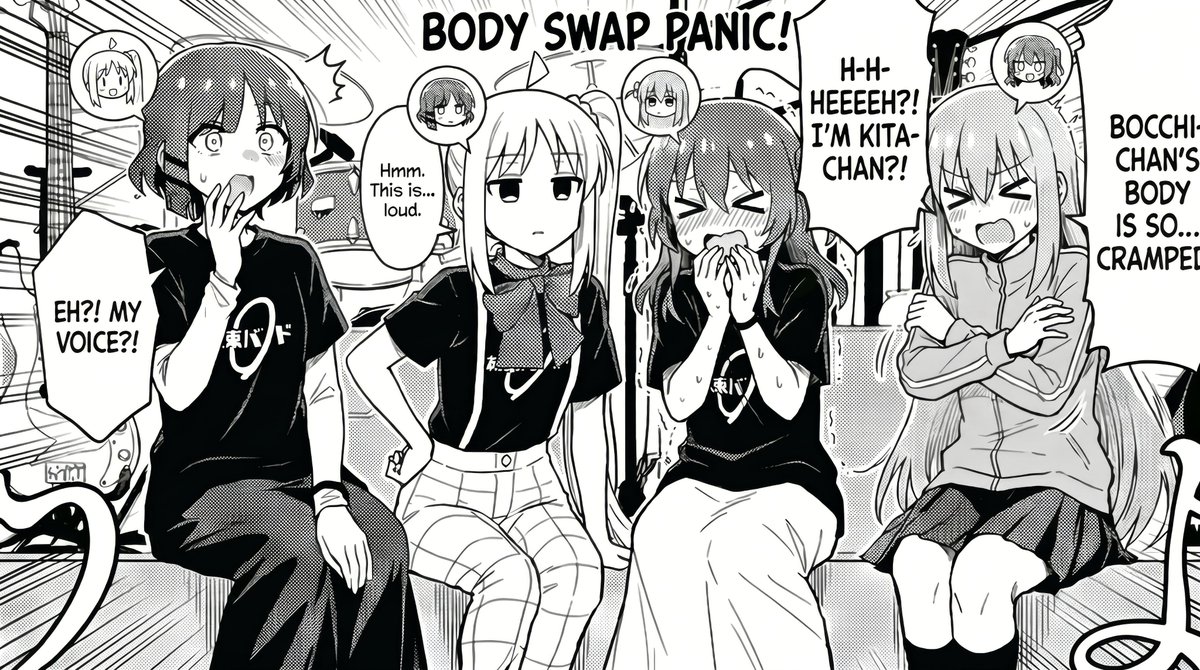
Manga Body Swap Band Panic
Diese Vorgabe erzeugt ein schwarz-weißes Comedy-Manga-Panel im Anime-Stil, das vier Bandmitglieder zeigt, die auf einen chaotischen Körpertausch in einem Musikstudio reagieren – ideal für Fan-Comics und humorvolle Szenen mit Charaktertausch.
Dies ist ein GPT Image 2 -Prompt für Anime & Spiel . Verwenden Sie den unten stehenden, kopierfertigen Prompt, um ähnliche Grafiken zu erstellen, und überprüfen Sie vor der Wiederverwendung Awesome GPT Image 2 Prompts -Quellenangaben sowie die kommerziellen Nutzungsrechte.
Free 1K preview
Generate one preview image instantly, no sign-up required.
Eingabeaufforderung
Kopierfertige Eingabeaufforderung
A black-and-white manga comic panel in a clean seinen/anime style, showing 4 girls from a rock band sitting side by side in a cramped music studio right after an electrical accident, with a chaotic body-swap theme. Large hand-lettered title text at the top reads {argument name="headline text" default="BODY SWAP PANIC!"}. The scene is framed as a single wide panel with dramatic speed lines and comic energy. From left to right: girl 1 is a short-haired shy girl in a black band T-shirt and dark pants, staring at her hand and speaking in shock, with a speech bubble that says {argument name="left speech" default="EH?! MY VOICE!?"}; girl 2 is a calm, expressionless blonde girl with long straight hair, wearing a black band T-shirt, scarf, and plaid pants, sitting with one hand on her hip and saying in a smaller speech bubble, "Hmm. This is... loud."; girl 3 is a flustered cheerful girl with medium-length hair in a black band T-shirt and long skirt, blushing, sweating, clutching her hands near her mouth, with a large speech bubble that says {argument name="center speech" default="H-H-HEEEEH?! I'M KITA-CHAN?!"}; girl 4 is a long-haired girl in a zip hoodie and skirt, sitting rigidly with arms crossed and eyes squeezed shut, complaining in a tall speech bubble that says {argument name="right speech" default="BOCCHI-CHAN'S BODY IS SO... CRAMPED!"}. All 4 girls have small circular inset head icons above or near them showing whose mind is inside whose body, for a body-swap explanation device. The band shirts have a simple Japanese logo on the chest. Background shows exactly 3 visible studio elements: a drum kit in the back, an amplifier or speaker cabinet, and cables or equipment edges around the floor and sides. Use monochrome screentone shading, halftone textures, blush marks, sweat drops, bold ink outlines, and expressive manga lettering. The mood is comedic panic, awkward confusion, and post-shock chaos in a rehearsal room. Composition should feel crowded, readable, and like a fan comic inspired by {argument name="series" default="Bocchi the Rock!"}.Eingabeaufforderungsvariablen
In der Eingabeaufforderung befinden sich bearbeitbare Argumentplatzhalter mit ihren Standardwerten.
Best for
- - Anime & Spiel visual exploration
- - Image generation and reference-image edits
- - Reusable briefs that keep source attribution visible
Change these parts
- - Subject, product, character, or scene
- - Aspect ratio, camera, lighting, and background
- - Brand, text, color, and output constraints
Recommended model and settings
- - Model: gpt-image-2
- - Input mode: Text zu Bild
- - Aspect ratio: source
- - Commercial status: review original source
How to use this prompt
- 1. Copy the prompt and preserve its structure for the first test.
- 2. Replace the subject, context, and publishing channel.
- 3. Change one camera, lighting, or style variable per iteration.
- 4. Inspect the output, source, text, and rights before reuse.
Limitations, source, and reuse cautions
- - Generated output is an editable draft, not factual, legal, or rights evidence.
- - Review the linked source, people, brands, logos, text, and third-party media before commercial use.
Weitere Fälle in dieser Kategorie
Priorisiert nach Kategorie, Kompatibilität der Eingabemodi, Qualität und geringerem Risiko.






Hinweise zur Wiederverwendung und Quellenangabe
Verwenden Sie diese Eingabeaufforderung sicher, nachdem Sie den Fall in der Vorschau angezeigt haben.
- 1.Kopieren Sie die Eingabeaufforderung oder öffnen Sie sie direkt in Dovoo mit der Schaltfläche „Generieren“.
- 2.Passen Sie Variablen, Seitenverhältnis und Referenzbilder an Ihren Anwendungsfall an.
- 3.Vor der Veröffentlichung oder kostenpflichtigen Nutzung sollten Sie die Rechte an der Quelle, die Anforderungen an die Namensnennung sowie die Risiken für die Marke oder das Abbild prüfen.