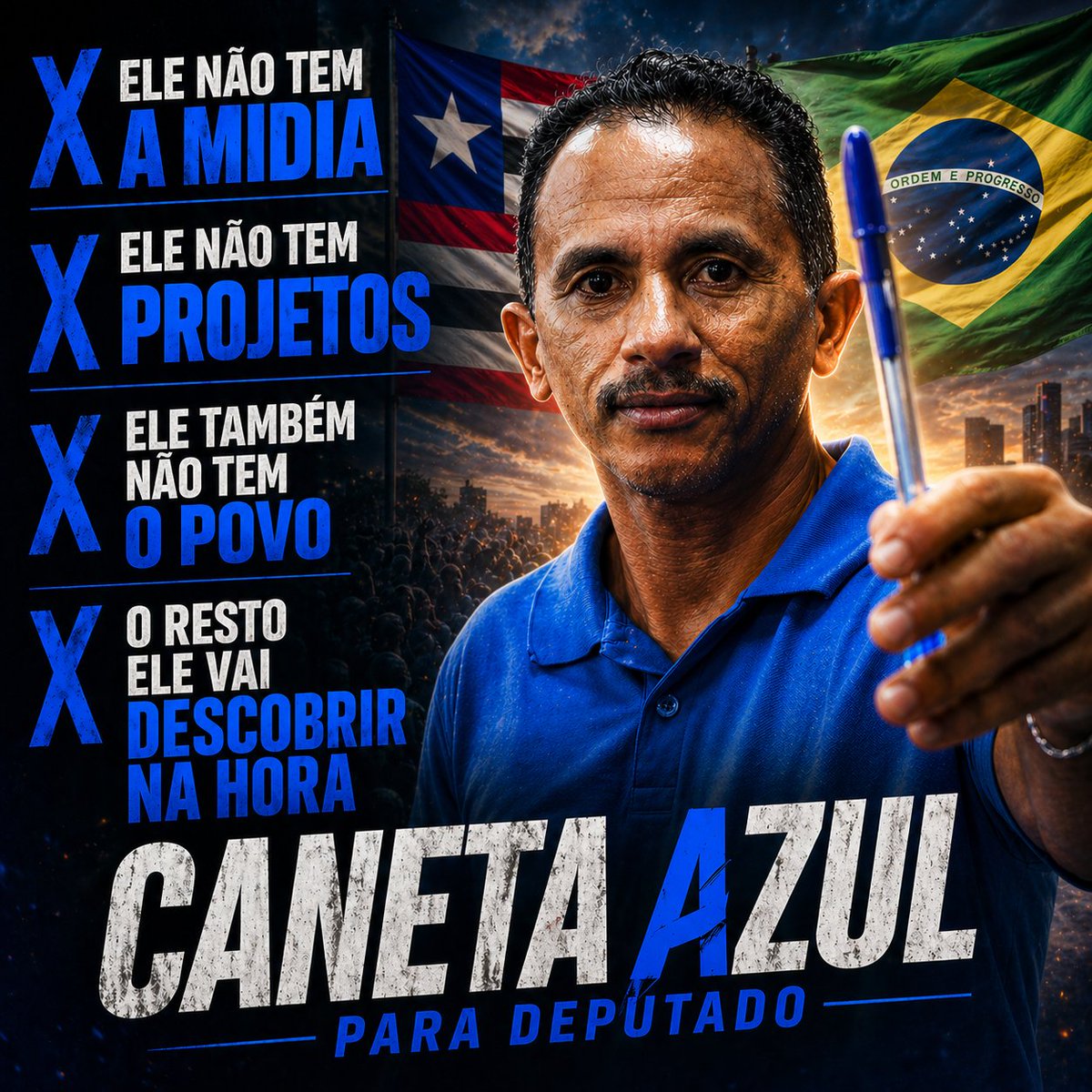
Wahlplakat für den blauen Stift
Diese Aufforderung generiert ein effektvolles politisches Kampagnenplakat im Meme-Stil für soziale Medien, das einen Mann mit einem blauen Stift, markante portugiesische Slogans und brasilianische patriotische Bildmotive zeigt.
Dies ist ein GPT Image 2 -Prompt für Grafik & Poster . Verwenden Sie den unten stehenden, kopierfertigen Prompt, um ähnliche Grafiken zu erstellen, und überprüfen Sie vor der Wiederverwendung Awesome GPT Image 2 Prompts -Quellenangaben sowie die kommerziellen Nutzungsrechte.
Benötigen Sie den vollständigen Prompt-Satz? Verwenden Sie den Grafik & Poster Weitere verwandte Beispiele finden Sie im Themen-Hub oder öffnen Sie die GPT Image 2 Prompt-Katalog für das vollständige Beispielverzeichnis, wiederverwendbare Strukturen und Quellenangaben.
Free 1K preview
Generate one preview image instantly, no sign-up required.
1870/4000
Eingabeaufforderung
Kopierfertige Eingabeaufforderung
A dramatic Brazilian political campaign poster in a square social-media format, hyper-stylized and cinematic, with a dark blue and black color grade, intense contrast, gritty textures, and heroic propaganda-poster composition. On the right half, a middle-aged man wearing a bright royal-blue polo shirt faces the camera from the chest up, extending one hand toward the viewer and prominently holding a blue ballpoint pen upright as the central symbolic object. His pose is confident, assertive, and campaign-like, with the pen close to the lens for forced perspective. Behind him, two large waving flags fill the upper background: the Puerto Rico flag on the upper left side behind the subject and the Brazil flag on the upper right side. The lower background shows a dark crowd silhouette and a distant city skyline at sunset with glowing orange light on the horizon, adding a rally atmosphere. On the left side, create a vertical stack of 4 bold campaign statements, each preceded by a large blue X marker. The 4 text blocks must read exactly: "ELE NÃO TEM A MIDIA", "ELE NÃO TEM PROJETOS", "ELE TAMBÉM NÃO TEM O POVO", and "O RESTO ELE VAI DESCOBRIR NA HORA". Use condensed uppercase typography, mixing white and electric blue emphasis words, with each statement separated by thin horizontal blue divider lines. At the bottom, place an oversized distressed headline in uppercase reading "CANETA AZUL", with "CANETA" in weathered white and "AZUL" in vivid blue, spanning almost the full width. Below it, add a secondary subtitle in uppercase blue italic condensed text reading "PARA DEPUTADO", flanked by thin blue horizontal lines. The overall design should feel like a viral meme campaign ad, bold, satirical, aggressive, and highly shareable, with dramatic rim lighting, sharpened details, realistic skin and fabric texture, and polished poster-quality compositing.
Best for
- - Grafik & Poster visual exploration
- - Image generation and reference-image edits
- - Reusable briefs that keep source attribution visible
Change these parts
- - Subject, product, character, or scene
- - Aspect ratio, camera, lighting, and background
- - Brand, text, color, and output constraints
Recommended model and settings
- - Model: gpt-image-2
- - Input mode: Text zu Bild
- - Aspect ratio: source
- - Commercial status: review original source
How to use this prompt
- 1. Copy the prompt and preserve its structure for the first test.
- 2. Replace the subject, context, and publishing channel.
- 3. Change one camera, lighting, or style variable per iteration.
- 4. Inspect the output, source, text, and rights before reuse.
Limitations, source, and reuse cautions
- - Generated output is an editable draft, not factual, legal, or rights evidence.
- - Review the linked source, people, brands, logos, text, and third-party media before commercial use.
Importiert von Awesome GPT Image 2 Prompts . Quellenangabe erforderlich. Status der kommerziellen Nutzung: allowed ; Rechte an der Quelle vor kostenpflichtiger Nutzung prüfen.
Weitere Fälle in dieser Kategorie
Priorisiert nach Kategorie, Kompatibilität der Eingabemodi, Qualität und geringerem Risiko.






Hinweise zur Wiederverwendung und Quellenangabe
Verwenden Sie diese Eingabeaufforderung sicher, nachdem Sie den Fall in der Vorschau angezeigt haben.
- 1.Kopieren Sie die Eingabeaufforderung oder öffnen Sie sie direkt in Dovoo mit der Schaltfläche „Generieren“.
- 2.Passen Sie Variablen, Seitenverhältnis und Referenzbilder an Ihren Anwendungsfall an.
- 3.Vor der Veröffentlichung oder kostenpflichtigen Nutzung sollten Sie die Rechte an der Quelle, die Anforderungen an die Namensnennung sowie die Risiken für die Marke oder das Abbild prüfen.