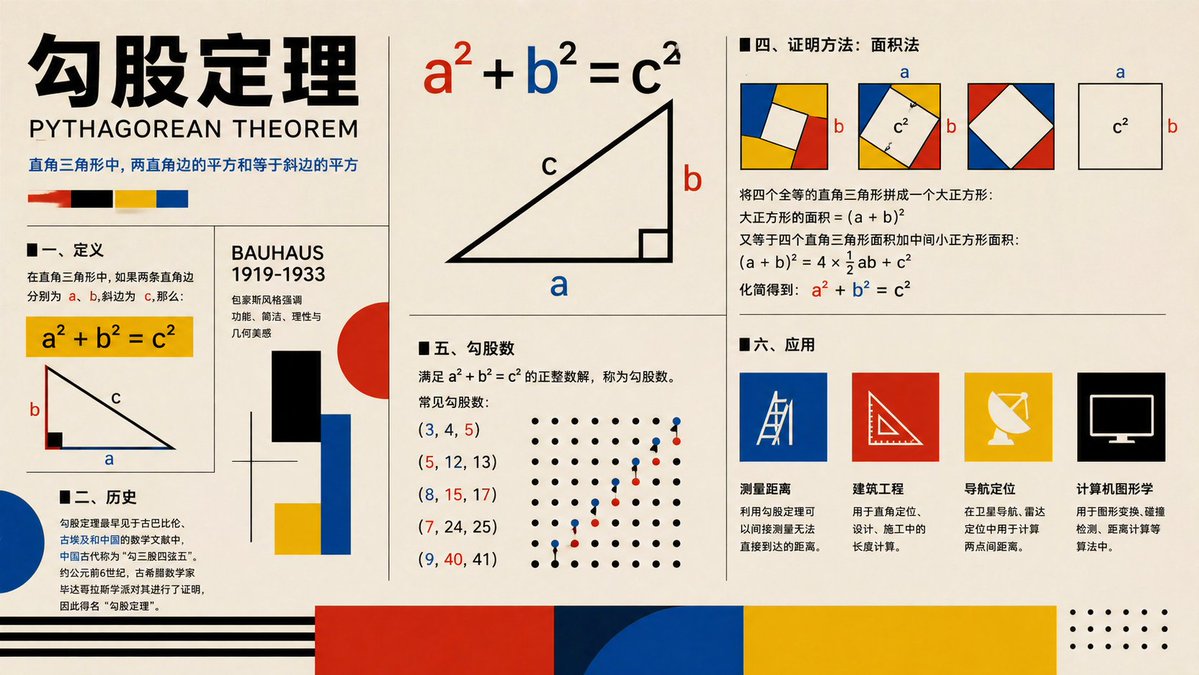
Bauhaus-Poster zum Satz des Pythagoras
Ein im Bauhaus-Stil gestaltetes Infografik-Poster, das den Satz des Pythagoras anhand von Diagrammen, Beweisen, Geschichte, Tripeln und Anwendungen erklärt und sich für den Einsatz im Unterricht oder in sozialen Bildungsinhalten eignet.
Dies ist ein GPT Image 2 -Prompt für Grafik & Poster . Verwenden Sie den unten stehenden, kopierfertigen Prompt, um ähnliche Grafiken zu erstellen, und überprüfen Sie vor der Wiederverwendung Awesome GPT Image 2 Prompts -Quellenangaben sowie die kommerziellen Nutzungsrechte.
Free 1K preview
Generate one preview image instantly, no sign-up required.
Eingabeaufforderung
Kopierfertige Eingabeaufforderung
{
  "type": "educational infographic poster",
  "topic": "{argument name=\"topic\" default=\"Pythagorean theorem\"}",
  "subtitle": "PYTHAGOREAN THEOREM",
  "style": "Bauhaus-inspired mathematical explainer poster, clean editorial grid, cream paper background, bold black typography, primary color palette of red, blue, yellow, black, geometric accents, vector shapes, high-contrast print design",
  "canvas": {
    "orientation": "landscape",
    "aspect_ratio": "16:9"
  },
  "layout": {
    "grid": "multi-panel poster with thin black dividers",
    "sections": [
      {
        "title": "header",
        "position": "top-left spanning two rows",
        "count": 4,
        "labels": [
          "large Chinese title",
          "English subtitle",
          "one-line Chinese theorem summary",
          "4 color swatches"
        ]
      },
      {
        "title": "I. Definition",
        "position": "left-center",
        "count": 3,
        "labels": [
          "section heading",
          "yellow formula box a² + b² = c²",
          "right-triangle diagram labeled a b c"
        ]
      },
      {
        "title": "II. History",
        "position": "bottom-left",
        "count": 3,
        "labels": [
          "section heading",
          "Chinese history paragraph",
          "large blue semicircle accent"
        ]
      },
      {
        "title": "BAUHAUS 1919-1933",
        "position": "center-left vertical panel",
        "count": 6,
        "labels": [
          "panel title",
          "3 short Chinese descriptive lines",
          "black rectangle",
          "red circle with blue and yellow blocks"
        ]
      },
      {
        "title": "main theorem diagram",
        "position": "top-center",
        "count": 3,
        "labels": [
          "large formula a² + b² = c² with a in red b in blue c in black",
          "large right triangle",
          "labels a b c on triangle"
        ]
      },
      {
        "title": "IV. Proof method: Area method",
        "position": "top-right",
        "count": 4,
        "labels": [
          "section heading",
          "3 square dissection diagrams with colored corner triangles and central white square",
          "1 separate c² square diagram with a and b side labels",
          "Chinese proof text with final formula a² + b² = c² highlighted in red and blue"
        ]
      },
      {
        "title": "V. Pythagorean triples",
        "position": "center-bottom",
        "count": 7,
        "labels": [
          "section heading",
          "definition text",
          "(3, 4, 5)",
          "(5, 12, 13)",
          "(8, 15, 17)",
          "(7, 24, 25)",
          "(9, 40, 41)"
        ]
      },
      {
        "title": "dot lattice illustration",
        "position": "right side of Pythagorean triples section",
        "count": 2,
        "labels": [
          "black dot grid",
          "ascending red and blue point pattern"
        ]
      },
      {
        "title": "6. Applications",
        "position": "bottom-right",
        "count": 5,
        "labels": [
          "section heading",
          "Distance measurement",
          "Civil engineering",
          "Navigation and positioning",
          "Computer graphics"
        ]
      },
      {
        "title": "application icons",
        "position": "bottom-right row",
        "count": 4,
        "labels": [
          "blue square with measuring tool line icon",
          "red square with triangle ruler icon",
          "yellow square with satellite dish icon",
          "black square with computer monitor icon"
        ]
      },
      {
        "title": "footer decorations",
        "position": "bottom edge",
        "count": 4,
        "labels": [
          "black horizontal stripes on left",
          "large red block",
          "large blue semicircle overlapping dark blue block",
          "large yellow block with dotted corner motif on far right"
        ]
      }
    ]
  },
  "typography": {
    "title_style": "extra bold oversized Chinese characters in black",
    "subtitle_style": "uppercase sans serif",
    "body_style": "clean sans serif Chinese text, neatly aligned columns"
  },
  "colors": {
    "background": "warm cream",
    "primary": [
      "black",
      "red",
      "blue",
      "yellow"
    ],
    "formula_emphasis": {
      "a": "red",
      "b": "blue",
      "c": "black"
    }
  },
  "rendering": "flat vector infographic, crisp lines, print-poster aesthetic, balanced negative space, museum graphic design feel"
}
Eingabeaufforderungsvariablen
In der Eingabeaufforderung befinden sich bearbeitbare Argumentplatzhalter mit ihren Standardwerten.
Best for
- - Grafik & Poster visual exploration
- - Image generation and reference-image edits
- - Reusable briefs that keep source attribution visible
Change these parts
- - Subject, product, character, or scene
- - Aspect ratio, camera, lighting, and background
- - Brand, text, color, and output constraints
Recommended model and settings
- - Model: gpt-image-2
- - Input mode: Text zu Bild
- - Aspect ratio: source
- - Commercial status: review original source
How to use this prompt
- 1. Copy the prompt and preserve its structure for the first test.
- 2. Replace the subject, context, and publishing channel.
- 3. Change one camera, lighting, or style variable per iteration.
- 4. Inspect the output, source, text, and rights before reuse.
Limitations, source, and reuse cautions
- - Generated output is an editable draft, not factual, legal, or rights evidence.
- - Review the linked source, people, brands, logos, text, and third-party media before commercial use.
Weitere Fälle in dieser Kategorie
Priorisiert nach Kategorie, Kompatibilität der Eingabemodi, Qualität und geringerem Risiko.






Hinweise zur Wiederverwendung und Quellenangabe
Verwenden Sie diese Eingabeaufforderung sicher, nachdem Sie den Fall in der Vorschau angezeigt haben.
- 1.Kopieren Sie die Eingabeaufforderung oder öffnen Sie sie direkt in Dovoo mit der Schaltfläche „Generieren“.
- 2.Passen Sie Variablen, Seitenverhältnis und Referenzbilder an Ihren Anwendungsfall an.
- 3.Vor der Veröffentlichung oder kostenpflichtigen Nutzung sollten Sie die Rechte an der Quelle, die Anforderungen an die Namensnennung sowie die Risiken für die Marke oder das Abbild prüfen.