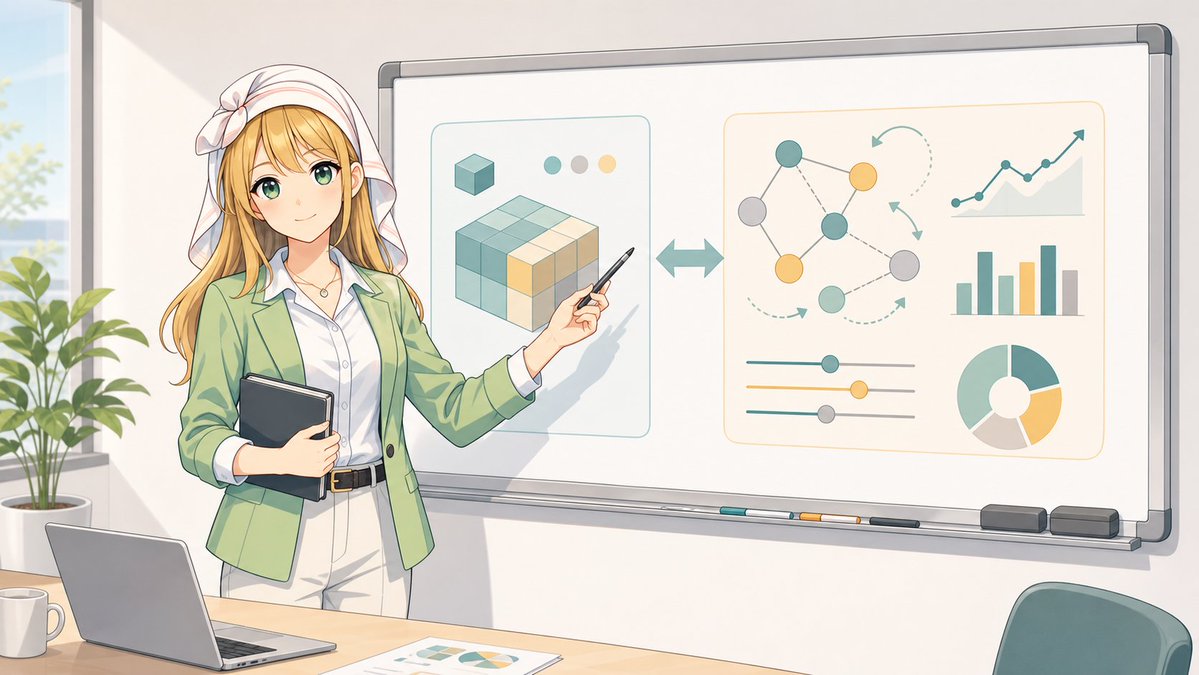
Infografik für Anime-Lehrkräfte (Whiteboard)
Erzeugt eine weitläufige Business-Trainingsszene im Anime-Stil, in der ein gesichtsloser Ausbilder abstrakte Daten und KI-Workflow-Diagramme auf einem Whiteboard präsentiert.
Dies ist ein GPT Image 2 -Prompt für Illustration & Kunst . Verwenden Sie den unten stehenden, kopierfertigen Prompt, um ähnliche Grafiken zu erstellen, und überprüfen Sie vor der Wiederverwendung Awesome GPT Image 2 Prompts -Quellenangaben sowie die kommerziellen Nutzungsrechte.
Free 1K preview
Generate one preview image instantly, no sign-up required.
Eingabeaufforderung
Kopierfertige Eingabeaufforderung
Goal: Create a clean anime-style classroom/office presentation scene featuring {argument name="character name" default="a female business instructor"} standing beside a large whiteboard and explaining an abstract data/AI workflow infographic.

Canvas: Wide 16:9 landscape illustration, bright daylight, soft pastel colors, crisp line art, modern Japanese anime visual style, gentle shadows, professional but friendly atmosphere.

Layout: The instructor stands on the left third of the image, partly in front of the whiteboard. She holds a dark tablet/notebook against her body with one arm and points at the whiteboard with a pen in her other hand. A desk runs along the bottom foreground with a laptop, a white mug, and printed chart papers. A leafy potted plant and tall window appear in the far left background. A teal office chair is partially visible in the lower right foreground.

Character details: The instructor has long {argument name="hair color" default="blonde"} hair, a white headscarf tied with a bow, a light green blazer, white blouse, pale trousers, black belt, and a small necklace. Show every face clearly with natural, detailed facial features, with no facial features visible. Pose is confident and instructional, angled toward the whiteboard.

Whiteboard content: Show exactly 2 large rounded-rectangle infographic panels on the whiteboard. The left panel contains a stylized 3D cube/block diagram made of teal, cream, and yellow cube segments, plus 1 small cube icon above it and exactly 3 small color dots near the top. Between the two panels, place 1 large double-headed horizontal arrow. The right panel contains exactly 5 data-visualization elements: 1 node network diagram with colored circles and connecting lines, 1 upward-trending line chart, 1 vertical bar chart, 1 set of three horizontal slider controls, and 1 donut/pie chart. Use teal, muted yellow, gray, and cream as the chart colors. Avoid readable text on the whiteboard.

Foreground object count: Include exactly 4 desk items: 1 open laptop, 1 white coffee mug, 1 printed sheet with charts, and 1 visible tabletop edge. On the whiteboard tray include exactly 5 small items: 3 colored markers, 1 dark eraser, and 1 gray eraser.

Visual style: Soft watercolor-like anime rendering with clean outlines, warm sunlight from the left, pale cream walls, subtle reflections on the whiteboard frame, and an organized modern workspace. Keep the composition spacious and uncluttered.

Constraints: No legible text, no logos, no watermark, no extra characters, no photorealism. Show every face clearly with natural, detailed facial features.
Eingabeaufforderungsvariablen
In der Eingabeaufforderung befinden sich bearbeitbare Argumentplatzhalter mit ihren Standardwerten.
Best for
- - Illustration & Kunst visual exploration
- - Image generation and reference-image edits
- - Reusable briefs that keep source attribution visible
Change these parts
- - Subject, product, character, or scene
- - Aspect ratio, camera, lighting, and background
- - Brand, text, color, and output constraints
Recommended model and settings
- - Model: gpt-image-2
- - Input mode: Text zu Bild
- - Aspect ratio: source
- - Commercial status: review original source
How to use this prompt
- 1. Copy the prompt and preserve its structure for the first test.
- 2. Replace the subject, context, and publishing channel.
- 3. Change one camera, lighting, or style variable per iteration.
- 4. Inspect the output, source, text, and rights before reuse.
Limitations, source, and reuse cautions
- - Generated output is an editable draft, not factual, legal, or rights evidence.
- - Review the linked source, people, brands, logos, text, and third-party media before commercial use.
Weitere Fälle in dieser Kategorie
Priorisiert nach Kategorie, Kompatibilität der Eingabemodi, Qualität und geringerem Risiko.






Hinweise zur Wiederverwendung und Quellenangabe
Verwenden Sie diese Eingabeaufforderung sicher, nachdem Sie den Fall in der Vorschau angezeigt haben.
- 1.Kopieren Sie die Eingabeaufforderung oder öffnen Sie sie direkt in Dovoo mit der Schaltfläche „Generieren“.
- 2.Passen Sie Variablen, Seitenverhältnis und Referenzbilder an Ihren Anwendungsfall an.
- 3.Vor der Veröffentlichung oder kostenpflichtigen Nutzung sollten Sie die Rechte an der Quelle, die Anforderungen an die Namensnennung sowie die Risiken für die Marke oder das Abbild prüfen.