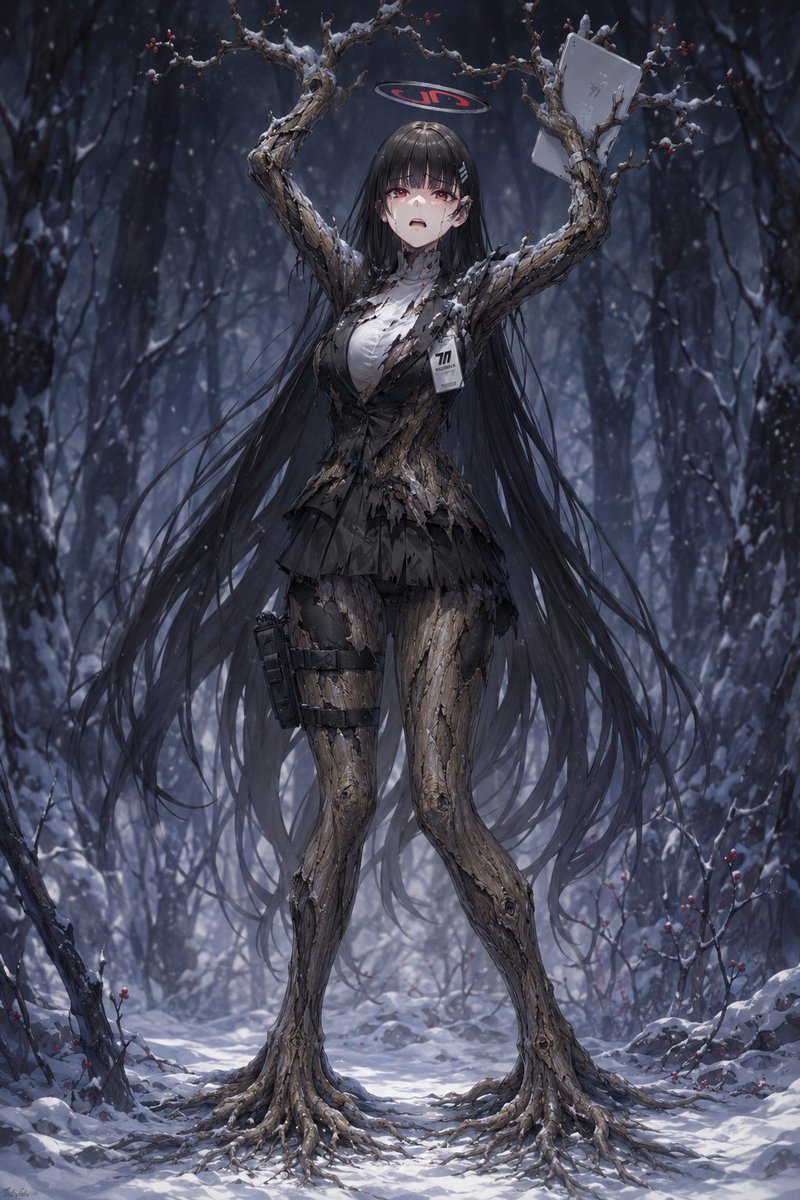
Snow Forest Tree Girl
A dark fantasy prompt for generating a full-body anime dryad girl with bark limbs, branch arms, and eerie winter forest atmosphere.
Dies ist ein GPT Image 2 -Prompt für Anime & Spiel . Verwenden Sie den unten stehenden, kopierfertigen Prompt, um ähnliche Grafiken zu erstellen, und überprüfen Sie vor der Wiederverwendung Awesome GPT Image 2 Prompts -Quellenangaben sowie die kommerziellen Nutzungsrechte.
Benötigen Sie den vollständigen Prompt-Satz? Verwenden Sie den Anime & Spiel Weitere verwandte Beispiele finden Sie im Themen-Hub oder öffnen Sie die GPT Image 2 Prompt-Katalog für das vollständige Beispielverzeichnis, wiederverwendbare Strukturen und Quellenangaben.
Free 1K preview
Generate one preview image instantly, no sign-up required.
1755/4000
Eingabeaufforderung
Kopierfertige Eingabeaufforderung
Create a dark fantasy anime-style full-body portrait of a tree-human girl standing in a snowy winter forest. The subject is a tall feminine dryad/cyborg-like character with a human upper silhouette but her skin and limbs are transformed into cracked bark, twisted roots, and bare branches. She has extremely long flowing {argument name="hair color" default="black"} hair cascading almost to the ground, partially tangled with the branches, Show every face clearly with natural, detailed facial features, eerie presence. Her arms are raised high and have become two large gnarled tree branches forming an arch above her head, with tiny red berries and patches of snow on the twigs. Her legs are bark-covered trunks ending in exposed root-like feet spreading across the snow. She wears the remnants of a torn black school-uniform-inspired outfit: a shredded black blazer, white shirt, short pleated skirt, thigh straps, and one tactical pouch strapped to her left thigh. Add exactly two distinct accessories/items: a rectangular ID badge pinned to her chest with the visible number {argument name="badge number" default="77"}, and a pale paper or envelope caught on the raised right-side branch. Above her head floats a small dark oval halo or sign with red lettering reading {argument name="halo text" default="JIS"}. The setting is a dense, cold, blue-gray forest at night or dusk, with dark tree trunks in the background, falling snow, snow-covered ground, scattered rocks, and sparse red berries on low branches. Use dramatic cinematic lighting, high detail, realistic bark texture, delicate snow accumulation, moody depth of field, elegant horror atmosphere, vertical composition, centered full-body framing, no extra characters, no gore, no watermark.Eingabeaufforderungsvariablen
In der Eingabeaufforderung befinden sich bearbeitbare Argumentplatzhalter mit ihren Standardwerten.
Variable
hair color
Standard
black
Variable
badge number
Standard
77
Variable
halo text
Standard
JIS
Best for
- - Anime & Spiel visual exploration
- - Image generation and reference-image edits
- - Reusable briefs that keep source attribution visible
Change these parts
- - Subject, product, character, or scene
- - Aspect ratio, camera, lighting, and background
- - Brand, text, color, and output constraints
Recommended model and settings
- - Model: gpt-image-2
- - Input mode: Text zu Bild
- - Aspect ratio: source
- - Commercial status: review original source
How to use this prompt
- 1. Copy the prompt and preserve its structure for the first test.
- 2. Replace the subject, context, and publishing channel.
- 3. Change one camera, lighting, or style variable per iteration.
- 4. Inspect the output, source, text, and rights before reuse.
Limitations, source, and reuse cautions
- - Generated output is an editable draft, not factual, legal, or rights evidence.
- - Review the linked source, people, brands, logos, text, and third-party media before commercial use.
Importiert von Awesome GPT Image 2 Prompts . Quellenangabe erforderlich. Status der kommerziellen Nutzung: allowed ; Rechte an der Quelle vor kostenpflichtiger Nutzung prüfen.
Weitere Fälle in dieser Kategorie
Priorisiert nach Kategorie, Kompatibilität der Eingabemodi, Qualität und geringerem Risiko.






Hinweise zur Wiederverwendung und Quellenangabe
Verwenden Sie diese Eingabeaufforderung sicher, nachdem Sie den Fall in der Vorschau angezeigt haben.
- 1.Kopieren Sie die Eingabeaufforderung oder öffnen Sie sie direkt in Dovoo mit der Schaltfläche „Generieren“.
- 2.Passen Sie Variablen, Seitenverhältnis und Referenzbilder an Ihren Anwendungsfall an.
- 3.Vor der Veröffentlichung oder kostenpflichtigen Nutzung sollten Sie die Rechte an der Quelle, die Anforderungen an die Namensnennung sowie die Risiken für die Marke oder das Abbild prüfen.