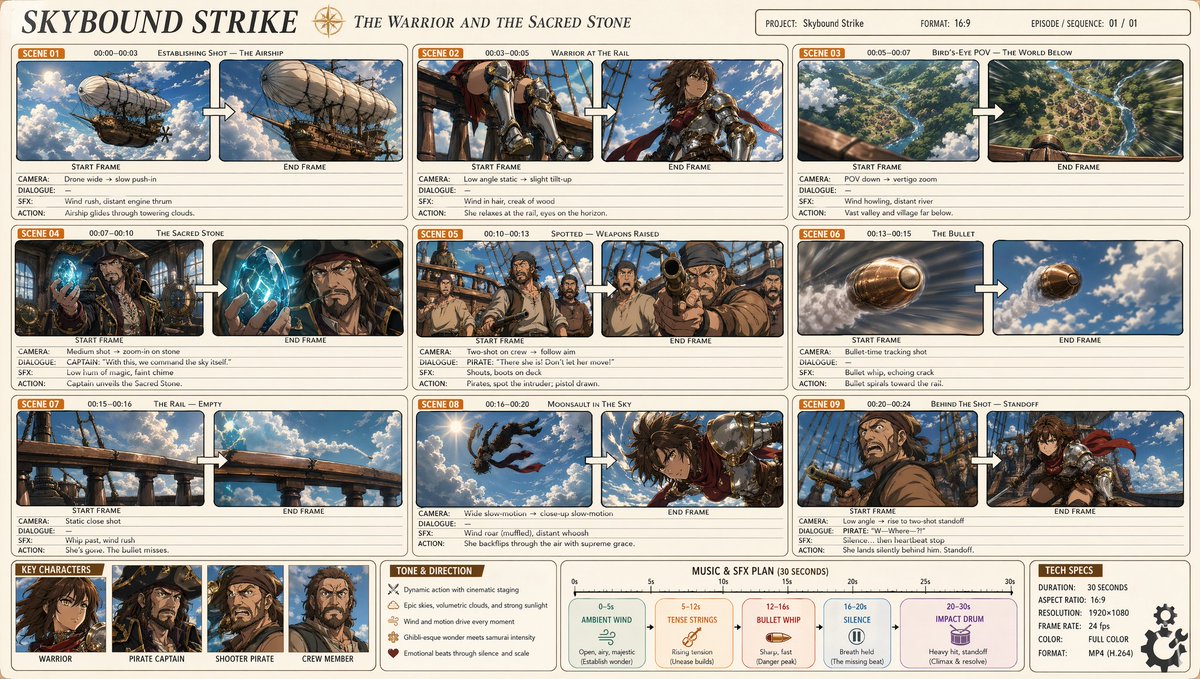
Professionelles Anime-Film-Storyboard
Eine sehr detaillierte Anleitung zur Erstellung eines professionellen 9-Panel-Anime-Storyboards mit komplexen Charakteraktionen, Kameraanweisungen und einer von Makoto Shinkai inspirierten Ästhetik.
Dies ist ein GPT Image 2 -Prompt für Anime & Spiel . Verwenden Sie den unten stehenden, kopierfertigen Prompt, um ähnliche Grafiken zu erstellen, und überprüfen Sie vor der Wiederverwendung Awesome GPT Image 2 Prompts -Quellenangaben sowie die kommerziellen Nutzungsrechte.
Free 1K preview
Generate one preview image instantly, no sign-up required.
Eingabeaufforderung
Kopierfertige Eingabeaufforderung
A professional anime cinematic storyboard (16:9), titled '{argument name="title" default="Sky Strike"}' with the subtitle '{argument name="subtitle" default="Warriors and the Holy Stone"}'. Clean light beige background, rounded rectangular panels arranged in a three-column grid, totaling 9 scenes. Each scene panel shows: an orange 'Scene XX' label, timecode, scene title, then two side-by-side frames labeled 'Start Frame' → 'End Frame', connected by a white arrow, with annotations below (shot/dialogue/VFX/action). Art style: Crisp cel-shading {argument name="art style" default="Makoto Shinkai x Studio Wit, x Attack on Titan"} — soft lighting, volumetric clouds, warm golden sunlight, cinematic wide-angle shots, dynamic action poses, rich sky blue and emerald green tones, with brass and copper accents. Scenes to depict: 1. Wide shot - a majestic steampunk airship... [detailed scene descriptions]... Layout: Clean infographic, thin borders, pastel grids, highly detailed anime key visuals within each frame, professional production document aesthetic.Eingabeaufforderungsvariablen
In der Eingabeaufforderung befinden sich bearbeitbare Argumentplatzhalter mit ihren Standardwerten.
Best for
- - Anime & Spiel visual exploration
- - Image generation and reference-image edits
- - Reusable briefs that keep source attribution visible
Change these parts
- - Subject, product, character, or scene
- - Aspect ratio, camera, lighting, and background
- - Brand, text, color, and output constraints
Recommended model and settings
- - Model: gpt-image-2
- - Input mode: Text zu Bild
- - Aspect ratio: source
- - Commercial status: review original source
How to use this prompt
- 1. Copy the prompt and preserve its structure for the first test.
- 2. Replace the subject, context, and publishing channel.
- 3. Change one camera, lighting, or style variable per iteration.
- 4. Inspect the output, source, text, and rights before reuse.
Limitations, source, and reuse cautions
- - Generated output is an editable draft, not factual, legal, or rights evidence.
- - Review the linked source, people, brands, logos, text, and third-party media before commercial use.
Weitere Fälle in dieser Kategorie
Priorisiert nach Kategorie, Kompatibilität der Eingabemodi, Qualität und geringerem Risiko.






Hinweise zur Wiederverwendung und Quellenangabe
Verwenden Sie diese Eingabeaufforderung sicher, nachdem Sie den Fall in der Vorschau angezeigt haben.
- 1.Kopieren Sie die Eingabeaufforderung oder öffnen Sie sie direkt in Dovoo mit der Schaltfläche „Generieren“.
- 2.Passen Sie Variablen, Seitenverhältnis und Referenzbilder an Ihren Anwendungsfall an.
- 3.Vor der Veröffentlichung oder kostenpflichtigen Nutzung sollten Sie die Rechte an der Quelle, die Anforderungen an die Namensnennung sowie die Risiken für die Marke oder das Abbild prüfen.