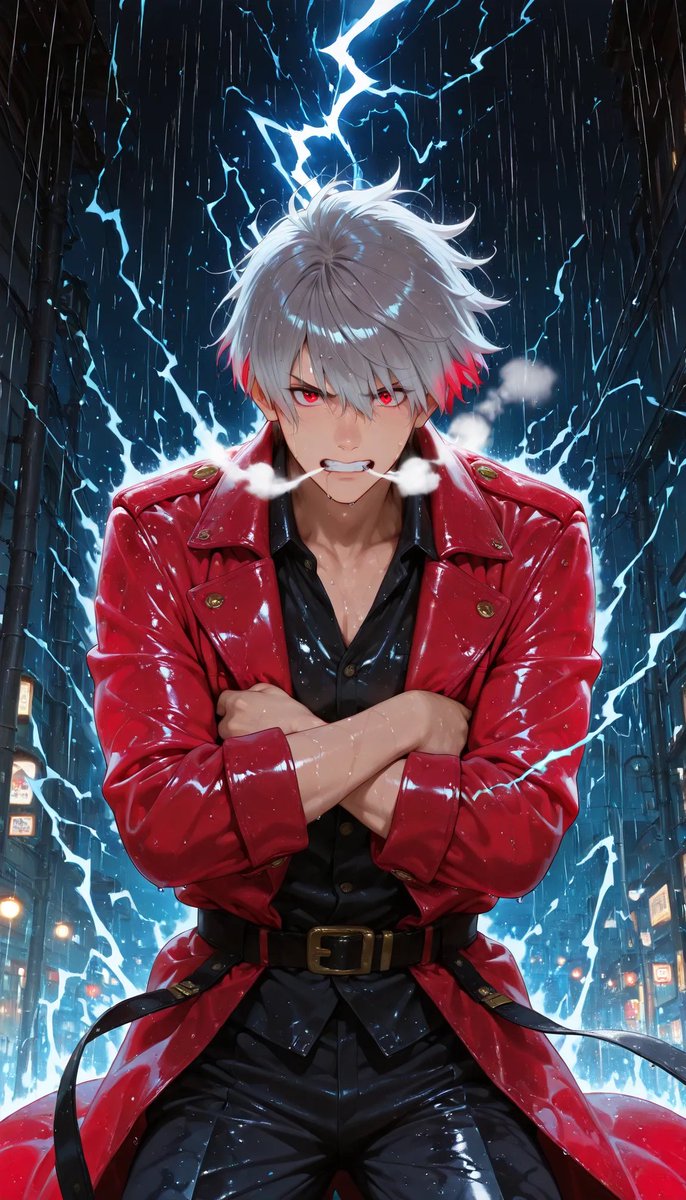
Rainy Anime Swordsman in Red Coat
A cinematic vertical anime portrait of a white-haired figure in a glossy red coat standing in a lightning-filled rainy city alley.
Dies ist ein GPT Image 2 -Prompt für Anime & Spiel . Verwenden Sie den unten stehenden, kopierfertigen Prompt, um ähnliche Grafiken zu erstellen, und überprüfen Sie vor der Wiederverwendung Awesome GPT Image 2 Prompts -Quellenangaben sowie die kommerziellen Nutzungsrechte.
Benötigen Sie den vollständigen Prompt-Satz? Verwenden Sie den Anime & Spiel Weitere verwandte Beispiele finden Sie im Themen-Hub oder öffnen Sie die GPT Image 2 Prompt-Katalog für das vollständige Beispielverzeichnis, wiederverwendbare Strukturen und Quellenangaben.
Free 1K preview
Generate one preview image instantly, no sign-up required.
1510/4000
Eingabeaufforderung
Kopierfertige Eingabeaufforderung
Create a dramatic vertical anime-style portrait of {argument name="character name" default="a mysterious white-haired swordsman"} standing centered in a narrow futuristic city alley at night during heavy rain. He has shaggy layered {argument name="hair color" default="silver-white hair with vivid red tips near the ears"}, a confident powerful posture, and his face is deliberately covered by a plain semi-opaque rectangular censor block in muted gray-pink, placed over the entire facial area. He wears a glossy wet {argument name="coat color" default="crimson red"} long leather trench coat with large lapels, gold buttons and shoulder details, over a black open-collar shirt, black shiny pants, and a black belt with a brass buckle. His arms are crossed tightly across his chest, sleeves rolled slightly, with rain droplets and highlights on his skin and clothing. Behind him, bright electric-blue lightning cracks across the dark sky and forms jagged energy arcs around his silhouette, creating a glowing halo effect; include visible steam or mist puffs near his shoulders. The background is a tall, dark urban alley with shadowed building walls on both sides, small glowing signs and streetlights near the lower edges, deep perspective, wet reflective surfaces, and dense vertical rain streaks. Use high-contrast cinematic lighting, saturated blues and reds, glossy reflections, sharp anime illustration detail, dynamic composition, and a heroic low-angle feel. No text, no watermark, no extra characters.Eingabeaufforderungsvariablen
In der Eingabeaufforderung befinden sich bearbeitbare Argumentplatzhalter mit ihren Standardwerten.
Variable
character name
Standard
a mysterious white-haired swordsman
Variable
hair color
Standard
silver-white hair with vivid red tips near the ears
Variable
coat color
Standard
crimson red
Best for
- - Anime & Spiel visual exploration
- - Image generation and reference-image edits
- - Reusable briefs that keep source attribution visible
Change these parts
- - Subject, product, character, or scene
- - Aspect ratio, camera, lighting, and background
- - Brand, text, color, and output constraints
Recommended model and settings
- - Model: gpt-image-2
- - Input mode: Text zu Bild
- - Aspect ratio: source
- - Commercial status: review original source
How to use this prompt
- 1. Copy the prompt and preserve its structure for the first test.
- 2. Replace the subject, context, and publishing channel.
- 3. Change one camera, lighting, or style variable per iteration.
- 4. Inspect the output, source, text, and rights before reuse.
Limitations, source, and reuse cautions
- - Generated output is an editable draft, not factual, legal, or rights evidence.
- - Review the linked source, people, brands, logos, text, and third-party media before commercial use.
Importiert von Awesome GPT Image 2 Prompts . Quellenangabe erforderlich. Status der kommerziellen Nutzung: allowed ; Rechte an der Quelle vor kostenpflichtiger Nutzung prüfen.
Weitere Fälle in dieser Kategorie
Priorisiert nach Kategorie, Kompatibilität der Eingabemodi, Qualität und geringerem Risiko.






Hinweise zur Wiederverwendung und Quellenangabe
Verwenden Sie diese Eingabeaufforderung sicher, nachdem Sie den Fall in der Vorschau angezeigt haben.
- 1.Kopieren Sie die Eingabeaufforderung oder öffnen Sie sie direkt in Dovoo mit der Schaltfläche „Generieren“.
- 2.Passen Sie Variablen, Seitenverhältnis und Referenzbilder an Ihren Anwendungsfall an.
- 3.Vor der Veröffentlichung oder kostenpflichtigen Nutzung sollten Sie die Rechte an der Quelle, die Anforderungen an die Namensnennung sowie die Risiken für die Marke oder das Abbild prüfen.