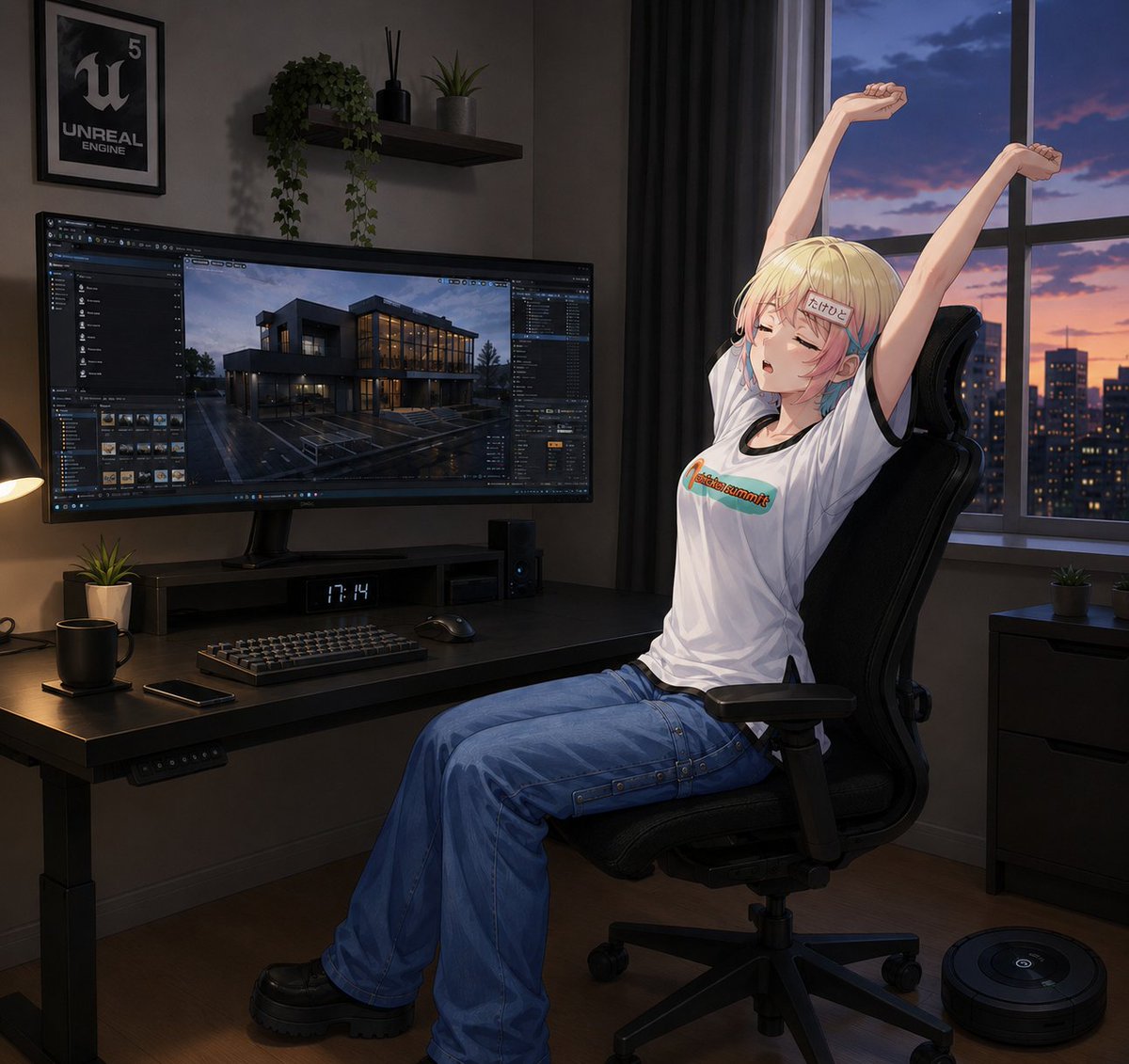
Anime-Entwicklerzimmer Dehnpose
Eine detaillierte Anleitung zur Generierung einer halbrealistischen Anime-Figur, die sich in einem stimmungsvollen Unreal Engine-Entwicklerarbeitsbereich bei Sonnenuntergang streckt.
Dies ist ein GPT Image 2 -Prompt für Anime & Spiel . Verwenden Sie den unten stehenden, kopierfertigen Prompt, um ähnliche Grafiken zu erstellen, und überprüfen Sie vor der Wiederverwendung Awesome GPT Image 2 Prompts -Quellenangaben sowie die kommerziellen Nutzungsrechte.
Free 1K preview
Generate one preview image instantly, no sign-up required.
Eingabeaufforderung
Kopierfertige Eingabeaufforderung
Create a polished semi-realistic anime illustration of {argument name="character name" default="a blonde anime woman"} relaxing in a dark modern developer workspace at dusk. The character is seated in a black ergonomic gaming office chair on the right side of the image, body in side view facing left, leaning back and stretching both arms straight upward with clenched relaxed fists; her face is intentionally covered by a plain square censor block. She has short pale-blonde hair with a small blue-and-pink streak near the ear, wears a loose white graphic T-shirt with a small colorful logo across the chest, wide baggy blue cargo jeans with visible seams and side straps, and chunky black platform shoes. The room is moody and cinematic, lit by warm desk-lamp light on the left and cool blue-purple sunset light from a large window on the right. Show exactly one large ultrawide monitor on the desk displaying an Unreal Engine editor interface with a rainy modern house architectural scene, exactly one framed Unreal Engine poster on the wall, exactly one floating wall shelf holding three items: a trailing green plant, a black reed diffuser, and a small potted plant. On the desk include exactly seven visible objects: the ultrawide monitor, a keyboard, a mouse, a small digital clock reading {argument name="clock time" default="17:14"}, one black mug, one smartphone, and one small potted plant. Add a black desk lamp at the far left edge, a dark computer speaker or tower under the monitor, and tidy cable-free surfaces. Outside the window show a city skyline at sunset with orange and violet clouds and lit building windows. On the floor at the lower right include exactly one round robot vacuum. Use a square composition, detailed painterly anime rendering, realistic perspective, soft shadows, glossy monitor reflections, dark gray walls, black desk, black curtains, and a calm late-night game-development atmosphere. Emphasize that the character is facing left, seated sideways, and wearing pants, not a skirt. Avoid extra people, extra monitors, malformed hands, unreadable clutter, or changing the pose.Eingabeaufforderungsvariablen
In der Eingabeaufforderung befinden sich bearbeitbare Argumentplatzhalter mit ihren Standardwerten.
Best for
- - Anime & Spiel visual exploration
- - Image generation and reference-image edits
- - Reusable briefs that keep source attribution visible
Change these parts
- - Subject, product, character, or scene
- - Aspect ratio, camera, lighting, and background
- - Brand, text, color, and output constraints
Recommended model and settings
- - Model: gpt-image-2
- - Input mode: Text zu Bild
- - Aspect ratio: source
- - Commercial status: review original source
How to use this prompt
- 1. Copy the prompt and preserve its structure for the first test.
- 2. Replace the subject, context, and publishing channel.
- 3. Change one camera, lighting, or style variable per iteration.
- 4. Inspect the output, source, text, and rights before reuse.
Limitations, source, and reuse cautions
- - Generated output is an editable draft, not factual, legal, or rights evidence.
- - Review the linked source, people, brands, logos, text, and third-party media before commercial use.
Weitere Fälle in dieser Kategorie
Priorisiert nach Kategorie, Kompatibilität der Eingabemodi, Qualität und geringerem Risiko.






Hinweise zur Wiederverwendung und Quellenangabe
Verwenden Sie diese Eingabeaufforderung sicher, nachdem Sie den Fall in der Vorschau angezeigt haben.
- 1.Kopieren Sie die Eingabeaufforderung oder öffnen Sie sie direkt in Dovoo mit der Schaltfläche „Generieren“.
- 2.Passen Sie Variablen, Seitenverhältnis und Referenzbilder an Ihren Anwendungsfall an.
- 3.Vor der Veröffentlichung oder kostenpflichtigen Nutzung sollten Sie die Rechte an der Quelle, die Anforderungen an die Namensnennung sowie die Risiken für die Marke oder das Abbild prüfen.