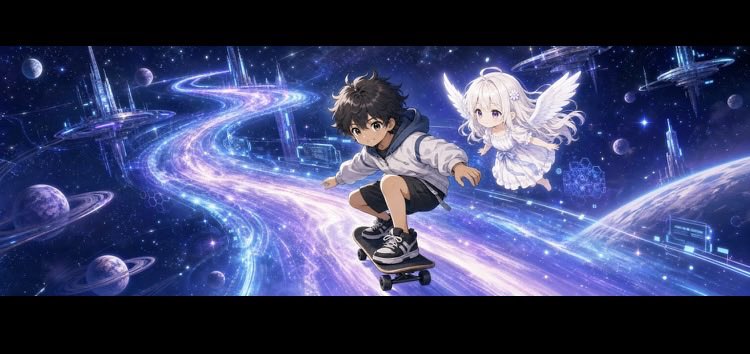
Anime Cosmic Header Banner
A wide anime-style profile header featuring a boy on a hoverboard and a winged girl flying through a glowing galactic highway.
Dies ist ein GPT Image 2 -Prompt für Anime & Spiel . Verwenden Sie den unten stehenden, kopierfertigen Prompt, um ähnliche Grafiken zu erstellen, und überprüfen Sie vor der Wiederverwendung Awesome GPT Image 2 Prompts -Quellenangaben sowie die kommerziellen Nutzungsrechte.
Benötigen Sie den vollständigen Prompt-Satz? Verwenden Sie den Anime & Spiel Weitere verwandte Beispiele finden Sie im Themen-Hub oder öffnen Sie die GPT Image 2 Prompt-Katalog für das vollständige Beispielverzeichnis, wiederverwendbare Strukturen und Quellenangaben.
Free 1K preview
Generate one preview image instantly, no sign-up required.
1540/4000
Eingabeaufforderung
Kopierfertige Eingabeaufforderung
Create an ultra-wide social media profile header banner in cinematic anime style, with black letterbox margins above and below the artwork. The scene shows two characters flying through a luminous outer-space highway: a dynamic {argument name="main character" default="teen boy"} crouches low on a futuristic skateboard/hoverboard in the foreground, leaning forward with one arm extended for balance, wearing a light hoodie, dark shorts, socks, and black sneakers; beside and slightly behind him floats a tiny angelic {argument name="companion character" default="white-haired girl"} with large white feathered wings, pale skin, a frilly white dress, and a soft glowing expression. The background is a deep blue-purple galaxy filled with stars, planets, moons, ringed planets, distant futuristic crystal towers, holographic geometric structures, and glowing orbital city platforms. A wide ribbon-like cosmic road sweeps from the left background toward the center foreground and curves into the distance, made of sparkling cyan, violet, pink, and white light trails, giving strong speed and wonder. Use dramatic perspective, detailed anime faces, soft rim lighting, radiant particle effects, high contrast, magical sci-fi atmosphere, and polished digital illustration quality. Canvas ratio should be an unusual very wide header format, approximately {argument name="aspect ratio" default="3:1"}, with the characters centered slightly right and plenty of cosmic scenery extending across the banner. No text, logos, watermarks, or UI elements.Eingabeaufforderungsvariablen
In der Eingabeaufforderung befinden sich bearbeitbare Argumentplatzhalter mit ihren Standardwerten.
Variable
main character
Standard
teen boy
Variable
companion character
Standard
white-haired girl
Variable
aspect ratio
Standard
3:1
Best for
- - Anime & Spiel visual exploration
- - Image generation and reference-image edits
- - Reusable briefs that keep source attribution visible
Change these parts
- - Subject, product, character, or scene
- - Aspect ratio, camera, lighting, and background
- - Brand, text, color, and output constraints
Recommended model and settings
- - Model: gpt-image-2
- - Input mode: Text zu Bild
- - Aspect ratio: source
- - Commercial status: review original source
How to use this prompt
- 1. Copy the prompt and preserve its structure for the first test.
- 2. Replace the subject, context, and publishing channel.
- 3. Change one camera, lighting, or style variable per iteration.
- 4. Inspect the output, source, text, and rights before reuse.
Limitations, source, and reuse cautions
- - Generated output is an editable draft, not factual, legal, or rights evidence.
- - Review the linked source, people, brands, logos, text, and third-party media before commercial use.
Importiert von Awesome GPT Image 2 Prompts . Quellenangabe erforderlich. Status der kommerziellen Nutzung: allowed ; Rechte an der Quelle vor kostenpflichtiger Nutzung prüfen.
Weitere Fälle in dieser Kategorie
Priorisiert nach Kategorie, Kompatibilität der Eingabemodi, Qualität und geringerem Risiko.






Hinweise zur Wiederverwendung und Quellenangabe
Verwenden Sie diese Eingabeaufforderung sicher, nachdem Sie den Fall in der Vorschau angezeigt haben.
- 1.Kopieren Sie die Eingabeaufforderung oder öffnen Sie sie direkt in Dovoo mit der Schaltfläche „Generieren“.
- 2.Passen Sie Variablen, Seitenverhältnis und Referenzbilder an Ihren Anwendungsfall an.
- 3.Vor der Veröffentlichung oder kostenpflichtigen Nutzung sollten Sie die Rechte an der Quelle, die Anforderungen an die Namensnennung sowie die Risiken für die Marke oder das Abbild prüfen.