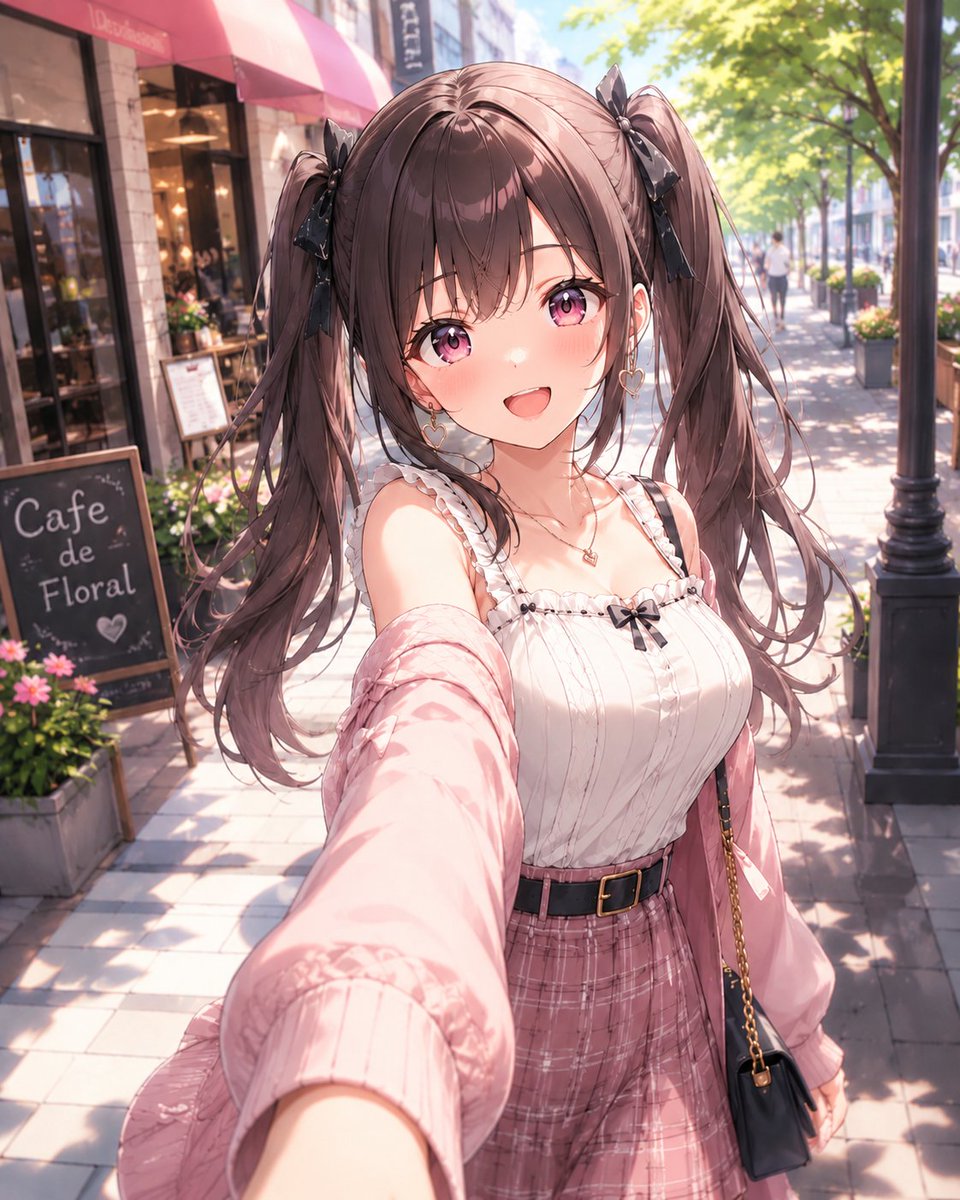
Anime Cafe Street Selfie
A polished anime-style prompt for generating a cheerful twin-tailed girl taking a sunny cafe-street selfie.
Dies ist ein GPT Image 2 -Prompt für Anime & Spiel . Verwenden Sie den unten stehenden, kopierfertigen Prompt, um ähnliche Grafiken zu erstellen, und überprüfen Sie vor der Wiederverwendung Awesome GPT Image 2 Prompts -Quellenangaben sowie die kommerziellen Nutzungsrechte.
Benötigen Sie den vollständigen Prompt-Satz? Verwenden Sie den Anime & Spiel Weitere verwandte Beispiele finden Sie im Themen-Hub oder öffnen Sie die GPT Image 2 Prompt-Katalog für das vollständige Beispielverzeichnis, wiederverwendbare Strukturen und Quellenangaben.
Free 1K preview
Generate one preview image instantly, no sign-up required.
1553/4000
Eingabeaufforderung
Kopierfertige Eingabeaufforderung
Create a bright, high-detail Japanese anime style selfie portrait of a cheerful young woman on a sunny European-style cafe street. The camera is held at arm’s length from a slightly high, wide-angle perspective, with her extended arm dominating the lower foreground and her face centered close to the viewer. She has {argument name="hair color" default="soft chocolate brown"} hair in long twin ponytails tied with black ribbon bows, wispy bangs, loose flowing strands, large sparkling {argument name="eye color" default="pink-purple"} eyes, rosy cheeks, and an open happy smile. Dress her in a feminine casual outfit: a white ribbed camisole with frilled straps and a small black bow at the neckline, a pale pink oversized cardigan slipping off one shoulder, a dusty pink plaid high-waisted skirt, a black belt with a gold buckle, delicate heart earrings, a small necklace, and a small black shoulder bag with a gold chain. Place her on a sunlit sidewalk lined with leafy green trees, a black streetlamp, storefront windows, flower planters, and a cafe with a pink awning; include one chalkboard sign on the left that reads {argument name="cafe sign text" default="Cafe de Floral"}. Use warm morning light, soft bokeh background pedestrians, dappled tree shadows on the pavement, glossy anime rendering, delicate linework, pastel colors, detailed hair highlights, and a romantic slice-of-life mood. Vertical portrait composition, 4:5 aspect ratio, crisp character focus with softly blurred background, no watermark, no extra text besides the cafe sign.Eingabeaufforderungsvariablen
In der Eingabeaufforderung befinden sich bearbeitbare Argumentplatzhalter mit ihren Standardwerten.
Variable
hair color
Standard
soft chocolate brown
Variable
eye color
Standard
pink-purple
Variable
cafe sign text
Standard
Cafe de Floral
Best for
- - Anime & Spiel visual exploration
- - Image generation and reference-image edits
- - Reusable briefs that keep source attribution visible
Change these parts
- - Subject, product, character, or scene
- - Aspect ratio, camera, lighting, and background
- - Brand, text, color, and output constraints
Recommended model and settings
- - Model: gpt-image-2
- - Input mode: Text zu Bild
- - Aspect ratio: source
- - Commercial status: review original source
How to use this prompt
- 1. Copy the prompt and preserve its structure for the first test.
- 2. Replace the subject, context, and publishing channel.
- 3. Change one camera, lighting, or style variable per iteration.
- 4. Inspect the output, source, text, and rights before reuse.
Limitations, source, and reuse cautions
- - Generated output is an editable draft, not factual, legal, or rights evidence.
- - Review the linked source, people, brands, logos, text, and third-party media before commercial use.
Importiert von Awesome GPT Image 2 Prompts . Quellenangabe erforderlich. Status der kommerziellen Nutzung: allowed ; Rechte an der Quelle vor kostenpflichtiger Nutzung prüfen.
Weitere Fälle in dieser Kategorie
Priorisiert nach Kategorie, Kompatibilität der Eingabemodi, Qualität und geringerem Risiko.






Hinweise zur Wiederverwendung und Quellenangabe
Verwenden Sie diese Eingabeaufforderung sicher, nachdem Sie den Fall in der Vorschau angezeigt haben.
- 1.Kopieren Sie die Eingabeaufforderung oder öffnen Sie sie direkt in Dovoo mit der Schaltfläche „Generieren“.
- 2.Passen Sie Variablen, Seitenverhältnis und Referenzbilder an Ihren Anwendungsfall an.
- 3.Vor der Veröffentlichung oder kostenpflichtigen Nutzung sollten Sie die Rechte an der Quelle, die Anforderungen an die Namensnennung sowie die Risiken für die Marke oder das Abbild prüfen.