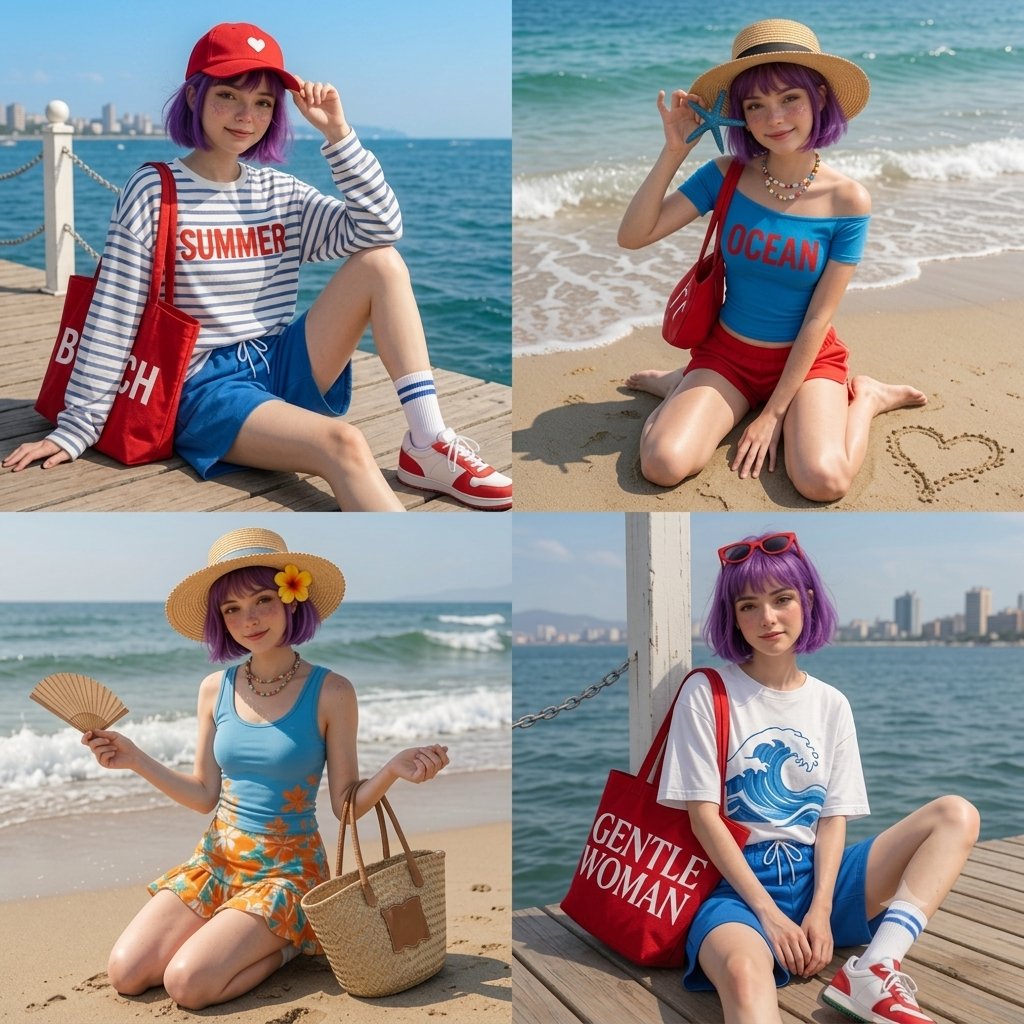
Anime Beach Day 4-Panel Grid
A creative 2x2 grid prompt featuring an anime character in various beach scenarios, from relaxing on a pier to finding a starfish, with detailed fashion and scene descriptions.
Dies ist ein GPT Image 2 -Prompt für Anime & Spiel . Verwenden Sie den unten stehenden, kopierfertigen Prompt, um ähnliche Grafiken zu erstellen, und überprüfen Sie vor der Wiederverwendung Awesome GPT Image 2 Prompts -Quellenangaben sowie die kommerziellen Nutzungsrechte.
Free 1K preview
Generate one preview image instantly, no sign-up required.
Eingabeaufforderung
Kopierfertige Eingabeaufforderung
A 4-panel grid (2x2 layout) featuring a cute anime girl with a {argument name="hair color" default="vibrant purple"} bob haircut and light freckles enjoying a sunny summer beach day. Top-Left: She is sitting on a wooden pier by the deep blue sea, wearing a red baseball cap with a white heart, a white long-sleeve shirt with blue stripes that says '{argument name="shirt text" default="SUMMER"}', blue shorts, and white socks with red sneakers, holding a large red 'BEACH' tote bag. Top-Right: She is kneeling on the sandy beach shore, holding a blue starfish near her face, wearing a straw sunhat, a blue off-the-shoulder top that says 'OCEAN', and red shorts, with a small heart drawn in the sand. Bottom-Left: She is kneeling on the beach with ocean waves behind her, holding a folding fan and a woven straw tote bag, wearing a straw hat with a yellow hibiscus flower, a blue tank top, and a vibrant orange floral mini-skirt. Bottom-Right: She is sitting on the wooden deck by a white post with a city skyline in the distance, wearing red sunglasses on her head, {argument name="bottom outfit" default="a white t-shirt with a blue wave graphic, blue drawstring shorts"}, and carrying a large red tote bag with white bold text that says 'GENTLE WOMAN'.Eingabeaufforderungsvariablen
In der Eingabeaufforderung befinden sich bearbeitbare Argumentplatzhalter mit ihren Standardwerten.
Best for
- - Anime & Spiel visual exploration
- - Image generation and reference-image edits
- - Reusable briefs that keep source attribution visible
Change these parts
- - Subject, product, character, or scene
- - Aspect ratio, camera, lighting, and background
- - Brand, text, color, and output constraints
Recommended model and settings
- - Model: gpt-image-2
- - Input mode: Text zu Bild
- - Aspect ratio: source
- - Commercial status: review original source
How to use this prompt
- 1. Copy the prompt and preserve its structure for the first test.
- 2. Replace the subject, context, and publishing channel.
- 3. Change one camera, lighting, or style variable per iteration.
- 4. Inspect the output, source, text, and rights before reuse.
Limitations, source, and reuse cautions
- - Generated output is an editable draft, not factual, legal, or rights evidence.
- - Review the linked source, people, brands, logos, text, and third-party media before commercial use.
Weitere Fälle in dieser Kategorie
Priorisiert nach Kategorie, Kompatibilität der Eingabemodi, Qualität und geringerem Risiko.






Hinweise zur Wiederverwendung und Quellenangabe
Verwenden Sie diese Eingabeaufforderung sicher, nachdem Sie den Fall in der Vorschau angezeigt haben.
- 1.Kopieren Sie die Eingabeaufforderung oder öffnen Sie sie direkt in Dovoo mit der Schaltfläche „Generieren“.
- 2.Passen Sie Variablen, Seitenverhältnis und Referenzbilder an Ihren Anwendungsfall an.
- 3.Vor der Veröffentlichung oder kostenpflichtigen Nutzung sollten Sie die Rechte an der Quelle, die Anforderungen an die Namensnennung sowie die Risiken für die Marke oder das Abbild prüfen.