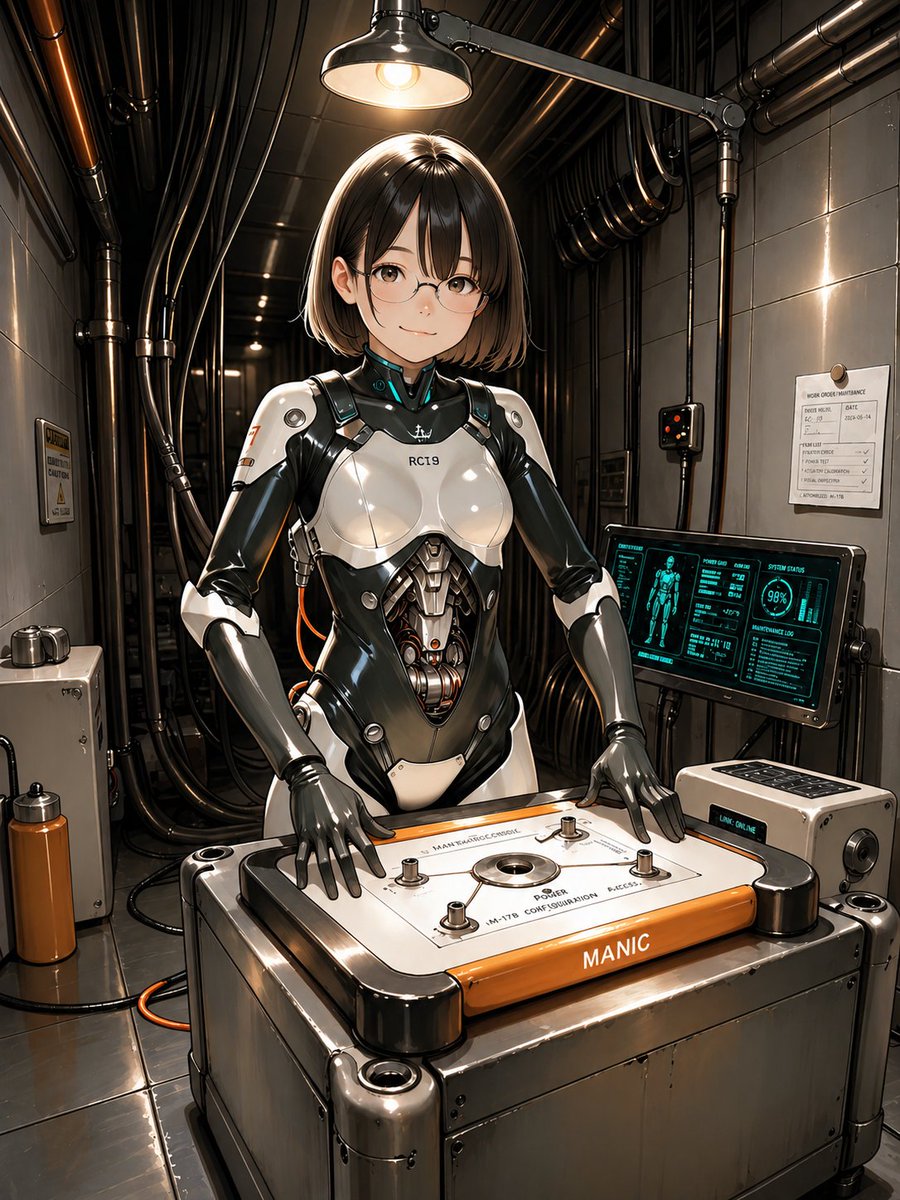
Android-Ingenieur im Wartungsbereich
Diese Vorgabe erzeugt eine ausgefeilte Sci-Fi-Anime-Illustration einer weiblichen Androidentechnikerin in einem industriellen Reparaturraum, ideal für Cyberpunk-Charakterzeichnungen und futuristische Konzeptvisualisierungen.
Dies ist ein GPT Image 2 -Prompt für Anime & Spiel . Verwenden Sie den unten stehenden, kopierfertigen Prompt, um ähnliche Grafiken zu erstellen, und überprüfen Sie vor der Wiederverwendung Awesome GPT Image 2 Prompts -Quellenangaben sowie die kommerziellen Nutzungsrechte.
Free 1K preview
Generate one preview image instantly, no sign-up required.
Eingabeaufforderung
Kopierfertige Eingabeaufforderung
A highly detailed futuristic anime-style illustration of a female android engineer in a narrow industrial maintenance room, standing behind a waist-high machine workbench and facing the viewer. She has a sleek short bob haircut with straight bangs, in {argument name="hair color" default="dark brown"}, and wears subtle rectangular glasses. Her face is calm and focused. Her body is a glossy white-and-black biomechanical suit with realistic panel seams, exposed mechanical abdomen components, articulated gray robotic hands, and a small chest marking reading "RC19". The overall look is elegant, feminine, and mechanical rather than bulky. She is posed with both hands resting on a large rectangular control platform in front of her, a heavy metallic device with rounded black corner housings, a white top panel, four visible bolt posts, a central circular port, technical printed labels, and an orange front strip labeled {argument name="front machine label" default="MANIC"}. The scene is lit by a single overhead industrial lamp centered above her head, creating dramatic warm highlights on the polished armor and metal surfaces. The room is dense with black pipes and bundled cables running along the ceiling and walls, with metallic wall panels, a small warning plaque on the left wall, a maintenance notice sheet on the right wall, a compact control box, and a floor cable looping near the machine. On the right side, include 1 angled diagnostic monitor displaying a cyan holographic-style interface with a humanoid body diagram, status graphs, and a circular readout showing "98%". Next to it, include 1 small auxiliary console box with buttons and a small illuminated label reading {argument name="console text" default="LINK ONLINE"}. The mood is cybernetic maintenance, precision engineering, and quiet industrial sci-fi realism. Use a centered full-body-to-knees composition, slightly low eye level, crisp linework, glossy reflections, intricate hard-surface detailing, realistic metal textures, cinematic contrast, warm overhead light against cool screen glow, and a polished high-end concept art finish.Eingabeaufforderungsvariablen
In der Eingabeaufforderung befinden sich bearbeitbare Argumentplatzhalter mit ihren Standardwerten.
Best for
- - Anime & Spiel visual exploration
- - Image generation and reference-image edits
- - Reusable briefs that keep source attribution visible
Change these parts
- - Subject, product, character, or scene
- - Aspect ratio, camera, lighting, and background
- - Brand, text, color, and output constraints
Recommended model and settings
- - Model: gpt-image-2
- - Input mode: Text zu Bild
- - Aspect ratio: source
- - Commercial status: review original source
How to use this prompt
- 1. Copy the prompt and preserve its structure for the first test.
- 2. Replace the subject, context, and publishing channel.
- 3. Change one camera, lighting, or style variable per iteration.
- 4. Inspect the output, source, text, and rights before reuse.
Limitations, source, and reuse cautions
- - Generated output is an editable draft, not factual, legal, or rights evidence.
- - Review the linked source, people, brands, logos, text, and third-party media before commercial use.
Weitere Fälle in dieser Kategorie
Priorisiert nach Kategorie, Kompatibilität der Eingabemodi, Qualität und geringerem Risiko.






Hinweise zur Wiederverwendung und Quellenangabe
Verwenden Sie diese Eingabeaufforderung sicher, nachdem Sie den Fall in der Vorschau angezeigt haben.
- 1.Kopieren Sie die Eingabeaufforderung oder öffnen Sie sie direkt in Dovoo mit der Schaltfläche „Generieren“.
- 2.Passen Sie Variablen, Seitenverhältnis und Referenzbilder an Ihren Anwendungsfall an.
- 3.Vor der Veröffentlichung oder kostenpflichtigen Nutzung sollten Sie die Rechte an der Quelle, die Anforderungen an die Namensnennung sowie die Risiken für die Marke oder das Abbild prüfen.