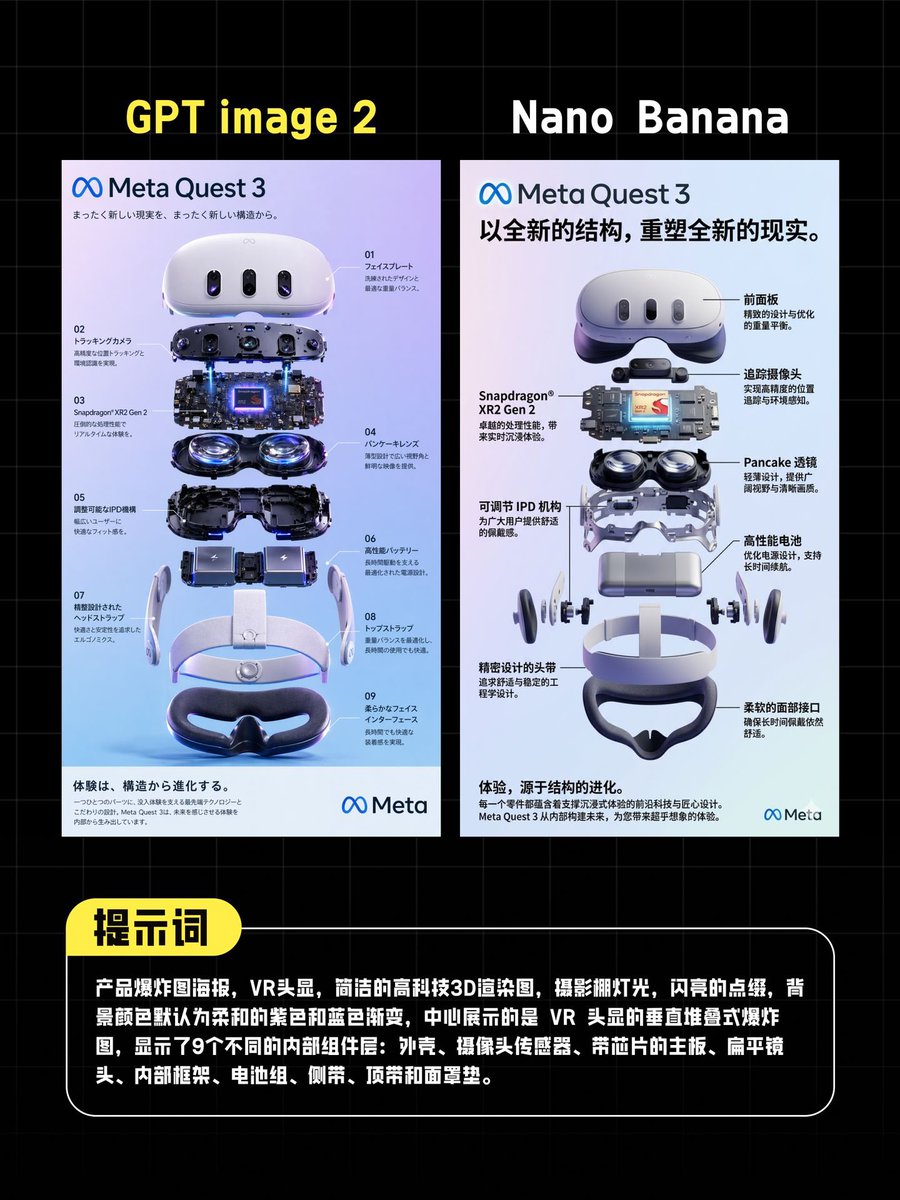
KI-VR-Postervergleich
Dadurch wird eine Vergleichsgrafik im Social-Media-Stil erstellt, die zwei KI-Bildmodelle nebeneinander darstellt. Hierfür werden Meta Quest 3-Poster mit Explosionsansicht und ein Hinweisfeld verwendet.
Dies ist ein GPT Image 2 -Prompt für Grafik & Poster . Verwenden Sie den unten stehenden, kopierfertigen Prompt, um ähnliche Grafiken zu erstellen, und überprüfen Sie vor der Wiederverwendung Awesome GPT Image 2 Prompts -Quellenangaben sowie die kommerziellen Nutzungsrechte.
Free 1K preview
Generate one preview image instantly, no sign-up required.
Eingabeaufforderung
Kopierfertige Eingabeaufforderung
{
  "type": "comparison poster",
  "style": "tech product showdown infographic, clean promotional layout, dark background with faint blue grid lines, high-contrast social-media graphic",
  "canvas": {
    "aspect_ratio": "4:5",
    "background": "black with subtle square grid"
  },
  "layout": {
    "sections": [
      {
        "title": "GPT image 2",
        "position": "top-left above left poster",
        "count": 1,
        "labels": [
          "GPT image 2"
        ]
      },
      {
        "title": "Nano Banana",
        "position": "top-right above right poster",
        "count": 1,
        "labels": [
          "Nano Banana"
        ]
      },
      {
        "title": "Prompt",
        "position": "bottom callout header",
        "count": 1,
        "labels": [
          "Prompt"
        ]
      }
    ],
    "panels": 2,
    "panel_arrangement": "two tall vertical posters side by side, evenly spaced, centered horizontally",
    "bottom_callout": "large rounded black text box with white border spanning most of the width"
  },
  "left_panel": {
    "type": "VR headset exploded-view poster",
    "branding": "Meta Quest 3",
    "headline": "まったく新しい現実を、まったく新しい構造から。",
    "language": "Japanese",
    "poster_background": "soft white to lavender-blue gradient",
    "main_object": "Meta Quest 3 headset shown as a vertically exploded assembly render",
    "component_count": 9,
    "number_labels": [
      "01",
      "02",
      "03",
      "04",
      "05",
      "06",
      "07",
      "08",
      "09"
    ],
    "components": [
      "front shell and faceplate",
      "sensor/camera bar assembly",
      "mainboard and chipset layer with glowing blue core",
      "dual pancake lens modules",
      "internal lower housing",
      "battery modules",
      "side strap arms",
      "top strap and headband frame",
      "face cushion"
    ],
    "annotations": "small Japanese technical callouts around the components with thin leader lines",
    "footer": "light gray information strip with dense small text and Meta logo at bottom right"
  },
  "right_panel": {
    "type": "VR headset exploded-view poster",
    "branding": "Meta Quest 3",
    "headline": "Reshape a new reality with a brand new structure.",
    "language": "Chinese",
    "poster_background": "soft white to pale gray-blue gradient",
    "main_object": "Meta Quest 3 headset shown as a vertically exploded assembly render",
    "component_count": 9,
    "callout_count": 8,
    "components": [
      "front shell",
      "sensor strip",
      "mainboard with Snapdragon XR2 Gen 2 chip",
      "dual pancake lenses",
      "adjustable IPD mechanism",
      "high-performance battery",
      "head strap arms",
      "facial interface",
      "lower face cushion"
    ],
    "callout_labels": [
      "front shell",
      "Tracking camera",
      "Pancake lens",
      "high-performance battery",
      "Soft facial interface",
      "Precisely designed headband",
      "adjustable IPD mechanism",
      "Snapdragon XR2 Gen 2"
    ],
    "annotations": "bold Chinese callouts with black leader lines placed on both sides of the exploded render",
    "footer": "light gray information strip with dense small text and Meta logo at bottom right"
  },
  "bottom_text_box": {
    "shape": "rounded rectangle",
    "header_badge": "yellow pill-shaped label attached to top-left edge",
    "body_text": "{argument name=\"prompt text\" default=\"Product exploded view poster, VR headset, simple high-tech 3D rendering, studio lighting, shimmering embellishments, the background color defaults to a soft purple and blue gradient, the middle shows a vertically stacked exploded view of the VR headset, displaying 9 different internal components: shell, camera sensor, motherboard with chip, flat lens, internal frame, battery pack, side arm, top band, and face cushion.\"}",
    "text_color": "white",
    "font": "bold sans-serif Chinese text"
  },
  "visual_details": {
    "rendering": "ultra-clean 3D product visualization, glossy white plastic, dark glass sensors, metallic internals, subtle purple-blue reflections",
    "lighting": "studio lighting with polished highlights and soft shadows",
    "mood": "professional, competitive, modern AI tool comparison graphic"
  }
}
Eingabeaufforderungsvariablen
In der Eingabeaufforderung befinden sich bearbeitbare Argumentplatzhalter mit ihren Standardwerten.
Best for
- - Grafik & Poster visual exploration
- - Image generation and reference-image edits
- - Reusable briefs that keep source attribution visible
Change these parts
- - Subject, product, character, or scene
- - Aspect ratio, camera, lighting, and background
- - Brand, text, color, and output constraints
Recommended model and settings
- - Model: gpt-image-2
- - Input mode: Text zu Bild
- - Aspect ratio: source
- - Commercial status: review original source
How to use this prompt
- 1. Copy the prompt and preserve its structure for the first test.
- 2. Replace the subject, context, and publishing channel.
- 3. Change one camera, lighting, or style variable per iteration.
- 4. Inspect the output, source, text, and rights before reuse.
Limitations, source, and reuse cautions
- - Generated output is an editable draft, not factual, legal, or rights evidence.
- - Review the linked source, people, brands, logos, text, and third-party media before commercial use.
Weitere Fälle in dieser Kategorie
Priorisiert nach Kategorie, Kompatibilität der Eingabemodi, Qualität und geringerem Risiko.






Hinweise zur Wiederverwendung und Quellenangabe
Verwenden Sie diese Eingabeaufforderung sicher, nachdem Sie den Fall in der Vorschau angezeigt haben.
- 1.Kopieren Sie die Eingabeaufforderung oder öffnen Sie sie direkt in Dovoo mit der Schaltfläche „Generieren“.
- 2.Passen Sie Variablen, Seitenverhältnis und Referenzbilder an Ihren Anwendungsfall an.
- 3.Vor der Veröffentlichung oder kostenpflichtigen Nutzung sollten Sie die Rechte an der Quelle, die Anforderungen an die Namensnennung sowie die Risiken für die Marke oder das Abbild prüfen.