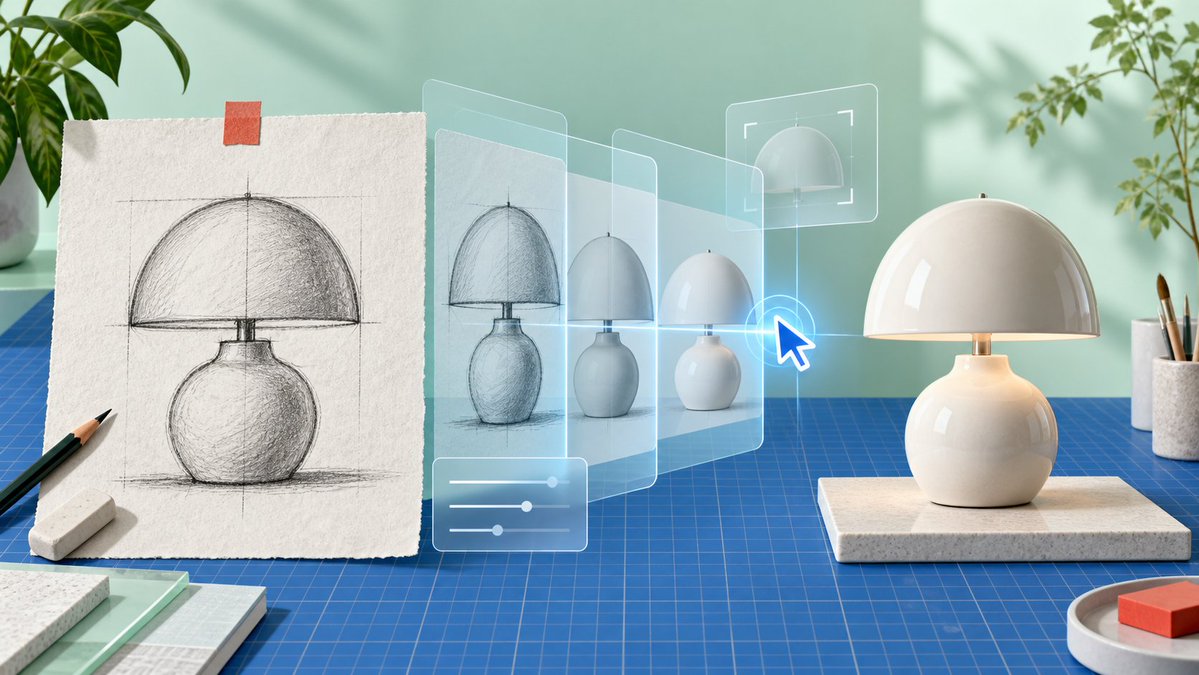
AI Product Sketch to Lamp Render
A photorealistic studio scene visualizing an AI workflow that transforms a hand-drawn product sketch into a finished ceramic table lamp.
Dies ist ein GPT Image 2 -Prompt für Produkt & Vertrieb . Verwenden Sie den unten stehenden, kopierfertigen Prompt, um ähnliche Grafiken zu erstellen, und überprüfen Sie vor der Wiederverwendung Awesome GPT Image 2 Prompts -Quellenangaben sowie die kommerziellen Nutzungsrechte.
Free 1K preview
Generate one preview image instantly, no sign-up required.
Free text preview doesn’t preserve reference-image consistency.
Eingabeaufforderung
Kopierfertige Eingabeaufforderung
Create a clean, photorealistic product-design workspace scene showing an AI-assisted transformation from sketch to finished object. Use a wide 16:9 canvas with soft natural daylight, pastel mint-green wall, realistic shadows from window light, and a modern maker-studio aesthetic. On the left, place a sheet of rough off-white textured drawing paper standing upright on a blue gridded cutting mat, held at the top with one small strip of orange tape; the paper shows a detailed graphite construction sketch of a {argument name="product type" default="mushroom-shaped ceramic table lamp"}, including vertical and horizontal guide lines, a domed shade, a short neck, rounded bulbous base, hatch shading, and a ground shadow. In front of the sketch are exactly 2 drawing tools: one black pencil angled diagonally and one white rectangular eraser. Across the center, add a translucent futuristic UI visualization: exactly 4 semi-transparent glass panels receding from left to right, each showing the lamp evolving from rough sketch to cleaner render to simplified 3D form, with pale cyan outlines and a subtle blue glow. Add exactly 3 interface overlays: one bottom-left rounded rectangle with three horizontal slider controls, one upper-right rectangular crop/selection frame around a dome preview, and one bright blue glowing cursor arrow pointing at the lamp evolution. On the right, place the final physical {argument name="product color and material" default="glossy warm-white ceramic"} lamp on a rectangular speckled stone platform: a smooth hemispherical dome shade, small brass stem, softly glowing warm light under the shade, and a round bulbous base matching the sketch. Surround the scene with studio props: leafy green plants partially visible at the upper left and upper right, a white cup holding paintbrushes at the far right, a small round tray with a red-orange block in the lower right, and stacked sample boards or notebooks in the lower left. The blue cutting mat should cover the tabletop with precise grid lines, reinforcing a design-prototyping environment. No visible text, no logos, no watermark; emphasize the concept of turning a hand sketch into a finished product through transparent AI editing layers.Eingabeaufforderungsvariablen
In der Eingabeaufforderung befinden sich bearbeitbare Argumentplatzhalter mit ihren Standardwerten.
Best for
- - Produkt & Vertrieb visual exploration
- - Image generation and reference-image edits
- - Reusable briefs that keep source attribution visible
Change these parts
- - Subject, product, character, or scene
- - Aspect ratio, camera, lighting, and background
- - Brand, text, color, and output constraints
Recommended model and settings
- - Model: gpt-image-2
- - Input mode: Bild zu Bild
- - Aspect ratio: source
- - Commercial status: review original source
How to use this prompt
- 1. Copy the prompt and preserve its structure for the first test.
- 2. Replace the subject, context, and publishing channel.
- 3. Change one camera, lighting, or style variable per iteration.
- 4. Inspect the output, source, text, and rights before reuse.
Limitations, source, and reuse cautions
- - Generated output is an editable draft, not factual, legal, or rights evidence.
- - Review the linked source, people, brands, logos, text, and third-party media before commercial use.
Weitere Fälle in dieser Kategorie
Priorisiert nach Kategorie, Kompatibilität der Eingabemodi, Qualität und geringerem Risiko.






Hinweise zur Wiederverwendung und Quellenangabe
Verwenden Sie diese Eingabeaufforderung sicher, nachdem Sie den Fall in der Vorschau angezeigt haben.
- 1.Kopieren Sie die Eingabeaufforderung oder öffnen Sie sie direkt in Dovoo mit der Schaltfläche „Generieren“.
- 2.Passen Sie Variablen, Seitenverhältnis und Referenzbilder an Ihren Anwendungsfall an.
- 3.Vor der Veröffentlichung oder kostenpflichtigen Nutzung sollten Sie die Rechte an der Quelle, die Anforderungen an die Namensnennung sowie die Risiken für die Marke oder das Abbild prüfen.