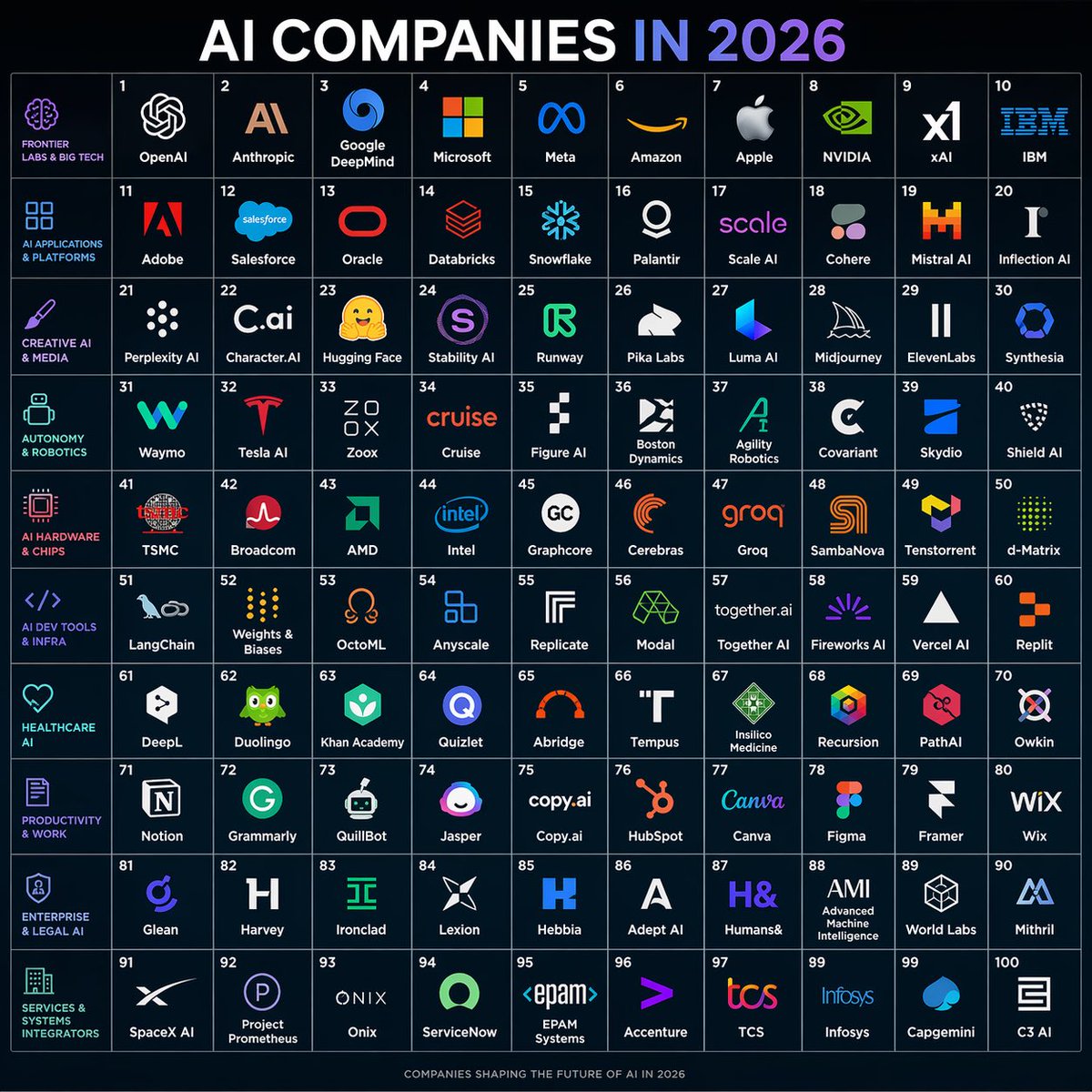
KI-Unternehmen im Jahr 2026 – Rasterposter
Ein dunkles, elegantes Infografik-Poster, das 100 KI-Unternehmen in einem nummerierten 10x10-Raster zeigt und sich für soziale Medien, Trendkarten und Ökosystemübersichten eignet.
Dies ist ein GPT Image 2 -Prompt für Grafik & Poster . Verwenden Sie den unten stehenden, kopierfertigen Prompt, um ähnliche Grafiken zu erstellen, und überprüfen Sie vor der Wiederverwendung Awesome GPT Image 2 Prompts -Quellenangaben sowie die kommerziellen Nutzungsrechte.
Free 1K preview
Generate one preview image instantly, no sign-up required.
Eingabeaufforderung
Kopierfertige Eingabeaufforderung
{
  "type": "futuristic infographic poster",
  "subject": "a square 10x10 grid map of 100 AI companies for the year 2026",
  "style": "clean dark-tech editorial infographic, flat vector logos on a deep navy background, thin glowing grid lines, crisp high-contrast typography, modern startup ecosystem poster",
  "aspect_ratio": "1:1",
  "background": {
    "color": "very dark navy blue",
    "texture": "subtle gradient with faint glow"
  },
  "title_block": {
    "headline": "{argument name=\"headline text\" default=\"AI COMPANIES IN 2026\"}",
    "position": "top center",
    "style": "very large bold sans-serif uppercase, white text with the word '2026' in a blue-to-purple gradient"
  },
  "layout": {
    "type": "grid poster",
    "grid": {
      "columns": 10,
      "rows": 10,
      "cell_count": 100,
      "numbering": "cells numbered 1 through 100 in small white numerals at the top-left of each cell",
      "cell_style": "uniform square cells with thin pale blue borders and centered company logos plus company names"
    },
    "left_sidebar": {
      "count": 10,
      "position": "far left vertical column of category labels aligned to each row",
      "style": "small uppercase cyan and magenta text with matching simple line icons",
      "labels": [
        "FRONTIER LABS & BIG TECH",
        "AI APPLICATIONS & PLATFORMS",
        "CREATIVE AI & MEDIA",
        "AUTONOMY & ROBOTICS",
        "AI HARDWARE & CHIPS",
        "AI DEV TOOLS & INFRA",
        "HEALTHCARE AI",
        "PRODUCTIVITY & WORK",
        "ENTERPRISE & LEGAL AI",
        "SERVICES & SYSTEMS INTEGRATORS"
      ]
    },
    "sections": [
      {
        "title": "FRONTIER LABS & BIG TECH",
        "position": "row 1",
        "count": 10,
        "labels": [
          "OpenAI",
          "Anthropic",
          "Google DeepMind",
          "Microsoft",
          "Meta",
          "Amazon",
          "Apple",
          "NVIDIA",
          "xAI",
          "IBM"
        ]
      },
      {
        "title": "AI APPLICATIONS & PLATFORMS",
        "position": "row 2",
        "count": 10,
        "labels": [
          "Adobe",
          "Salesforce",
          "Oracle",
          "Databricks",
          "Snowflake",
          "Palantir",
          "Scale AI",
          "Cohere",
          "Mistral AI",
          "Inflection AI"
        ]
      },
      {
        "title": "CREATIVE AI & MEDIA",
        "position": "row 3",
        "count": 10,
        "labels": [
          "Perplexity AI",
          "Character.AI",
          "Hugging Face",
          "Stability AI",
          "Runway",
          "Pika Labs",
          "Luma AI",
          "Midjourney",
          "ElevenLabs",
          "Synthesia"
        ]
      },
      {
        "title": "AUTONOMY & ROBOTICS",
        "position": "row 4",
        "count": 10,
        "labels": [
          "Waymo",
          "Tesla AI",
          "Zoox",
          "Cruise",
          "Figure AI",
          "Boston Dynamics",
          "Agility Robotics",
          "Covariant",
          "Skydio",
          "Shield AI"
        ]
      },
      {
        "title": "AI HARDWARE & CHIPS",
        "position": "row 5",
        "count": 10,
        "labels": [
          "TSMC",
          "Broadcom",
          "AMD",
          "Intel",
          "Graphcore",
          "Cerebras",
          "Groq",
          "SambaNova",
          "Tenstorrent",
          "d-Matrix"
        ]
      },
      {
        "title": "AI DEV TOOLS & INFRA",
        "position": "row 6",
        "count": 10,
        "labels": [
          "LangChain",
          "Weights & Biases",
          "OctoML",
          "Anyscale",
          "Replicate",
          "Modal",
          "Together AI",
          "Fireworks AI",
          "Vercel AI",
          "Replit"
        ]
      },
      {
        "title": "HEALTHCARE AI",
        "position": "row 7",
        "count": 10,
        "labels": [
          "DeepL",
          "Duolingo",
          "Khan Academy",
          "Quizlet",
          "Abridge",
          "Tempus",
          "Insilico Medicine",
          "Recursion",
          "PathAI",
          "Owkin"
        ]
      },
      {
        "title": "PRODUCTIVITY & WORK",
        "position": "row 8",
        "count": 10,
        "labels": [
          "Notion",
          "Grammarly",
          "QuillBot",
          "Jasper",
          "Copy.ai",
          "HubSpot",
          "Canva",
          "Figma",
          "Framer",
          "Wix"
        ]
      },
      {
        "title": "ENTERPRISE & LEGAL AI",
        "position": "row 9",
        "count": 10,
        "labels": [
          "Glean",
          "Harvey",
          "Ironclad",
          "Lexion",
          "Hebbia",
          "Adept AI",
          "Humans&",
          "AMI",
          "World Labs",
          "Mithril"
        ]
      },
      {
        "title": "SERVICES & SYSTEMS INTEGRATORS",
        "position": "row 10",
        "count": 10,
        "labels": [
          "SpaceX AI",
          "Project Prometheus",
          "Onix",
          "ServiceNow",
          "EPAM Systems",
          "Accenture",
          "TCS",
          "Infosys",
          "Capgemini",
          "C3 AI"
        ]
      }
    ]
  },
  "branding": {
    "footer": "small centered footer text reading 'COMPANIES SHAPING THE FUTURE OF AI IN 2026'"
  },
  "logo_treatment": "each company shown with a simplified recognizable logo mark in its brand colors above or beside its name; logos are centered within each tile and scaled consistently",
  "color_palette": {
    "primary": "very dark navy blue",
    "grid": "muted blue-gray",
    "text": "white",
    "accent": "cyan, purple, magenta, electric blue, orange, green depending on brand logos"
  },
  "rendering_notes": "symmetrical poster composition, infographic precision, no perspective distortion, sharp vector edges, evenly spaced margins, polished social-media-shareable design"
}
Eingabeaufforderungsvariablen
In der Eingabeaufforderung befinden sich bearbeitbare Argumentplatzhalter mit ihren Standardwerten.
Best for
- - Grafik & Poster visual exploration
- - Image generation and reference-image edits
- - Reusable briefs that keep source attribution visible
Change these parts
- - Subject, product, character, or scene
- - Aspect ratio, camera, lighting, and background
- - Brand, text, color, and output constraints
Recommended model and settings
- - Model: gpt-image-2
- - Input mode: Text zu Bild
- - Aspect ratio: source
- - Commercial status: review original source
How to use this prompt
- 1. Copy the prompt and preserve its structure for the first test.
- 2. Replace the subject, context, and publishing channel.
- 3. Change one camera, lighting, or style variable per iteration.
- 4. Inspect the output, source, text, and rights before reuse.
Limitations, source, and reuse cautions
- - Generated output is an editable draft, not factual, legal, or rights evidence.
- - Review the linked source, people, brands, logos, text, and third-party media before commercial use.
Weitere Fälle in dieser Kategorie
Priorisiert nach Kategorie, Kompatibilität der Eingabemodi, Qualität und geringerem Risiko.






Hinweise zur Wiederverwendung und Quellenangabe
Verwenden Sie diese Eingabeaufforderung sicher, nachdem Sie den Fall in der Vorschau angezeigt haben.
- 1.Kopieren Sie die Eingabeaufforderung oder öffnen Sie sie direkt in Dovoo mit der Schaltfläche „Generieren“.
- 2.Passen Sie Variablen, Seitenverhältnis und Referenzbilder an Ihren Anwendungsfall an.
- 3.Vor der Veröffentlichung oder kostenpflichtigen Nutzung sollten Sie die Rechte an der Quelle, die Anforderungen an die Namensnennung sowie die Risiken für die Marke oder das Abbild prüfen.