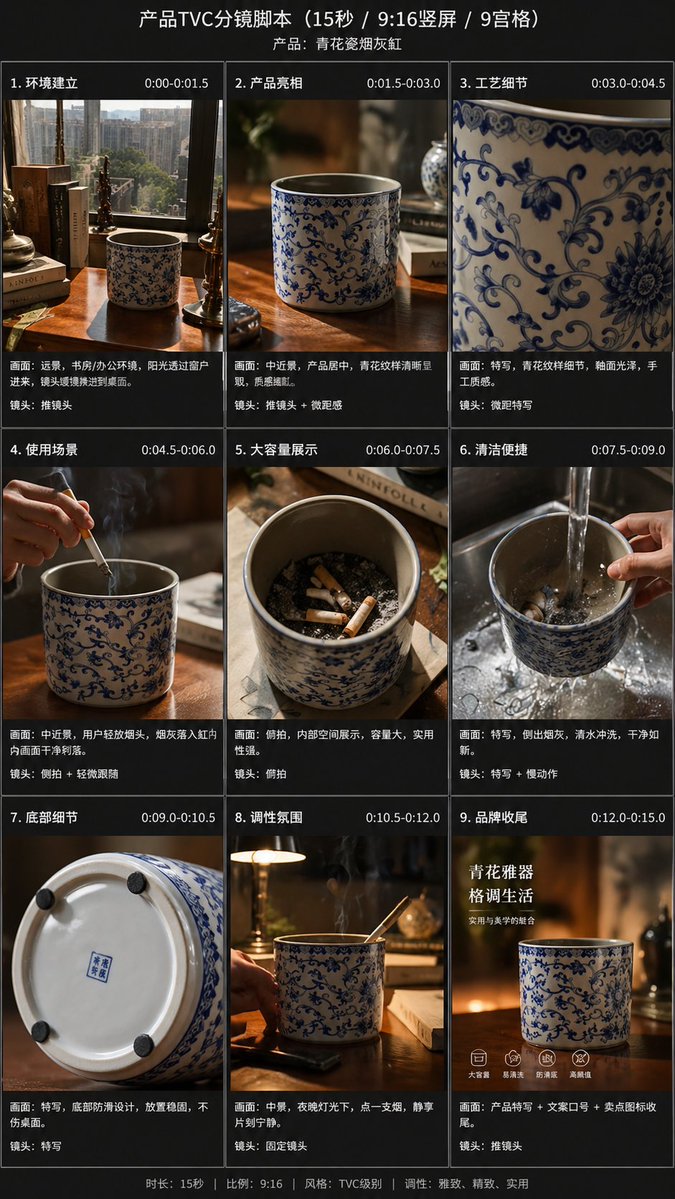
Storyboard für einen 9-Panel-Produkt-TV-Spot
Diese Anleitung verwandelt ein einzelnes Produktreferenzfoto in ein professionelles, 9-teiliges vertikales Storyboard für E-Commerce-Präsentationen, Previsualisierungen oder die Planung von Werbevideos.
Dies ist ein GPT Image 2 -Prompt für Produkt & Vertrieb . Verwenden Sie den unten stehenden, kopierfertigen Prompt, um ähnliche Grafiken zu erstellen, und überprüfen Sie vor der Wiederverwendung Awesome GPT Image 2 Prompts -Quellenangaben sowie die kommerziellen Nutzungsrechte.
Free 1K preview
Generate one preview image instantly, no sign-up required.
Free text preview doesn’t preserve reference-image consistency.
Eingabeaufforderung
Kopierfertige Eingabeaufforderung
Using the provided reference images, transform a single, casually taken product photo into a beautiful e-commerce TVC storyboard project for advertising {argument name="video duration" default="15-second"}, formatted as {argument name="aspect ratio" default="9:16"} vertical screen, and presented in a 9-grid format. Maintain the blue and white porcelain ashtray as the main product, but re-stage it in cinematic advertising shots, adopting warm, high-end lighting effects, shallow depth of field, and exquisite, lifestyle-oriented desktop environments. Add a dark storyboard layout and label each panel with a Chinese title and timeline. Include 9 scenes: 1) A wide shot of the environment, showing the desk, books, window, and product placement; 2) A medium shot of the product on the desktop; 3) An extreme close-up of the blue and white porcelain pattern; 4) A usage scenario, showing a hand placing a cigarette into the ashtray, accompanied by visible smoke; 5) An overhead view showcasing the capacity, displaying multiple cigarette butts inside; 6) A cleaning scene, rinsing in the sink with running water, holding the product; 7) A close-up of the bottom details, showing the bottom and anti-slip pad; 8) A nighttime atmosphere/lifestyle scene, with the product placed on a desk, smoke swirling, accompanied by ambient desk lamp lighting; 9) A brand ending frame, with the product as the core, accompanied by Chinese marketing copy. Add an overall title “Product TVC Storyboard Script (15 seconds / 9:16 vertical screen / 9-grid)” and a product subtitle {argument name="product name" default="Blue and White Porcelain Ashtray"}. Add Chinese scene titles and timestamps to each of the 9 panels, and add a short Chinese descriptive caption below each image, referencing a professional commercial shooting list. Throughout the process, adopt a high-end, realistic commercial photography style, maintaining consistent product branding, elegant Chinese aesthetics, and a concise, high-end storyboard presentation.Eingabeaufforderungsvariablen
In der Eingabeaufforderung befinden sich bearbeitbare Argumentplatzhalter mit ihren Standardwerten.
Best for
- - Produkt & Vertrieb visual exploration
- - Image generation and reference-image edits
- - Reusable briefs that keep source attribution visible
Change these parts
- - Subject, product, character, or scene
- - Aspect ratio, camera, lighting, and background
- - Brand, text, color, and output constraints
Recommended model and settings
- - Model: gpt-image-2
- - Input mode: Bild zu Bild
- - Aspect ratio: source
- - Commercial status: review original source
How to use this prompt
- 1. Copy the prompt and preserve its structure for the first test.
- 2. Replace the subject, context, and publishing channel.
- 3. Change one camera, lighting, or style variable per iteration.
- 4. Inspect the output, source, text, and rights before reuse.
Limitations, source, and reuse cautions
- - Generated output is an editable draft, not factual, legal, or rights evidence.
- - Review the linked source, people, brands, logos, text, and third-party media before commercial use.
Weitere Fälle in dieser Kategorie
Priorisiert nach Kategorie, Kompatibilität der Eingabemodi, Qualität und geringerem Risiko.






Hinweise zur Wiederverwendung und Quellenangabe
Verwenden Sie diese Eingabeaufforderung sicher, nachdem Sie den Fall in der Vorschau angezeigt haben.
- 1.Kopieren Sie die Eingabeaufforderung oder öffnen Sie sie direkt in Dovoo mit der Schaltfläche „Generieren“.
- 2.Passen Sie Variablen, Seitenverhältnis und Referenzbilder an Ihren Anwendungsfall an.
- 3.Vor der Veröffentlichung oder kostenpflichtigen Nutzung sollten Sie die Rechte an der Quelle, die Anforderungen an die Namensnennung sowie die Risiken für die Marke oder das Abbild prüfen.