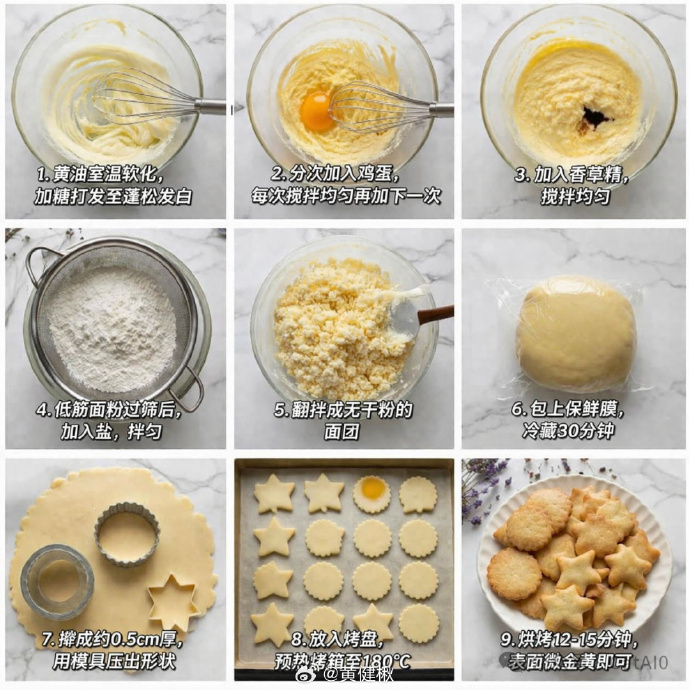
9-teiliges Anleitungsraster zum Keksebacken
Erzeugt ein 3x3-Fotoraster, das den Backprozess von Keksen Schritt für Schritt detailliert darstellt, komplett mit erklärenden Textüberlagerungen.
Dies ist ein GPT Image 2 -Prompt für Speisen und Getränke . Verwenden Sie den unten stehenden, kopierfertigen Prompt, um ähnliche Grafiken zu erstellen, und überprüfen Sie vor der Wiederverwendung Awesome GPT Image 2 Prompts -Quellenangaben sowie die kommerziellen Nutzungsrechte.
Benötigen Sie den vollständigen Prompt-Satz? Verwenden Sie den Speisen und Getränke Weitere verwandte Beispiele finden Sie im Themen-Hub oder öffnen Sie die GPT Image 2 Prompt-Katalog für das vollständige Beispielverzeichnis, wiederverwendbare Strukturen und Quellenangaben.
Free 1K preview
Generate one preview image instantly, no sign-up required.
2471/4000
Eingabeaufforderung
Kopierfertige Eingabeaufforderung
{
  "type": "step-by-step recipe tutorial grid",
  "subject": "{argument name=\"recipe subject\" default=\"butter cookies\"}",
  "style": "top-down food photography, bright natural lighting, photorealistic",
  "background": "{argument name=\"background surface\" default=\"white marble countertop\"}",
  "layout": {
    "grid": "3x3",
    "panel_count": 9,
    "panels": [
      {
        "step": 1,
        "image_description": "In a transparent glass bowl, whisk the butter and sugar with a manual whisk.",
        "text_overlay": "1. Soften the butter to room temperature and cream with sugar until light and fluffy."
      },
      {
        "step": 2,
        "image_description": "Add the raw egg yolks to the butter mixture, placing the whisk in the bowl.",
        "text_overlay": "2. Add the eggs in portions, stirring well after each addition before adding the next."
      },
      {
        "step": 3,
        "image_description": "Add dark vanilla extract to the mixture.",
        "text_overlay": "3. Add vanilla extract and mix well."
      },
      {
        "step": 4,
        "image_description": "Sift the all-purpose flour through a metal sieve into a glass bowl.",
        "text_overlay": "4. After sifting the cake flour, add salt and mix well."
      },
      {
        "step": 5,
        "image_description": "Use a spatula to stir the crumbly dough.",
        "text_overlay": "5. Mix until there is no dry flour remaining in the dough."
      },
      {
        "step": 6,
        "image_description": "A smooth dough ball tightly wrapped in clear plastic wrap",
        "text_overlay": "6. Cover with plastic wrap and refrigerate for 30 minutes"
      },
      {
        "step": 7,
        "image_description": "Roll out the dough and use metal cookie cutters to cut out star and fan-shaped circles",
        "text_overlay": "7. Roll out to about 0.5cm thick and use cookie cutters to press out shapes"
      },
      {
        "step": 8,
        "image_description": "Arrange the raw cookie dough neatly on a baking sheet lined with baking paper",
        "text_overlay": "8. Place in a baking pan and preheat the oven to 180°C"
      },
      {
        "step": 9,
        "image_description": "Finished golden cookies are piled on a white lace plate, with some dried lavender placed in the corner.",
        "text_overlay": "{argument name=\"final step text\" default=\"9. Bake for 12-15 minutes, or until golden brown.\"}"
      }
    ]
  }
}
Eingabeaufforderungsvariablen
In der Eingabeaufforderung befinden sich bearbeitbare Argumentplatzhalter mit ihren Standardwerten.
Variable
recipe subject
Standard
butter cookies
Variable
background surface
Standard
white marble countertop
Variable
final step text
Standard
9. Bake for 12-15 minutes, or until golden brown.
Best for
- - Speisen und Getränke visual exploration
- - Image generation and reference-image edits
- - Reusable briefs that keep source attribution visible
Change these parts
- - Subject, product, character, or scene
- - Aspect ratio, camera, lighting, and background
- - Brand, text, color, and output constraints
Recommended model and settings
- - Model: gpt-image-2
- - Input mode: Text zu Bild
- - Aspect ratio: source
- - Commercial status: review original source
How to use this prompt
- 1. Copy the prompt and preserve its structure for the first test.
- 2. Replace the subject, context, and publishing channel.
- 3. Change one camera, lighting, or style variable per iteration.
- 4. Inspect the output, source, text, and rights before reuse.
Limitations, source, and reuse cautions
- - Generated output is an editable draft, not factual, legal, or rights evidence.
- - Review the linked source, people, brands, logos, text, and third-party media before commercial use.
Importiert von Awesome GPT Image 2 Prompts . Quellenangabe erforderlich. Status der kommerziellen Nutzung: allowed ; Rechte an der Quelle vor kostenpflichtiger Nutzung prüfen.
Weitere Fälle in dieser Kategorie
Priorisiert nach Kategorie, Kompatibilität der Eingabemodi, Qualität und geringerem Risiko.

Cute Focus Desk Flat Lay and Kawaii Illustration
Text zu Bild

Street Selfie with Cat in Matching Cap
Text zu Bild

Gray Denim Lace-Up Top Prompt for GPT Image 2
Text zu Bild

Morning Bed Stretching Legs Prompt
Text zu Bild
GPT Image 2 Prompt for Mirror Selfie with Flowers
Text zu Bild

Hiker in Red Jacket
Text zu Bild
Hinweise zur Wiederverwendung und Quellenangabe
Verwenden Sie diese Eingabeaufforderung sicher, nachdem Sie den Fall in der Vorschau angezeigt haben.
- 1.Kopieren Sie die Eingabeaufforderung oder öffnen Sie sie direkt in Dovoo mit der Schaltfläche „Generieren“.
- 2.Passen Sie Variablen, Seitenverhältnis und Referenzbilder an Ihren Anwendungsfall an.
- 3.Vor der Veröffentlichung oder kostenpflichtigen Nutzung sollten Sie die Rechte an der Quelle, die Anforderungen an die Namensnennung sowie die Risiken für die Marke oder das Abbild prüfen.