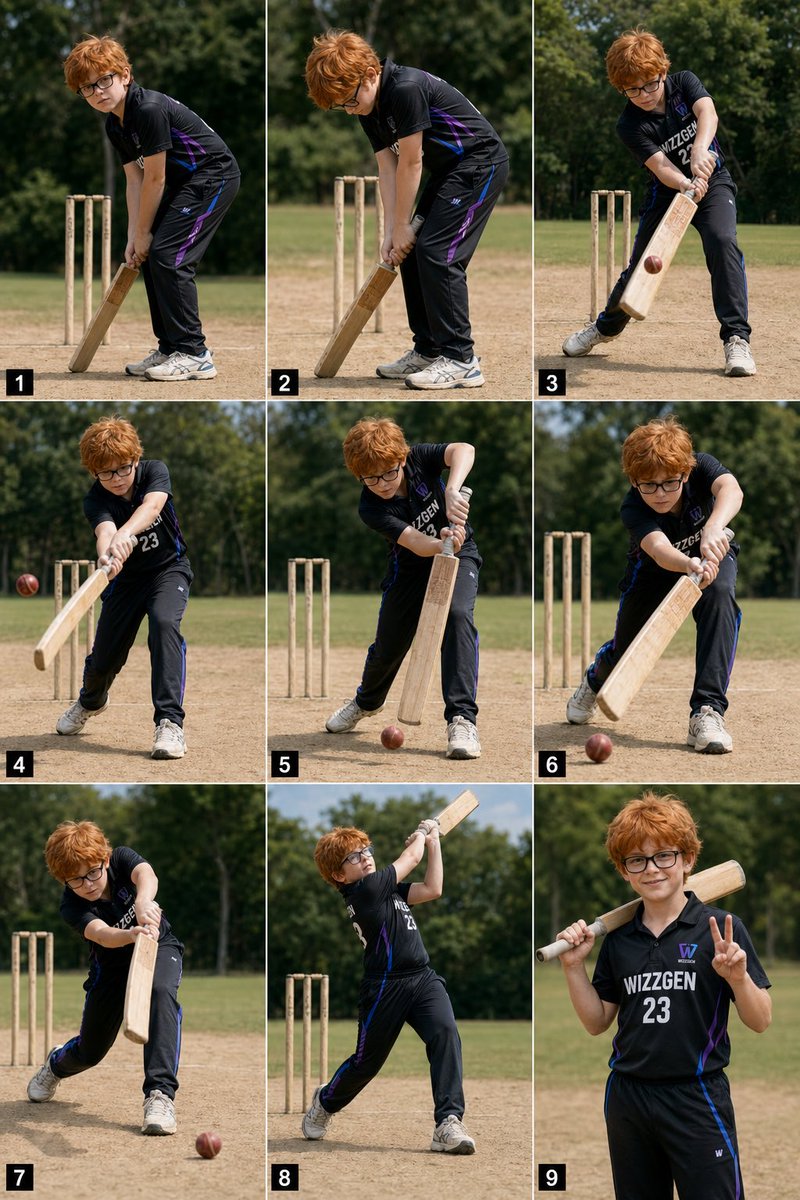
9-Panel-Collage zum Thema Cricket-Action für Jungen
Eine fotorealistische Collage aus neun Bildern, die einen Jungen in schwarzer Cricket-Uniform zeigt, der von der Schlaghaltung über den Schwung bis hin zur lässigen Pose alles durchläuft; ideal für Sportreportagen oder Social-Media-Posts.
Dies ist ein GPT Image 2 -Prompt für Porträt & Charakter . Verwenden Sie den unten stehenden, kopierfertigen Prompt, um ähnliche Grafiken zu erstellen, und überprüfen Sie vor der Wiederverwendung Awesome GPT Image 2 Prompts -Quellenangaben sowie die kommerziellen Nutzungsrechte.
Free 1K preview
Generate one preview image instantly, no sign-up required.
Eingabeaufforderung
Kopierfertige Eingabeaufforderung
{
  "type": "photorealistic 3x3 sports action collage",
  "subject": {
    "age": "young boy",
    "appearance": {
      "hair": {
        "color": "{argument name=\"hair color\" default=\"messy orange\"}",
        "style": "shaggy, tousled, medium length"
      },
      "eyewear": "thick-framed black glasses",
      "build": "slightly chubby child build"
    },
    "outfit": {
      "sport": "cricket",
      "jersey": {
        "color": "black",
        "style": "short-sleeve performance polo jersey with subtle purple and blue side accents",
        "front_text": "{argument name=\"jersey text\" default=\"WIZZGEN 23\"}"
      },
      "pants": "black athletic cricket pants with purple and blue side accents",
      "shoes": "light gray athletic cricket shoes"
    },
    "equipment": {
      "count": 3,
      "items": [
        "wooden cricket bat",
        "red cricket ball",
        "three wooden wickets"
      ]
    }
  },
  "setting": {
    "location": "{argument name=\"location\" default=\"outdoor cricket practice ground\"}",
    "ground": "dry dusty practice pitch with patchy tan dirt and short grass",
    "background": "sunlit green field with dense leafy trees in soft focus",
    "lighting": "bright natural midday sunlight",
    "camera": "eye-level sports photography, medium full-body framing, shallow depth of field"
  },
  "layout": {
    "grid": "3 columns by 3 rows",
    "count": 9,
    "numbering": "each panel has a small black square label with white numeral in the bottom-left corner, numbered 1 through 9",
    "panels": [
      {
        "index": 1,
        "pose": "ready batting stance, bent forward, bat grounded vertically in front, hands low on the handle, feet close together, wickets behind him"
      },
      {
        "index": 2,
        "pose": "similar preparatory stance with head lowered, adjusting grip and leaning more over the bat, wickets visible directly behind"
      },
      {
        "index": 3,
        "pose": "beginning a controlled swing across the body, front leg stepping out, red ball approaching the lower half of the bat"
      },
      {
        "index": 4,
        "pose": "stronger follow-through of a grounded shot, arms extended, ball visible to the left of the bat, torso turning toward camera"
      },
      {
        "index": 5,
        "pose": "bat brought down in a compact defensive motion, front leg planted wide, red ball bouncing low near his front foot"
      },
      {
        "index": 6,
        "pose": "another controlled defensive shot with the bat angled forward, ball rolling or skimming low in front"
      },
      {
        "index": 7,
        "pose": "front-foot drive continuation, body leaning into the shot, bat extended downward, ball moving away along the ground on the right"
      },
      {
        "index": 8,
        "pose": "full lofted follow-through with the bat raised high above the shoulder, chest open, back foot pivoted, wickets behind"
      },
      {
        "index": 9,
        "pose": "relaxed hero pose facing camera, bat resting across one shoulder, right hand making a peace sign"
      }
    ],
    "consistency": "same boy, same outfit, same pitch, same lighting across all 9 panels"
  },
  "style": "high-resolution photorealistic sports montage, natural colors, crisp details, realistic motion progression, social-media-ready action sequence"
}
Eingabeaufforderungsvariablen
In der Eingabeaufforderung befinden sich bearbeitbare Argumentplatzhalter mit ihren Standardwerten.
Best for
- - Porträt & Charakter visual exploration
- - Image generation and reference-image edits
- - Reusable briefs that keep source attribution visible
Change these parts
- - Subject, product, character, or scene
- - Aspect ratio, camera, lighting, and background
- - Brand, text, color, and output constraints
Recommended model and settings
- - Model: gpt-image-2
- - Input mode: Text zu Bild
- - Aspect ratio: source
- - Commercial status: review original source
How to use this prompt
- 1. Copy the prompt and preserve its structure for the first test.
- 2. Replace the subject, context, and publishing channel.
- 3. Change one camera, lighting, or style variable per iteration.
- 4. Inspect the output, source, text, and rights before reuse.
Limitations, source, and reuse cautions
- - Generated output is an editable draft, not factual, legal, or rights evidence.
- - Review the linked source, people, brands, logos, text, and third-party media before commercial use.
Weitere Fälle in dieser Kategorie
Priorisiert nach Kategorie, Kompatibilität der Eingabemodi, Qualität und geringerem Risiko.






Hinweise zur Wiederverwendung und Quellenangabe
Verwenden Sie diese Eingabeaufforderung sicher, nachdem Sie den Fall in der Vorschau angezeigt haben.
- 1.Kopieren Sie die Eingabeaufforderung oder öffnen Sie sie direkt in Dovoo mit der Schaltfläche „Generieren“.
- 2.Passen Sie Variablen, Seitenverhältnis und Referenzbilder an Ihren Anwendungsfall an.
- 3.Vor der Veröffentlichung oder kostenpflichtigen Nutzung sollten Sie die Rechte an der Quelle, die Anforderungen an die Namensnennung sowie die Risiken für die Marke oder das Abbild prüfen.