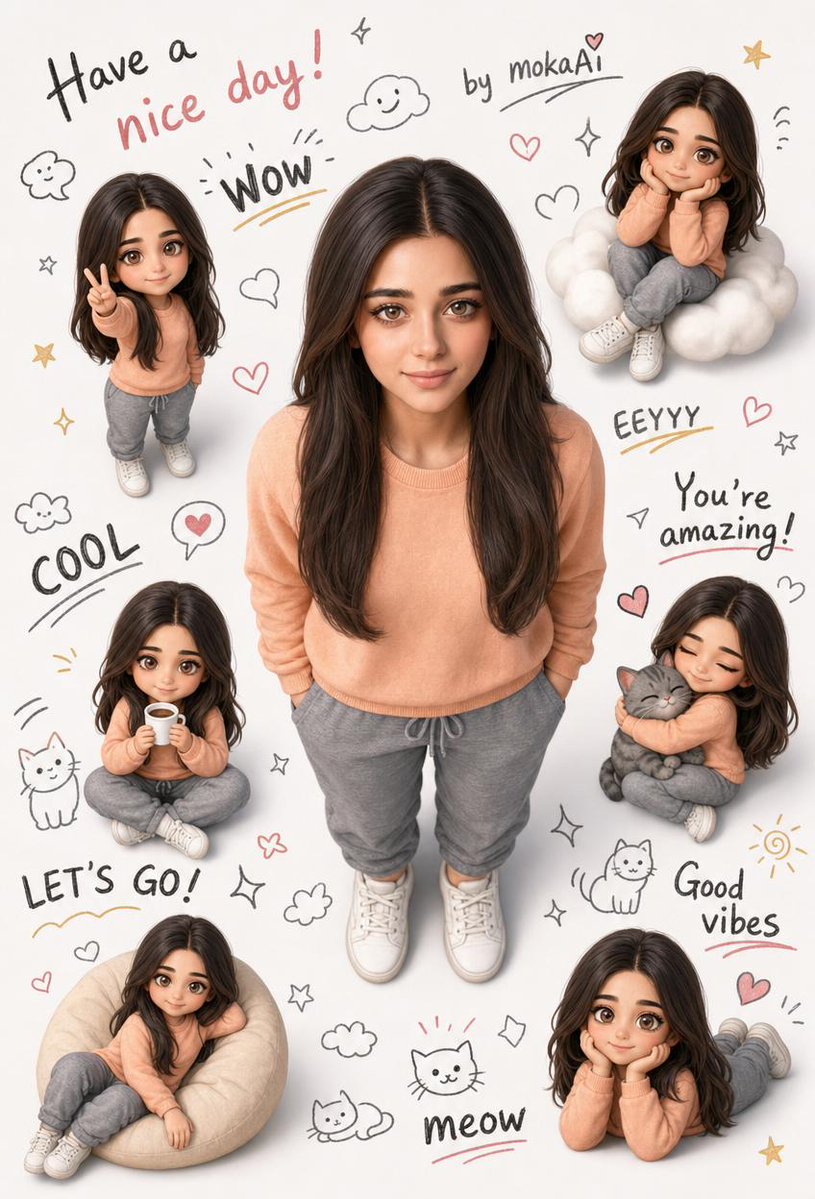
3D Semi-Realistic Stylized Portrait
Eine Aufforderung zur Erstellung eines niedlichen, stilisierten 3D-Porträts im semi-realistischen Stil. Dabei soll ein Referenzbild verwendet werden, um die Identität der Figur und die Details der Kleidung beizubehalten, während gleichzeitig verspielte Chibi-Versionen und Kritzeleien hinzugefügt werden.
Dies ist ein GPT Image 2 -Prompt für Porträt & Charakter . Verwenden Sie den unten stehenden, kopierfertigen Prompt, um ähnliche Grafiken zu erstellen, und überprüfen Sie vor der Wiederverwendung Awesome GPT Image 2 Prompts -Quellenangaben sowie die kommerziellen Nutzungsrechte.
Free 1K preview
Generate one preview image instantly, no sign-up required.
Free text preview doesn’t preserve reference-image consistency.
Eingabeaufforderung
Kopierfertige Eingabeaufforderung
Create a lovely 3D semi-realistic stylized portrait. Rely entirely on the facial features, clothing, and identity information in the attached reference image. Do not change any details of the face, hairstyle, or clothing. Main character: full body standing, located in the center of the image. Arms crossed, hands in pockets. Head slightly raised, looking directly at the camera with a natural smile. Camera angle is directly above – bird's-eye view, vertically aligned with the head. Feet are fully visible, without cropping. Distribute 5-6 miniature chibi versions of the same character around the character in various poses: making the victory sign, sitting on a cloud, holding a cup, hugging a cat, sitting comfortably, hands supporting the chin and smiling. The background should be clean white. Fill the empty spaces with hand-drawn doodles: stars, clouds, hearts, cats, smiley faces, sparkles. Write in different sizes of handwritten fonts in the background: "{argument name="message" default="Have a nice day!"}", "by {argument name="signature" default="mokaAi"}", "WOW", "COOL", "EEYYY", "You’re amazing!", "LET’S GO!", "Good vibes", "meow". Soft daylight illumination, high detail, professional quality. Aspect ratio: 9:16Eingabeaufforderungsvariablen
In der Eingabeaufforderung befinden sich bearbeitbare Argumentplatzhalter mit ihren Standardwerten.
Best for
- - Porträt & Charakter visual exploration
- - Image generation and reference-image edits
- - Reusable briefs that keep source attribution visible
Change these parts
- - Subject, product, character, or scene
- - Aspect ratio, camera, lighting, and background
- - Brand, text, color, and output constraints
Recommended model and settings
- - Model: gpt-image-2
- - Input mode: Bild zu Bild
- - Aspect ratio: source
- - Commercial status: review original source
How to use this prompt
- 1. Copy the prompt and preserve its structure for the first test.
- 2. Replace the subject, context, and publishing channel.
- 3. Change one camera, lighting, or style variable per iteration.
- 4. Inspect the output, source, text, and rights before reuse.
Limitations, source, and reuse cautions
- - Generated output is an editable draft, not factual, legal, or rights evidence.
- - Review the linked source, people, brands, logos, text, and third-party media before commercial use.
Weitere Fälle in dieser Kategorie
Priorisiert nach Kategorie, Kompatibilität der Eingabemodi, Qualität und geringerem Risiko.






Hinweise zur Wiederverwendung und Quellenangabe
Verwenden Sie diese Eingabeaufforderung sicher, nachdem Sie den Fall in der Vorschau angezeigt haben.
- 1.Kopieren Sie die Eingabeaufforderung oder öffnen Sie sie direkt in Dovoo mit der Schaltfläche „Generieren“.
- 2.Passen Sie Variablen, Seitenverhältnis und Referenzbilder an Ihren Anwendungsfall an.
- 3.Vor der Veröffentlichung oder kostenpflichtigen Nutzung sollten Sie die Rechte an der Quelle, die Anforderungen an die Namensnennung sowie die Risiken für die Marke oder das Abbild prüfen.