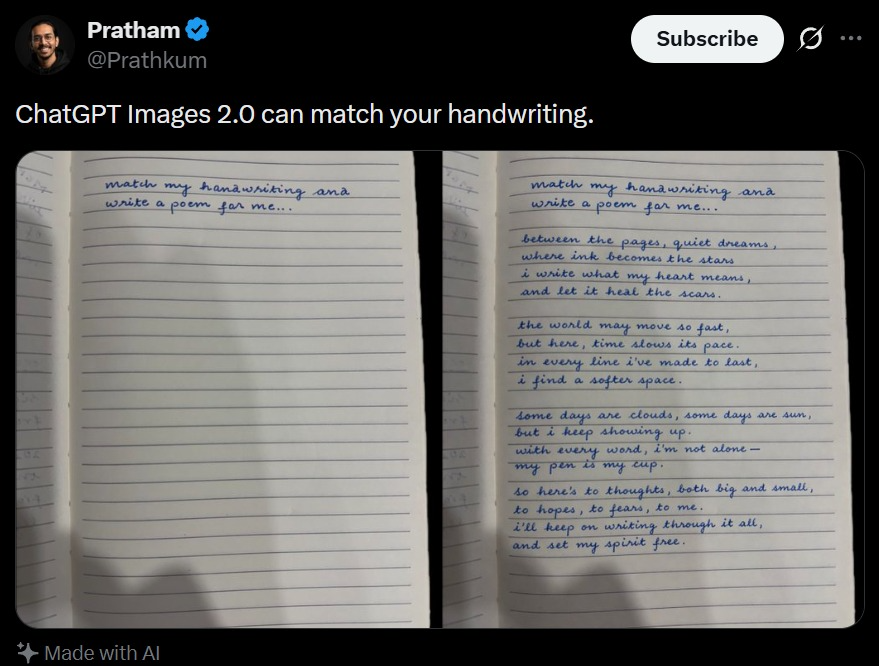
Tweet-skærmbillede med håndskriftmatch
Et realistisk skærmbillede fra sociale medier, der viser en sammenligning af håndskriftmatchende notesbøger, nyttigt til at generere virale AI-demo-opslag.
Dette er et GPT Image 2 -eksempel på en prompt for Anden Inspiration . Brug den kopieringsklare prompt nedenfor til at generere lignende visuelle elementer, og gennemgå Awesome GPT Image 2 Prompts -kreditering samt kommercielle brugsrettigheder før genbrug.
Har du brug for det fulde promptsæt? Brug Anden Inspiration emnehub for flere relaterede eksempler, eller åbn GPT Image 2 hurtig katalog for det fulde eksempelindeks, genanvendelige strukturer og kildeattribution.
Free 1K preview
Generate one preview image instantly, no sign-up required.
2144/4000
Hurtig
Klar til kopiering
A realistic dark-mode social media post screenshot styled like X/Twitter on a black interface. At the top left is a small blurred circular profile photo beside the display name {argument name="profile name" default="Pratham"} with a blue verification badge, and the handle {argument name="handle" default="@Prathkum"} underneath. At the top right is a rounded white Subscribe button plus two small interface icons. The tweet text in large white sans-serif type reads: {argument name="tweet text" default="ChatGPT Images 2.0 can match your handwriting."} Below it is a side-by-side comparison image made of 2 notebook photos separated by a narrow black vertical gap. Both photos show an open lined notebook page shot from above under dim indoor lighting with soft shadows near the bottom edge. The left notebook page is mostly blank except for 2 handwritten lines in neat blue cursive at the top that say: {argument name="handwriting prompt text" default="match my hanawriting ana write a poem for me.."} Keep the misspellings and punctuation exactly as written. The right notebook page shows the same first 2 handwritten lines at the top, followed by a handwritten poem in matching blue cursive handwriting filling the page in 4 stanzas. The poem text reads exactly: {argument name="poem text" default="between the pages, quiet dreams, where ink becomes the stars, i write what my heart means, and let it heal the scars.

the world may move so fast, but here, time slows its pace. in every line i’ve made to last, i find a softer space.

some days are clouds, some days are sun, but i keep showing up. with every word, i’m not alone— my pen is my cup.

so here’s to thoughts, both big and small, to hopes, to fears, to me. i’ll keep on writing through it all, and set my spirit free."} The handwriting should look natural, slightly uneven, and convincingly human, with blue ballpoint pen texture. At the bottom left of the post, include a small sparkle icon and the words “Made with AI”. Preserve the look of a genuine mobile app screenshot with realistic spacing, rounded image corners, crisp UI typography, and subtle screen-capture softness.
Promptvariabler
Redigerbare argumentpladsholdere fundet i prompten med deres standardværdier.
Variabel
profile name
Misligholdelse
Pratham
Variabel
handle
Misligholdelse
@Prathkum
Variabel
tweet text
Misligholdelse
ChatGPT Images 2.0 can match your handwriting.
Variabel
handwriting prompt text
Misligholdelse
match my hanawriting ana write a poem for me..
Variabel
poem text
Misligholdelse
between the pages, quiet dreams, where ink becomes the stars, i write what my heart means, and let it heal the scars.
the world may move so fast, but here, time slows its pace. in every line i’ve made to last, i find a softer space.
some days are clouds, some days are sun, but i keep showing up. with every word, i’m not alone— my pen is my cup.
so here’s to thoughts, both big and small, to hopes, to fears, to me. i’ll keep on writing through it all, and set my spirit free.
Best for
- - Anden Inspiration visual exploration
- - Image generation and reference-image edits
- - Reusable briefs that keep source attribution visible
Change these parts
- - Subject, product, character, or scene
- - Aspect ratio, camera, lighting, and background
- - Brand, text, color, and output constraints
Recommended model and settings
- - Model: gpt-image-2
- - Input mode: Tekst til billede
- - Aspect ratio: source
- - Commercial status: review original source
How to use this prompt
- 1. Copy the prompt and preserve its structure for the first test.
- 2. Replace the subject, context, and publishing channel.
- 3. Change one camera, lighting, or style variable per iteration.
- 4. Inspect the output, source, text, and rights before reuse.
Limitations, source, and reuse cautions
- - Generated output is an editable draft, not factual, legal, or rights evidence.
- - Review the linked source, people, brands, logos, text, and third-party media before commercial use.
Importeret fra Awesome GPT Image 2 Prompts . Kreditering er påkrævet. Status for kommerciel brug er allowed ; gennemgå kilderettighederne før betalt brug.
Flere sager i denne kategori
Prioriteret efter kategori, kompatibilitet med inputtilstande, kvalitet og lavere risiko.






Genbrug og kildenoter
Brug denne prompt sikkert efter at have gennemgået sagen.
- 1.Kopier prompten, eller åbn den direkte i Dovoo med genereringsknappen.
- 2.Juster variabler, billedformat og referencebilleder til din egen brug.
- 3.Før udgivelse eller betalt brug skal du verificere kilderettigheder, krav til kreditering og risici forbundet med branding eller lighed.