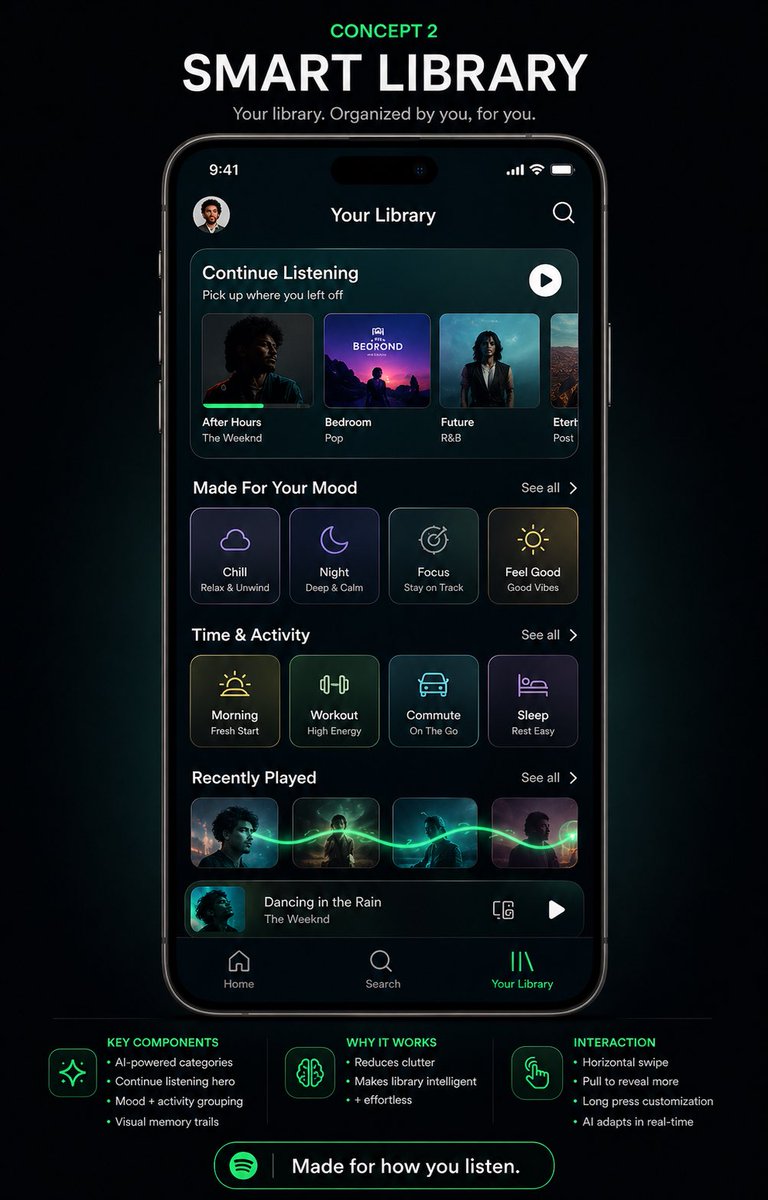
Smart Library Musik App Koncept
En poleret plakat med redesign af musikappen i mørk tilstand, der viser en futuristisk brugergrænseflade til smartphonebiblioteket, ideel til at fremvise spekulative produktkoncepter eller præsentationer af design på sociale medier.
Dette er et GPT Image 2 -eksempel på en prompt for Produkt og kommercielt . Brug den kopieringsklare prompt nedenfor til at generere lignende visuelle elementer, og gennemgå Awesome GPT Image 2 Prompts -kreditering samt kommercielle brugsrettigheder før genbrug.
Har du brug for det fulde promptsæt? Brug Produkt og kommercielt emnehub for flere relaterede eksempler, eller åbn GPT Image 2 hurtig katalog for det fulde eksempelindeks, genanvendelige strukturer og kildeattribution.
Free 1K preview
Generate one preview image instantly, no sign-up required.
4000/4000
Hurtig
Klar til kopiering
{
  "type": "mobile app UI concept poster",
  "brand": "Spotify-inspired music app redesign",
  "theme": "futuristic smart library, premium dark mode, neon green accents, sleek glassmorphism panels",
  "canvas": {
    "background": "deep black with subtle blue-green glow and soft vignette",
    "aspect_ratio": "portrait social media poster"
  },
  "headline_section": {
    "count": 3,
    "labels": [
      "CONCEPT 2",
      "SMART LIBRARY",
      "Your library. Organized by you, for you."
    ],
    "style": "centered at top, small neon green kicker above a large bold white uppercase headline, smaller light gray subtitle"
  },
  "centerpiece": {
    "device": "front-facing modern smartphone mockup with thin black bezels and dynamic-island style cutout",
    "screen_title": "Your Library",
    "status_bar": {
      "time": "9:41",
      "icons_count": 3,
      "icons": [
        "cellular signal",
        "Wi-Fi",
        "battery"
      ]
    },
    "top_row": {
      "count": 2,
      "items": [
        "small circular profile avatar at top left",
        "search icon at top right"
      ]
    },
    "screen_sections": [
      {
        "title": "Continue Listening",
        "count": 4,
        "labels": [
          "After Hours",
          "Bedroom",
          "Future",
          "Etern..."
        ],
        "details": "rounded rectangular hero carousel with 4 album cards, each showing cover art, title, and artist or genre text; subtitle reads 'Pick up where you left off'; white circular play button at upper right of the panel"
      },
      {
        "title": "Made For Your Mood",
        "count": 4,
        "labels": [
          "Chill",
          "Night",
          "Focus",
          "Feel Good"
        ],
        "details": "4 rounded square mood cards with thin glowing outlines, minimalist line icons, and small subtitles reading 'Relax & Unwind', 'Deep & Calm', 'Stay on Track', 'Good Vibes'; 'See all' on the right"
      },
      {
        "title": "Time & Activity",
        "count": 4,
        "labels": [
          "Morning",
          "Workout",
          "Commute",
          "Sleep"
        ],
        "details": "4 rounded square activity cards with neon line icons and subtitles 'Fresh Start', 'High Energy', 'On The Go', 'Rest Easy'; 'See all' on the right"
      },
      {
        "title": "Recently Played",
        "count": 4,
        "labels": [
          "album 1",
          "album 2",
          "album 3",
          "album 4"
        ],
        "details": "4 small rectangular album thumbnails connected by a glowing green waveform-like trail flowing horizontally across them; 'See all' on the right"
      },
      {
        "title": "Now playing bar",
        "count": 4,
        "labels": [
          "thumbnail",
          "track title",
          "device icon",
          "play button"
        ],
        "details": "bottom mini-player with album art thumbnail, title 'Dancing in the Rain', artist 'The Weeknd', a small device/connect icon, and a white play button"
      }
    ],
    "bottom_navigation": {
      "count": 3,
      "labels": [
        "Home",
        "Search",
        "Your Library"
      ],
      "active": "Your Library",
      "style": "simple icon-plus-label tab bar, active tab highlighted in neon green"
    }
  },
  "footer_info": {
    "sections": [
      {
        "title": "KEY COMPONENTS",
        "position": "bottom left",
        "count": 4,
        "labels": [
          "AI-powered categories",
          "Continue listening hero",
          "Mood + activity grouping",
          "Visual memory trails"
        ]
      },
      {
        "title": "WHY IT WORKS",
        "position": "bottom center",
        "count": 3,
        "labels": [
          "Reduces clutter",
          "Makes library intelligent",
          "+ effortless"
        ]
      },
      {
        "title": "INTERACTION",
        "position": "bottom right",
        "count": 4,
        "labels": [
          "Horizontal swipe",
          "Pull to reveal more",
          "Long press customization",
          "AI adapts in real-time"
        ]
      }
    ],
    "icons_count": 3,
    "icons": [
      "sparkles",
      "brain",
      "hand tap gesture"
    ]
  },
  "cta": {
    "count": 2,
    "labels": [
      "Spotify Logo",
      "Made for how you listen."
    ],
    "style": "large rounded neon green outlined button centered at the bottom"
  },
  "style_notes": "high-fidelity product design presentation, clean typography, realistic iPhone render, glossy screen reflections, subtle cyan and green ambient glow, modern UX case-study poster aesthetic, polished dribbble/behance presentation",
  "customization": {
    "headline": "{argument name=\"headline text\" default=\"SMART LIBRARY\"}",
    "concept_label": "{argument name=\"concept label\" default=\"CONCEPT 2\"}",
    "screen_title": "{argument name=\"screen title\" default=\"Your Library\"}",
    "brand_style": "{argument name=\"brand style\" default=\"Spotify-inspired\"}",
    "cta_text": "{argument name=\"cta text\" default=\"Made for how you listen.\"}"
  }
}
Promptvariabler
Redigerbare argumentpladsholdere fundet i prompten med deres standardværdier.
Variabel
headline text
Misligholdelse
SMART LIBRARY
Variabel
concept label
Misligholdelse
CONCEPT 2
Variabel
screen title
Misligholdelse
Your Library
Variabel
brand style
Misligholdelse
Spotify-inspired
Variabel
cta text
Misligholdelse
Made for how you listen.
Best for
- - Produkt og kommercielt visual exploration
- - Image generation and reference-image edits
- - Reusable briefs that keep source attribution visible
Change these parts
- - Subject, product, character, or scene
- - Aspect ratio, camera, lighting, and background
- - Brand, text, color, and output constraints
Recommended model and settings
- - Model: gpt-image-2
- - Input mode: Tekst til billede
- - Aspect ratio: source
- - Commercial status: review original source
How to use this prompt
- 1. Copy the prompt and preserve its structure for the first test.
- 2. Replace the subject, context, and publishing channel.
- 3. Change one camera, lighting, or style variable per iteration.
- 4. Inspect the output, source, text, and rights before reuse.
Limitations, source, and reuse cautions
- - Generated output is an editable draft, not factual, legal, or rights evidence.
- - Review the linked source, people, brands, logos, text, and third-party media before commercial use.
Importeret fra Awesome GPT Image 2 Prompts . Kreditering er påkrævet. Status for kommerciel brug er allowed ; gennemgå kilderettighederne før betalt brug.
Flere sager i denne kategori
Prioriteret efter kategori, kompatibilitet med inputtilstande, kvalitet og lavere risiko.






Genbrug og kildenoter
Brug denne prompt sikkert efter at have gennemgået sagen.
- 1.Kopier prompten, eller åbn den direkte i Dovoo med genereringsknappen.
- 2.Juster variabler, billedformat og referencebilleder til din egen brug.
- 3.Før udgivelse eller betalt brug skal du verificere kilderettigheder, krav til kreditering og risici forbundet med branding eller lighed.