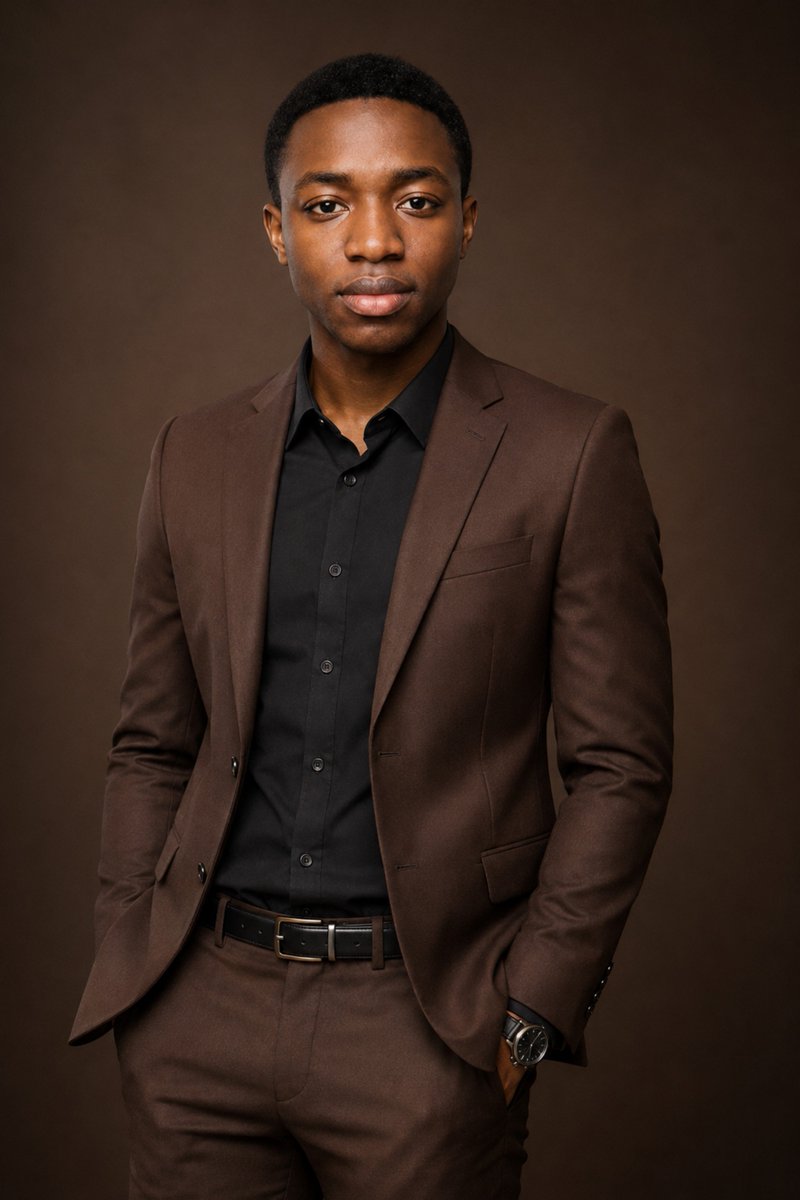
Premium Editorial Suit Portrait
A sophisticated prompt for transforming a standard portrait into a high-end corporate editorial shot with chocolate-brown tones.
Dette er et GPT Image 2 -eksempel på en prompt for Portræt og karakter . Brug den kopieringsklare prompt nedenfor til at generere lignende visuelle elementer, og gennemgå Awesome GPT Image 2 Prompts -kreditering samt kommercielle brugsrettigheder før genbrug.
Har du brug for det fulde promptsæt? Brug Portræt og karakter emnehub for flere relaterede eksempler, eller åbn GPT Image 2 hurtig katalog for det fulde eksempelindeks, genanvendelige strukturer og kildeattribution.
Free 1K preview
Generate one preview image instantly, no sign-up required.
Free text preview doesn’t preserve reference-image consistency.
2237/4000
Hurtig
Klar til kopiering
Use the uploaded photo as the composition, pose, wardrobe, lighting, and studio-style reference.

Create an ultra-realistic professional studio portrait of an adult man, framed from approximately mid-thigh upward. Position him slightly off-center, standing in a relaxed three-quarter pose while facing the camera. Have both hands naturally tucked into his trouser pockets, with his shoulders relaxed and posture upright and confident. Give him a warm, subtle smile that communicates professionalism, approachability, and quiet confidence.

Dress him in a perfectly tailored rich {argument name="suit color" default="chocolate-brown"} two-piece suit with a structured single-breasted blazer and matching trousers. Underneath, add a solid {argument name="shirt color" default="black"} button-up dress shirt, neatly tucked in with the collar closed and no tie. Complete the outfit with a sleek black leather belt with a minimal dark metallic buckle and a sophisticated black-and-silver wristwatch.

Give him a clean, neat low fade haircut with naturally textured short hair on top and a precise but realistic hairline. Keep the grooming polished and natural. No necklace, chain, earrings, rings, lapel pins, or excessive accessories.

Use a seamless warm {argument name="background color" default="chocolate-brown"} studio background, slightly darker than the suit, with a smooth subtle gradient and gentle falloff toward the edges. Maintain a sophisticated monochromatic brown-and-black color palette.

Use soft professional studio lighting with a large diffused key light illuminating the face from the front/side, gentle fill light to preserve natural skin detail, and subtle separation between the subject and background. Create soft realistic shadows around the jawline and suit while maintaining flattering facial highlights.

Capture realistic skin texture, individual hair detail, natural fabric texture, sharp blazer tailoring, subtle watch reflections, and accurate proportions. Use an 85mm portrait-lens aesthetic, shallow depth of field, crisp focus on the face and eyes, cinematic tonal depth, premium corporate editorial photography, photorealistic detail, and high-end magazine-quality finishing.

Aspect ratio: 2:3 portrait.
Promptvariabler
Redigerbare argumentpladsholdere fundet i prompten med deres standardværdier.
Variabel
suit color
Misligholdelse
chocolate-brown
Variabel
shirt color
Misligholdelse
black
Variabel
background color
Misligholdelse
chocolate-brown
Best for
- - Portræt og karakter visual exploration
- - Image generation and reference-image edits
- - Reusable briefs that keep source attribution visible
Change these parts
- - Subject, product, character, or scene
- - Aspect ratio, camera, lighting, and background
- - Brand, text, color, and output constraints
Recommended model and settings
- - Model: gpt-image-2
- - Input mode: Billede til billede
- - Aspect ratio: source
- - Commercial status: review original source
How to use this prompt
- 1. Copy the prompt and preserve its structure for the first test.
- 2. Replace the subject, context, and publishing channel.
- 3. Change one camera, lighting, or style variable per iteration.
- 4. Inspect the output, source, text, and rights before reuse.
Limitations, source, and reuse cautions
- - Generated output is an editable draft, not factual, legal, or rights evidence.
- - Review the linked source, people, brands, logos, text, and third-party media before commercial use.
Importeret fra Awesome GPT Image 2 Prompts . Kreditering er påkrævet. Status for kommerciel brug er allowed ; gennemgå kilderettighederne før betalt brug.
Flere sager i denne kategori
Prioriteret efter kategori, kompatibilitet med inputtilstande, kvalitet og lavere risiko.

Stylish Man Street Lamp Portrait
Billede til billede

Studio Portrait of Woman with Sunglasses
Tekst til billede

Sci-Fi Cyan Lighting Effect
Billede til billede

Oversized Head Cartoon Caricature Prompt
Billede til billedeMellem risiko

Cinematic Blue Backlit Portrait
Tekst til billede

Hiker in Red Jacket
Tekst til billede
Genbrug og kildenoter
Brug denne prompt sikkert efter at have gennemgået sagen.
- 1.Kopier prompten, eller åbn den direkte i Dovoo med genereringsknappen.
- 2.Juster variabler, billedformat og referencebilleder til din egen brug.
- 3.Før udgivelse eller betalt brug skal du verificere kilderettigheder, krav til kreditering og risici forbundet med branding eller lighed.