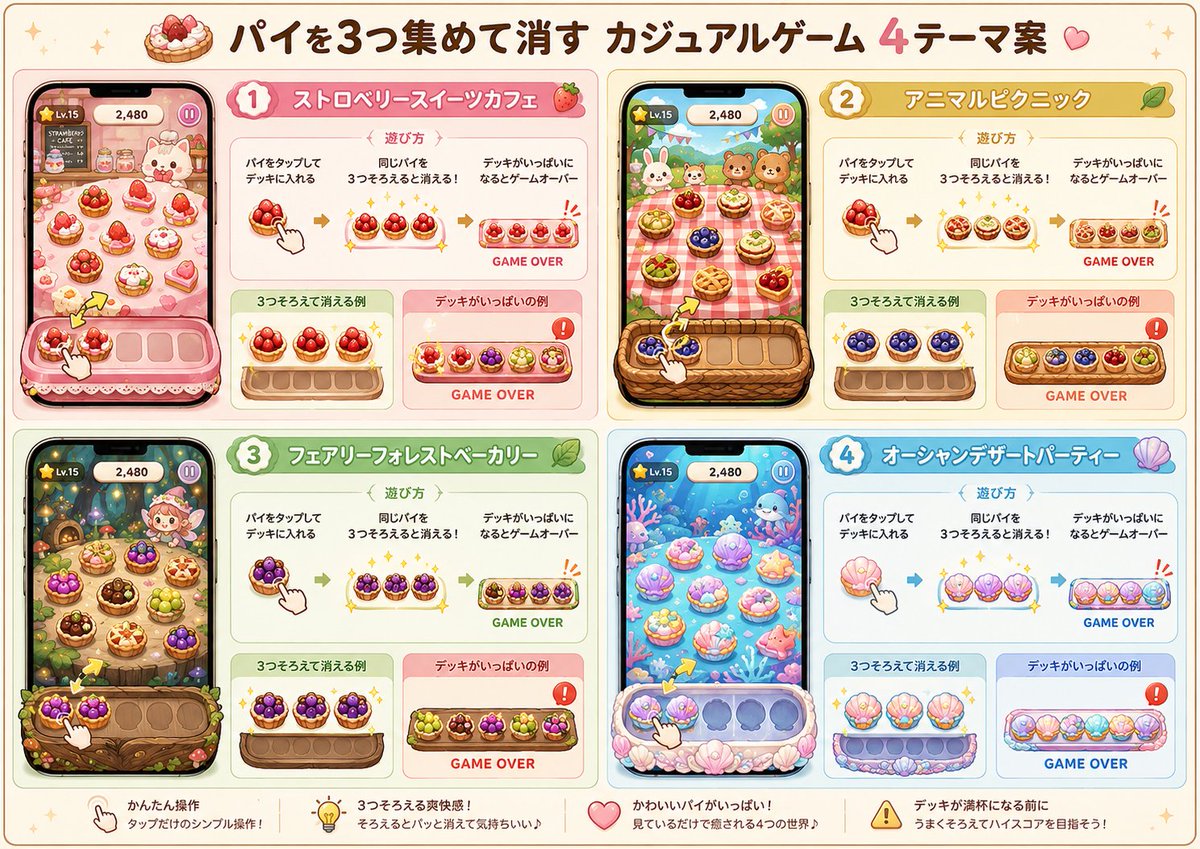
Four Theme Pie Puzzle Game Sheet
Generates a cute Japanese proposal-style concept sheet for a casual mobile pie-matching game with four themed UI mockups.
Dette er et GPT Image 2 -eksempel på en prompt for Anime og spil . Brug den kopieringsklare prompt nedenfor til at generere lignende visuelle elementer, og gennemgå Awesome GPT Image 2 Prompts -kreditering samt kommercielle brugsrettigheder før genbrug.
Har du brug for det fulde promptsæt? Brug Anime og spil emnehub for flere relaterede eksempler, eller åbn GPT Image 2 hurtig katalog for det fulde eksempelindeks, genanvendelige strukturer og kildeattribution.
Free 1K preview
Generate one preview image instantly, no sign-up required.
3535/4000
Hurtig
Klar til kopiering
Goal: Create a polished Japanese proposal-style idea sheet for a casual mobile puzzle game where players collect 3 matching pies to clear them, titled {argument name="headline text" default="パイを3つ集めて消す カジュアルゲーム 4テーマ案"}. The sheet should look like a cheerful game design concept board, with cute UI mockups and explanatory diagrams.

Canvas: Wide landscape 16:9 presentation sheet, warm cream background, thin rounded border, tiny sparkles and dessert decorations. Use a soft pastel kawaii illustration style with clean vector-like edges, subtle shadows, glossy game UI highlights, and high readability.

Layout: Divide the canvas into exactly 4 large rounded theme panels arranged in a 2×2 grid. Each panel has a numbered badge, a Japanese theme title banner, a smartphone gameplay mockup on the left, and instruction/example cards on the right. Add a bottom strip with exactly 4 short feature notes and icons.

Main title: At the top center, show a small pie icon followed by the large headline. Emphasize the number “4” in pink and add a small heart at the end.

Panel count and themes: Use exactly 4 theme concepts.
1. Pink dessert cafe theme titled {argument name="theme 1 title" default="ストロベリースイーツカフェ"}, with strawberry shortcakes, berry tarts, whipped cream, pink trays, and a cute bunny cafe mascot.
2. Yellow picnic theme titled {argument name="theme 2 title" default="アニマルピクニック"}, with a red-checkered picnic cloth, wicker basket tray, small animal friends, fruit pies, and sunny outdoor greenery.
3. Green fantasy woodland theme titled {argument name="theme 3 title" default="フェアリーフォレストベーカリー"}, with a magical forest bakery, mushrooms, lanterns, fairy-like character, berry pies, wooden tray, vines, leaves, and warm glowing lights.
4. Blue ocean dessert theme titled {argument name="theme 4 title" default="オーシャンデザートパーティー"}, with underwater pastel scenery, coral, shells, sea creatures, shell-shaped desserts, and a shell-decorated tray.

Smartphone mockups: Each of the 4 panels must include exactly 1 vertical phone screen on the left, for a total of 4 phones. Every phone shows a cute match-3-like pie collection game screen with a top HUD showing “Lv.15”, score “2,480”, and a pause button. In each game board, show many individual pies on a themed background, plus a bottom deck/tray with empty slots and a white hand cursor tapping or dragging a pie. Include a small yellow arrow indicating movement toward the tray.

Instruction cards: In each of the 4 panels, include a top explanation card headed “遊び方” with exactly 3 illustrated steps from left to right: tap a pie and put it into the deck, collect 3 of the same pie to clear them, and if the deck becomes full it is GAME OVER. Below it, include exactly 2 smaller example cards: one green/positive card labeled “3つそろえて消える例” showing 3 matching pies clearing with sparkles, and one red/warning card labeled “デッキがいっぱいの例” showing a full tray and the text “GAME OVER” with an exclamation warning icon.

Bottom strip: Add exactly 4 feature notes separated across the bottom, each with one icon: a hand icon with “かんたん操作 / タップだけのシンプル操作!”, a lightbulb icon with “3つそろえる爽快感! / そろえるとパッと消えて気持ちいい♪”, a heart icon with “かわいいパイがいっぱい! / 見ているだけで癒される4つの世界♪”, and a warning icon with “デッキが満杯になる前に / うまくそろえてハイスコアを目指そう!”.

Visual constraints: Keep all Japanese text crisp and legible, use rounded friendly fonts, maintain a consistent proposal-board layout, avoid photorealism, avoid dark or gritty styling, avoid extra panels, avoid extra phones, and do not add watermarks or logos.
Promptvariabler
Redigerbare argumentpladsholdere fundet i prompten med deres standardværdier.
Variabel
headline text
Misligholdelse
パイを3つ集めて消す カジュアルゲーム 4テーマ案
Variabel
theme 1 title
Misligholdelse
ストロベリースイーツカフェ
Variabel
theme 2 title
Misligholdelse
アニマルピクニック
Variabel
theme 3 title
Misligholdelse
フェアリーフォレストベーカリー
Variabel
theme 4 title
Misligholdelse
オーシャンデザートパーティー
Best for
- - Anime og spil visual exploration
- - Image generation and reference-image edits
- - Reusable briefs that keep source attribution visible
Change these parts
- - Subject, product, character, or scene
- - Aspect ratio, camera, lighting, and background
- - Brand, text, color, and output constraints
Recommended model and settings
- - Model: gpt-image-2
- - Input mode: Tekst til billede
- - Aspect ratio: source
- - Commercial status: review original source
How to use this prompt
- 1. Copy the prompt and preserve its structure for the first test.
- 2. Replace the subject, context, and publishing channel.
- 3. Change one camera, lighting, or style variable per iteration.
- 4. Inspect the output, source, text, and rights before reuse.
Limitations, source, and reuse cautions
- - Generated output is an editable draft, not factual, legal, or rights evidence.
- - Review the linked source, people, brands, logos, text, and third-party media before commercial use.
Importeret fra Awesome GPT Image 2 Prompts . Kreditering er påkrævet. Status for kommerciel brug er allowed ; gennemgå kilderettighederne før betalt brug.
Flere sager i denne kategori
Prioriteret efter kategori, kompatibilitet med inputtilstande, kvalitet og lavere risiko.

Anime Girl Heterochromia Portrait
Tekst til billede

Hell Hound Character Sheet Infographic
Tekst til billede

Cute Speech Bubble Mascot Profile Icon
Tekst til billede

Street Selfie with Cat in Matching Cap
Tekst til billede

MotoGP POV Cornering Shot
Tekst til billede

Luxury Travel Fashion Portrait Prompt
Tekst til billede
Genbrug og kildenoter
Brug denne prompt sikkert efter at have gennemgået sagen.
- 1.Kopier prompten, eller åbn den direkte i Dovoo med genereringsknappen.
- 2.Juster variabler, billedformat og referencebilleder til din egen brug.
- 3.Før udgivelse eller betalt brug skal du verificere kilderettigheder, krav til kreditering og risici forbundet med branding eller lighed.