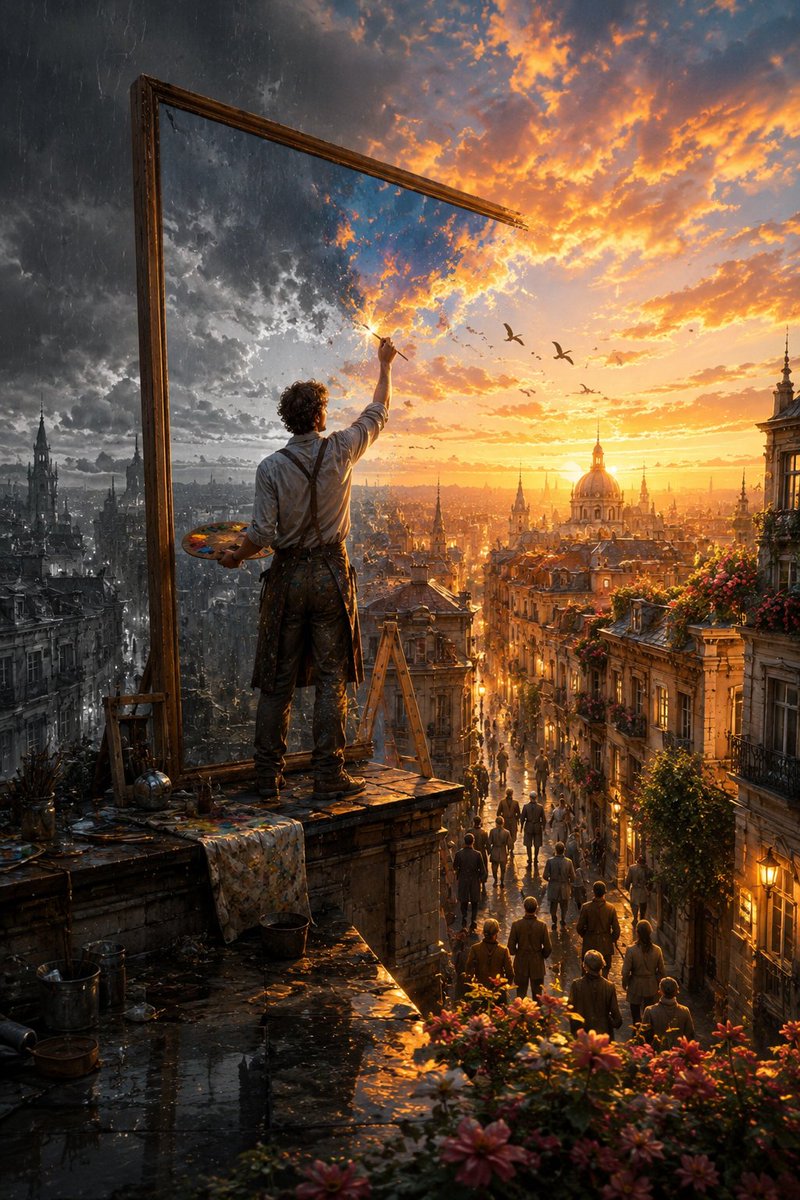
The Painter Who Finished the Sky
An epic cinematic fantasy prompt describing an artist transforming a dark, rainy world into a golden sunset through a magical canvas.
Dette er et GPT Image 2 -eksempel på en prompt for Illustration og kunst . Brug den kopieringsklare prompt nedenfor til at generere lignende visuelle elementer, og gennemgå Awesome GPT Image 2 Prompts -kreditering samt kommercielle brugsrettigheder før genbrug.
Har du brug for det fulde promptsæt? Brug Illustration og kunst emnehub for flere relaterede eksempler, eller åbn GPT Image 2 hurtig katalog for det fulde eksempelindeks, genanvendelige strukturer og kildeattribution.
Free 1K preview
Generate one preview image instantly, no sign-up required.
Free text preview doesn’t preserve reference-image consistency.
2847/4000
Hurtig
Klar til kopiering
Create a breathtaking cinematic fantasy scene titled “{argument name="scene title" default="The Painter Who Finished the Sky"}.” At sunset, a {argument name="artist description" default="lone artist"} stands high on the rooftop of an {argument name="location" default="old European city"}, viewed mostly from behind, holding a wooden painter’s palette in one hand and a fine paintbrush raised toward the sky in the other. Beside him rises an enormous antique wooden canvas frame, several times taller than the artist. But there is no ordinary canvas inside it—the frame is mysteriously connected directly to reality itself. Create a dramatic visual transformation across the scene. On the left side, the world is unfinished: cold, desaturated and rainy. Heavy charcoal storm clouds cover the sky, rain falls over monochrome historic buildings, wet rooftops reflect dim light, balconies are empty and the entire city feels quiet and lifeless. Exactly where the artist’s brush touches the sky, reality begins transforming. A luminous burst of golden paint-like energy spreads naturally outward from the brushstroke. Dark clouds gradually become magnificent glowing sunset clouds in gold, amber, peach and soft blue. Color flows from the sky down through the city as though reality itself is being painted. Historic buildings regain warm natural colors. Windows begin glowing. Flowers bloom across balconies. Green vines appear along old stone walls. Birds emerge naturally from the painted sky and fly into the real world. Warm sunlight pours dramatically through the streets below and reflects across rain-soaked cobblestones. The right half of the city is now completely transformed into an extraordinary golden-hour world filled with warmth, life and beauty, while the far left remains cold and monochrome. The boundary between the two worlds should feel magical and organic—not like a simple split-screen effect. Individual brushstrokes, particles of light and subtle trails of pigment should visibly transition into real clouds, architecture, flowers and sunlight. Far below, small groups of people have stopped in the streets and on balconies, looking upward in wonder as they realize the sky and city are being transformed above them. The artist is carefully painting one final tiny unfinished patch of darkness near the top of the sky. Composition: epic vertical cinematic framing, artist prominent in the foreground, enormous frame creating strong visual geometry, sprawling European city extending deep into the background, dramatic sense of scale and atmospheric perspective. Lighting: spectacular golden-hour sunlight contrasted against cool storm light, volumetric rays, wet reflections, subtle mist, realistic atmospheric haze. Style: sophisticated cinematic fantasy realism, photorealistic textures, emotionally powerful visual style.Promptvariabler
Redigerbare argumentpladsholdere fundet i prompten med deres standardværdier.
Variabel
scene title
Misligholdelse
The Painter Who Finished the Sky
Variabel
artist description
Misligholdelse
lone artist
Variabel
location
Misligholdelse
old European city
Best for
- - Illustration og kunst visual exploration
- - Image generation and reference-image edits
- - Reusable briefs that keep source attribution visible
Change these parts
- - Subject, product, character, or scene
- - Aspect ratio, camera, lighting, and background
- - Brand, text, color, and output constraints
Recommended model and settings
- - Model: gpt-image-2
- - Input mode: Billede til billede
- - Aspect ratio: source
- - Commercial status: review original source
How to use this prompt
- 1. Copy the prompt and preserve its structure for the first test.
- 2. Replace the subject, context, and publishing channel.
- 3. Change one camera, lighting, or style variable per iteration.
- 4. Inspect the output, source, text, and rights before reuse.
Limitations, source, and reuse cautions
- - Generated output is an editable draft, not factual, legal, or rights evidence.
- - Review the linked source, people, brands, logos, text, and third-party media before commercial use.
Importeret fra Awesome GPT Image 2 Prompts . Kreditering er påkrævet. Status for kommerciel brug er allowed ; gennemgå kilderettighederne før betalt brug.
Flere sager i denne kategori
Prioriteret efter kategori, kompatibilitet med inputtilstande, kvalitet og lavere risiko.

Split Face Horror Transformation
Billede til billede

Surreal Macro Fashion Illusion
Billede til billede

Surreal 3D Chess Match Artwork
Tekst til billede

Dax Cinematic Character Bible Sheet
Billede til billede

Grumpy Rhino Storybook Illustration
Tekst til billede

Vintage Digital Camera Mirror Selfie
Billede til billede
Genbrug og kildenoter
Brug denne prompt sikkert efter at have gennemgået sagen.
- 1.Kopier prompten, eller åbn den direkte i Dovoo med genereringsknappen.
- 2.Juster variabler, billedformat og referencebilleder til din egen brug.
- 3.Før udgivelse eller betalt brug skal du verificere kilderettigheder, krav til kreditering og risici forbundet med branding eller lighed.