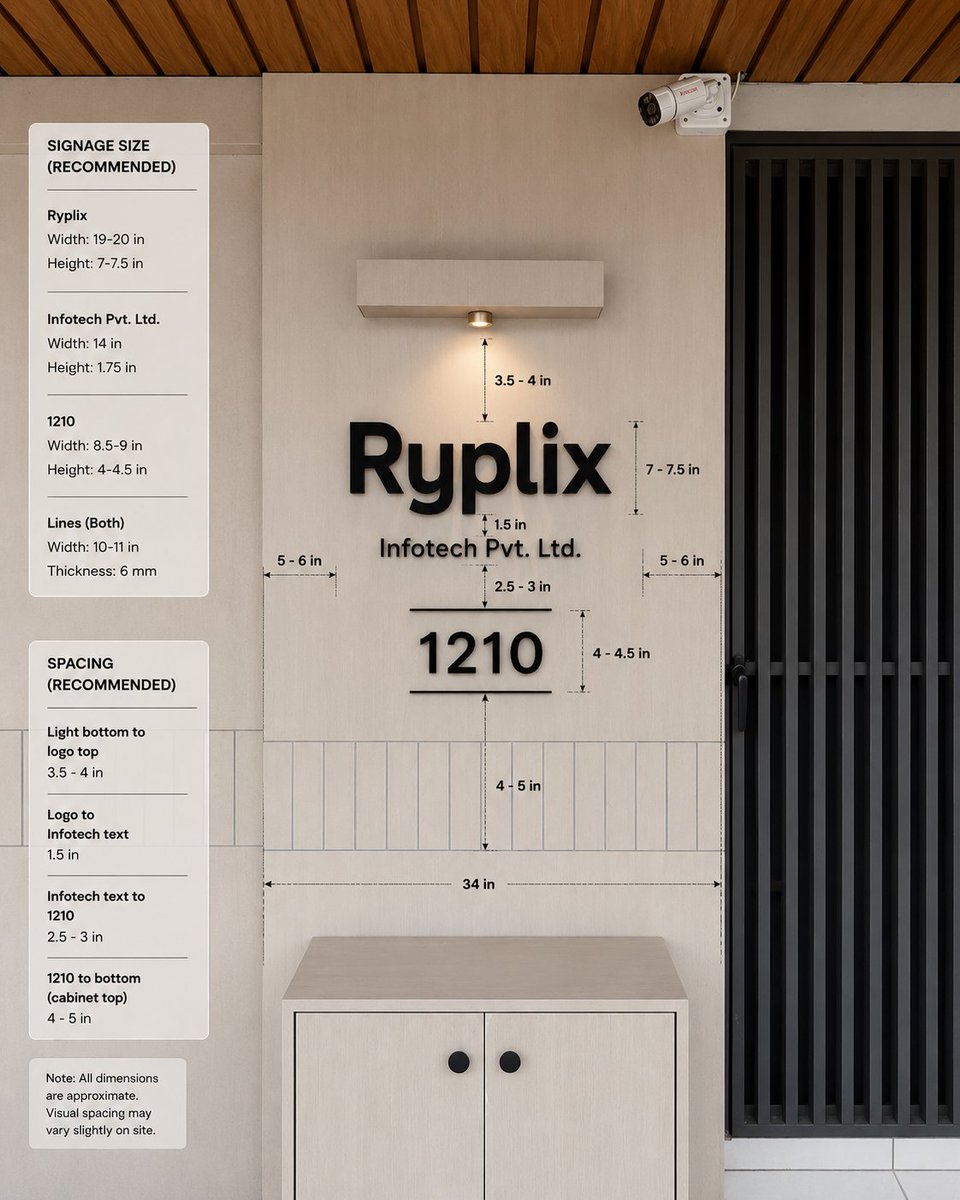
Mockup af kontorskiltningsdimensioner
En fotorealistisk mockup af en specifikation for kontorindgangsskiltning med dimensionsvejledninger og anbefalede størrelser til klientgodkendelse.
Dette er et GPT Image 2 -eksempel på en prompt for Produkt og kommercielt . Brug den kopieringsklare prompt nedenfor til at generere lignende visuelle elementer, og gennemgå Awesome GPT Image 2 Prompts -kreditering samt kommercielle brugsrettigheder før genbrug.
Har du brug for det fulde promptsæt? Brug Produkt og kommercielt emnehub for flere relaterede eksempler, eller åbn GPT Image 2 hurtig katalog for det fulde eksempelindeks, genanvendelige strukturer og kildeattribution.
Free 1K preview
Generate one preview image instantly, no sign-up required.
3653/4000
Hurtig
Klar til kopiering
Goal: Create a realistic interior wall signage mockup with measurement annotations for a reception/office entrance, showing recommended dimensions and spacing for a company sign.

Canvas: Square 1:1 image, photorealistic architectural visualization, front-facing view with slight natural perspective. Use a warm modern palette: light beige wall panels, pale wood cabinet, black signage, black metal door grille, and wood slat ceiling.

Scene layout: Center the composition on a beige feature wall with a mounted sign. On the right, include a tall black vertical-slat door or gate occupying about one quarter of the image width. At the top right of the wall, add one small white CCTV security camera angled downward. At the top center, add one rectangular wall-mounted light fixture with a single warm downlight. At the bottom center, place one light-wood cabinet with two doors and exactly two round black knobs. Across the lower wall behind the sign, include a horizontal band of narrow vertical rectangular tiles. The ceiling at the very top should show warm brown wooden slats running diagonally.

Main sign content: Use raised matte-black 3D letters on the wall. The largest line reads {argument name="company logo text" default="Ryplix"}. Directly underneath, centered smaller text reads {argument name="company legal text" default="Infotech Pvt. Ltd."}. Below that, centered, display a large number {argument name="unit number" default="1210"}, with one thin horizontal line above it and one thin horizontal line below it. Keep all sign elements black with soft realistic shadows.

Measurement annotations: Add fine black dimension arrows, dashed guide lines, and small technical labels around the sign. Include exactly 10 visible measurement labels in the main wall area: “3.5 - 4 in” from the bottom of the light to the logo, “7 - 7.5 in” beside the logo height, “1.5 in” between the logo and legal text, “2.5 - 3 in” between legal text and the number, “4 - 4.5 in” beside the number height, “4 - 5 in” from the number to the cabinet-top tile area, “34 in” as a long horizontal width guide above the cabinet, plus two side gap labels “5 - 6 in” on the left and “5 - 6 in” on the right.

Left information panels: Add exactly three rounded white cards stacked vertically along the left side of the image. Card 1 title: “SIGNAGE SIZE (RECOMMENDED)”. It contains exactly three item groups separated by thin horizontal rules: “Ryplix” with “Width: 19-20 in” and “Height: 7-7.5 in”; “Infotech Pvt. Ltd.” with “Width: 14 in” and “Height: 1.75 in”; “1210” with “Width: 8.5-9 in” and “Height: 4-4.5 in”; then “Lines (Both)” with “Width: 10-11 in” and “Thickness: 6 mm”. Card 2 title: “SPACING (RECOMMENDED)”. It contains exactly four item groups separated by thin rules: “Light bottom to logo top” with “3.5 - 4 in”; “Logo to Infotech text” with “1.5 in”; “Infotech text to 1210” with “2.5 - 3 in”; “1210 to bottom (cabinet top)” with “4 - 5 in”. Card 3 is a small note card reading: “Note: All dimensions are approximate. Visual spacing may vary slightly on site.”

Visual style: Clean modern office design, natural lighting, realistic materials, subtle shadows, crisp legible typography, professional signage installation guide aesthetic. Use black sans-serif text for all labels and cards. The measurement lines should look like a design-spec overlay, not handwritten.

Constraints: Keep the image free of people and clutter. Do not add extra logos, extra cards, extra measurement labels, or additional decorative objects. Maintain accurate alignment: logo, legal text, unit number, light, and cabinet should all be centered on the same vertical axis.
Promptvariabler
Redigerbare argumentpladsholdere fundet i prompten med deres standardværdier.
Variabel
company logo text
Misligholdelse
Ryplix
Variabel
company legal text
Misligholdelse
Infotech Pvt. Ltd.
Variabel
unit number
Misligholdelse
1210
Best for
- - Produkt og kommercielt visual exploration
- - Image generation and reference-image edits
- - Reusable briefs that keep source attribution visible
Change these parts
- - Subject, product, character, or scene
- - Aspect ratio, camera, lighting, and background
- - Brand, text, color, and output constraints
Recommended model and settings
- - Model: gpt-image-2
- - Input mode: Tekst til billede
- - Aspect ratio: source
- - Commercial status: review original source
How to use this prompt
- 1. Copy the prompt and preserve its structure for the first test.
- 2. Replace the subject, context, and publishing channel.
- 3. Change one camera, lighting, or style variable per iteration.
- 4. Inspect the output, source, text, and rights before reuse.
Limitations, source, and reuse cautions
- - Generated output is an editable draft, not factual, legal, or rights evidence.
- - Review the linked source, people, brands, logos, text, and third-party media before commercial use.
Importeret fra Awesome GPT Image 2 Prompts . Kreditering er påkrævet. Status for kommerciel brug er allowed ; gennemgå kilderettighederne før betalt brug.
Flere sager i denne kategori
Prioriteret efter kategori, kompatibilitet med inputtilstande, kvalitet og lavere risiko.

Transparent Earbuds on Stone Pedestal
Tekst til billede

Overhead Pepperoni Pizza Photo
Tekst til billede

Wet Transparent Earbud Macro
Tekst til billede

Pink Hijab Mirror Selfie Portrait
Tekst til billede

Fashion Studio Portrait with Blue Rim Lighting
Tekst til billede

Spring Editorial Fashion Collage
Tekst til billede
Genbrug og kildenoter
Brug denne prompt sikkert efter at have gennemgået sagen.
- 1.Kopier prompten, eller åbn den direkte i Dovoo med genereringsknappen.
- 2.Juster variabler, billedformat og referencebilleder til din egen brug.
- 3.Før udgivelse eller betalt brug skal du verificere kilderettigheder, krav til kreditering og risici forbundet med branding eller lighed.