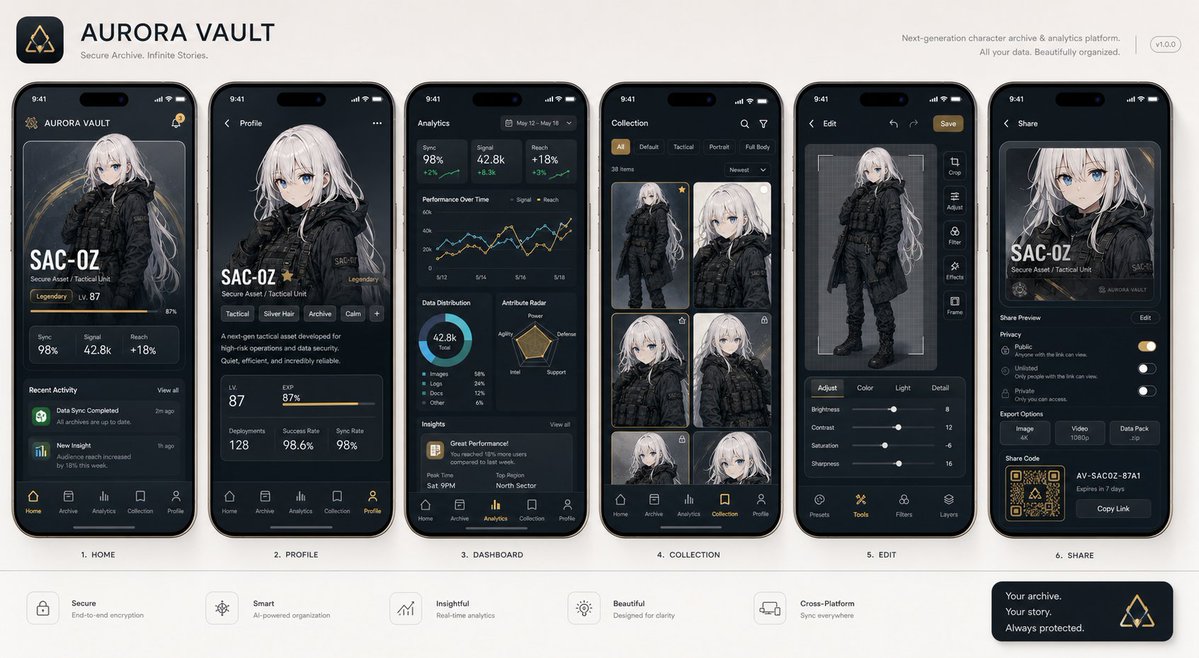
Næste generations mobilapp-brugergrænsefladepræsentation
En billed-til-billede prompt designet til at generere professionelle skærmbilleder af mobile app-brugergrænseflader med et konsistent emne på tværs af forskellige skærme, stylet som en Product Hunt eller Apple præsentation.
Dette er et GPT Image 2 -eksempel på en prompt for Produkt og kommercielt . Brug den kopieringsklare prompt nedenfor til at generere lignende visuelle elementer, og gennemgå Awesome GPT Image 2 Prompts -kreditering samt kommercielle brugsrettigheder før genbrug.
Free 1K preview
Generate one preview image instantly, no sign-up required.
Free text preview doesn’t preserve reference-image consistency.
Hurtig
Klar til kopiering
With the attached subject as the protagonist, please summarize "{argument name="app type" default="a collection of screenshots for a realistic next-generation mobile app"}" into a single image. This is not an advertising poster. It is a high-quality visual such as an App Store introduction image, product design announcement, or UI case study. Accurately maintain the features, color, shape, face, clothing, and impression of the subject in the reference image. Treat the subject as the main content within the app. Do not change it to another character or product. Arrange {argument name="number of screens" default="4 to 6"} vertical smartphone screens. Make each screen different. Included screens: Home screen, detailed profile screen, analysis dashboard, collection screen, editing screen, sharing screen. UI elements: Fictional app name, tab bar, card UI, buttons, graphs, tags, short descriptions, numeric displays, icons, small notification displays. The design is a sophisticated 2026 mobile UI. Clean, practical, and with clear information design. Do not overuse glassmorphism. Text should be easy to read, primarily in English and short. Do not use real company names, app names, or logos. The background is a simple studio background. The overall look is professional like app introduction images on Dribbble, Product Hunt, or Apple. However, make it look natural as a fictional product. Priorities: UI that looks real, retention of reference image features, persuasiveness as a screenshot, and information density worthy of being saved on social media.Promptvariabler
Redigerbare argumentpladsholdere fundet i prompten med deres standardværdier.
Best for
- - Produkt og kommercielt visual exploration
- - Image generation and reference-image edits
- - Reusable briefs that keep source attribution visible
Change these parts
- - Subject, product, character, or scene
- - Aspect ratio, camera, lighting, and background
- - Brand, text, color, and output constraints
Recommended model and settings
- - Model: gpt-image-2
- - Input mode: Billede til billede
- - Aspect ratio: source
- - Commercial status: review original source
How to use this prompt
- 1. Copy the prompt and preserve its structure for the first test.
- 2. Replace the subject, context, and publishing channel.
- 3. Change one camera, lighting, or style variable per iteration.
- 4. Inspect the output, source, text, and rights before reuse.
Limitations, source, and reuse cautions
- - Generated output is an editable draft, not factual, legal, or rights evidence.
- - Review the linked source, people, brands, logos, text, and third-party media before commercial use.
Related prompt packs
Flere sager i denne kategori
Prioriteret efter kategori, kompatibilitet med inputtilstande, kvalitet og lavere risiko.






Genbrug og kildenoter
Brug denne prompt sikkert efter at have gennemgået sagen.
- 1.Kopier prompten, eller åbn den direkte i Dovoo med genereringsknappen.
- 2.Juster variabler, billedformat og referencebilleder til din egen brug.
- 3.Før udgivelse eller betalt brug skal du verificere kilderettigheder, krav til kreditering og risici forbundet med branding eller lighed.