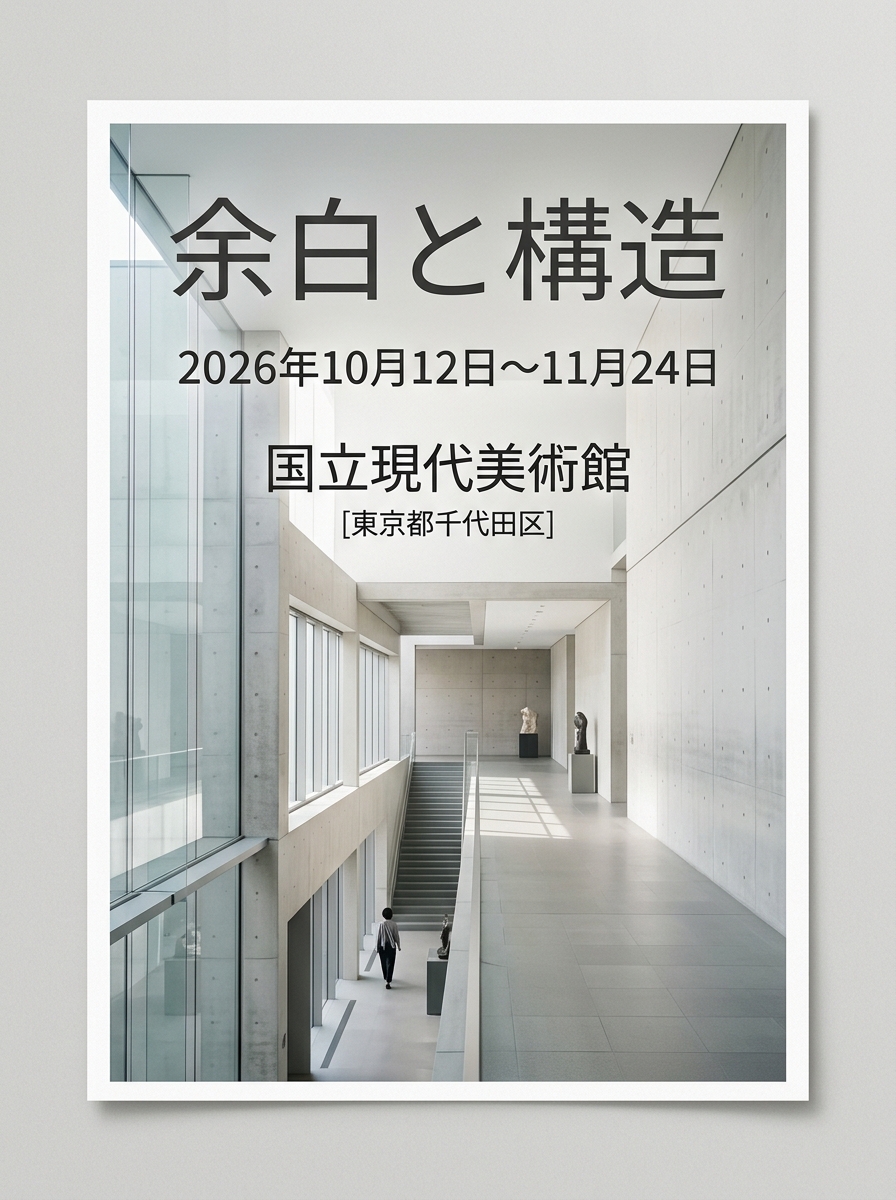
Minimalist Event Flyer Design
A structural prompt for generating clean, minimalist graphic flyers suitable for art exhibitions or modern design events, configured with layout parameters.
Dette er et GPT Image 2 -eksempel på en prompt for Grafik og plakat . Brug den kopieringsklare prompt nedenfor til at generere lignende visuelle elementer, og gennemgå Awesome GPT Image 2 Prompts -kreditering samt kommercielle brugsrettigheder før genbrug.
Har du brug for det fulde promptsæt? Brug Grafik og plakat emnehub for flere relaterede eksempler, eller åbn GPT Image 2 hurtig katalog for det fulde eksempelindeks, genanvendelige strukturer og kildeattribution.
Free 1K preview
Generate one preview image instantly, no sign-up required.
1986/4000
Hurtig
Klar til kopiering
[Event Information]
- Event Name: {argument name="event name" default="Margin and Structure"}
- Date & Time: {argument name="date" default="October 12 – November 24, 2026"}
- Venue: {argument name="venue" default="National Museum of Modern Art"}

[Quality, Direction, and Composition Specifications]
- Style: A poster for a contemporary art exhibition or modern design event, clean and minimalist editorial layout.
- Visual Elements: A beautiful live-action composition conveying silence and intelligence, set against geometric abstract art objects or concrete and glass architectural spaces.
- Typography Placement (For GPT-image / Nano Banana Pro): In the empty margins of the screen, the event name '{argument name="event name" default="Margin and Structure"}', the date '{argument name="date" default="October 12 – November 24, 2026"}', and venue information '{argument name="venue" default="National Museum of Modern Art"}' are beautifully laid out in a sophisticated, modern sans-serif font. The typography harmonizes without detracting from the beauty of the overall image.
- Lighting & Color: A clean space based on white, cool natural light with soft gradients of light, neutral tones with accent colors (e.g., navy or dark gray).

[Strict Layout and Output Constraints (Required)]
- Output the completed design itself, filling the entire canvas. Scene descriptions inside the design (walls, spaces, shadows) may follow the text instructions.
- Prohibited items: Photographs of the finished poster inside a frame, stuck to a wall, mockup photos placed on tables or paper, perspective distortion of paper edges, or drop shadows.
- Output the finished flat 2D design itself, filling the entire canvas. Scene elements inside the design (walls, rooms, shadows) described above are allowed. Absolutely NO photo-of-a-poster mockups: no picture frames, no poster-on-wall or poster-on-desk shots, no perspective warp or drop shadow around the artwork's edges.

- Aspect Ratio: --ar 3:4
Promptvariabler
Redigerbare argumentpladsholdere fundet i prompten med deres standardværdier.
Variabel
event name
Misligholdelse
Margin and Structure
Variabel
date
Misligholdelse
October 12 – November 24, 2026
Variabel
venue
Misligholdelse
National Museum of Modern Art
Best for
- - Grafik og plakat visual exploration
- - Image generation and reference-image edits
- - Reusable briefs that keep source attribution visible
Change these parts
- - Subject, product, character, or scene
- - Aspect ratio, camera, lighting, and background
- - Brand, text, color, and output constraints
Recommended model and settings
- - Model: gpt-image-2
- - Input mode: Tekst til billede
- - Aspect ratio: source
- - Commercial status: review original source
How to use this prompt
- 1. Copy the prompt and preserve its structure for the first test.
- 2. Replace the subject, context, and publishing channel.
- 3. Change one camera, lighting, or style variable per iteration.
- 4. Inspect the output, source, text, and rights before reuse.
Limitations, source, and reuse cautions
- - Generated output is an editable draft, not factual, legal, or rights evidence.
- - Review the linked source, people, brands, logos, text, and third-party media before commercial use.
Importeret fra Awesome GPT Image 2 Prompts . Kreditering er påkrævet. Status for kommerciel brug er allowed ; gennemgå kilderettighederne før betalt brug.
Flere sager i denne kategori
Prioriteret efter kategori, kompatibilitet med inputtilstande, kvalitet og lavere risiko.

Tuxedo Cat Photo and Line Art Diptych
Tekst til billede

Luxury Travel Fashion Portrait Prompt
Tekst til billede

Autumn Cozy Casual Outfit Prompt
Tekst til billede

Cute Focus Desk Flat Lay and Kawaii Illustration
Tekst til billede

Studio Portrait of Woman with Sunglasses
Tekst til billede

Matte Black B.AI Keyboard Keycap
Tekst til billede
Genbrug og kildenoter
Brug denne prompt sikkert efter at have gennemgået sagen.
- 1.Kopier prompten, eller åbn den direkte i Dovoo med genereringsknappen.
- 2.Juster variabler, billedformat og referencebilleder til din egen brug.
- 3.Før udgivelse eller betalt brug skal du verificere kilderettigheder, krav til kreditering og risici forbundet med branding eller lighed.