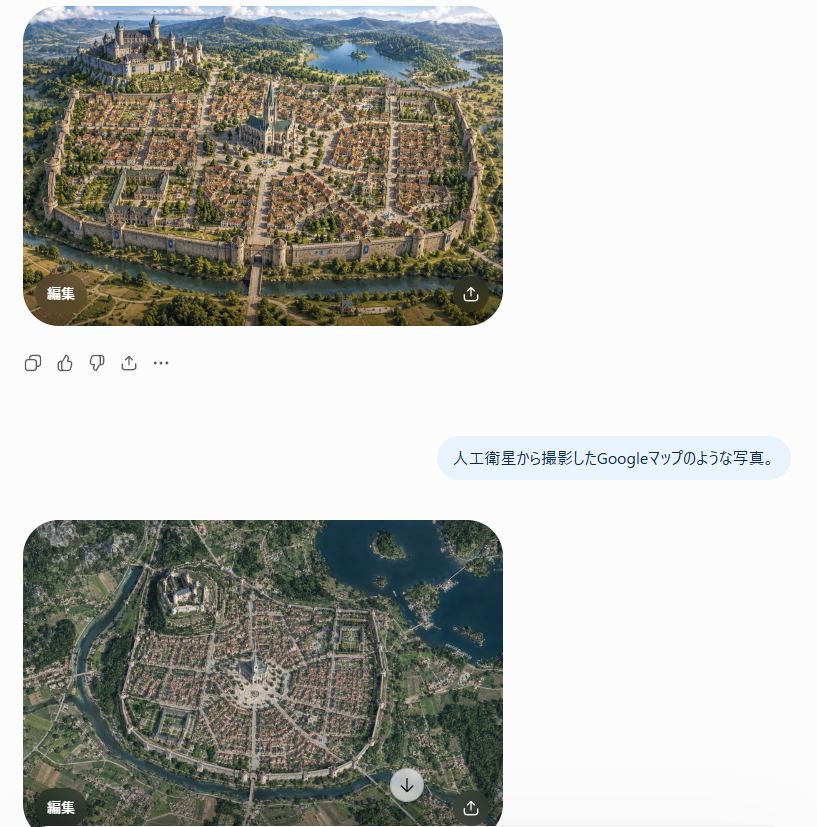
Satellite Map Medieval City
Transforms a fantasy city reference into a realistic top-down Google Maps-style satellite view for worldbuilding or concept visualization.
Dette er et GPT Image 2 -eksempel på en prompt for Landskab og natur . Brug den kopieringsklare prompt nedenfor til at generere lignende visuelle elementer, og gennemgå Awesome GPT Image 2 Prompts -kreditering samt kommercielle brugsrettigheder før genbrug.
Har du brug for det fulde promptsæt? Brug Landskab og natur emnehub for flere relaterede eksempler, eller åbn GPT Image 2 hurtig katalog for det fulde eksempelindeks, genanvendelige strukturer og kildeattribution.
Free 1K preview
Generate one preview image instantly, no sign-up required.
Free text preview doesn’t preserve reference-image consistency.
1223/4000
Hurtig
Klar til kopiering
Using REFERENCE_0 as the realistic landscape/detail base and REFERENCE_1 as the city-layout and sketch/worldbuilding reference, transform the scene into {argument name="style request" default="人工衛星から撮影したGoogleマップのような写真。"} Render it as a true vertical top-down satellite image, like a Google Maps capture, not an oblique fantasy illustration. Preserve the invented medieval city arrangement while making it look geographically real.

Keep exactly 5 major layout elements recognizable: 1) the walled oval/rounded city footprint, 2) the large castle district on the upper-left hill, 3) the central cathedral and radial plaza, 4) the lake in the upper-right/background area, and 5) the river or moat curving around the lower edge with a bridge/gate approach.

Style: photorealistic satellite imagery with natural terrain textures, muted earth colors, tiny roof grids, streets, vegetation, water, fields, and realistic atmospheric clarity. Remove the close foreground tower viewpoint from REFERENCE_0 and eliminate painterly/fantasy perspective. The result should feel like an authentic overhead map photo of {argument name="city type" default="a Central European medieval walled city"}, with believable scale and urban density.
Promptvariabler
Redigerbare argumentpladsholdere fundet i prompten med deres standardværdier.
Variabel
style request
Misligholdelse
人工衛星から撮影したGoogleマップのような写真。
Variabel
city type
Misligholdelse
a Central European medieval walled city
Best for
- - Landskab og natur visual exploration
- - Image generation and reference-image edits
- - Reusable briefs that keep source attribution visible
Change these parts
- - Subject, product, character, or scene
- - Aspect ratio, camera, lighting, and background
- - Brand, text, color, and output constraints
Recommended model and settings
- - Model: gpt-image-2
- - Input mode: Billede til billede
- - Aspect ratio: source
- - Commercial status: review original source
How to use this prompt
- 1. Copy the prompt and preserve its structure for the first test.
- 2. Replace the subject, context, and publishing channel.
- 3. Change one camera, lighting, or style variable per iteration.
- 4. Inspect the output, source, text, and rights before reuse.
Limitations, source, and reuse cautions
- - Generated output is an editable draft, not factual, legal, or rights evidence.
- - Review the linked source, people, brands, logos, text, and third-party media before commercial use.
Importeret fra Awesome GPT Image 2 Prompts . Kreditering er påkrævet. Status for kommerciel brug er allowed ; gennemgå kilderettighederne før betalt brug.
Flere sager i denne kategori
Prioriteret efter kategori, kompatibilitet med inputtilstande, kvalitet og lavere risiko.

Sci-Fi Cyan Lighting Effect
Billede til billede

Stylish Man Street Lamp Portrait
Billede til billede

Oversized Head Cartoon Caricature Prompt
Billede til billedeMellem risiko

Street Selfie with Cat in Matching Cap
Tekst til billede

MotoGP POV Cornering Shot
Tekst til billede

Orange Rooftop Fashion Photo Prompt
Tekst til billede
Genbrug og kildenoter
Brug denne prompt sikkert efter at have gennemgået sagen.
- 1.Kopier prompten, eller åbn den direkte i Dovoo med genereringsknappen.
- 2.Juster variabler, billedformat og referencebilleder til din egen brug.
- 3.Før udgivelse eller betalt brug skal du verificere kilderettigheder, krav til kreditering og risici forbundet med branding eller lighed.