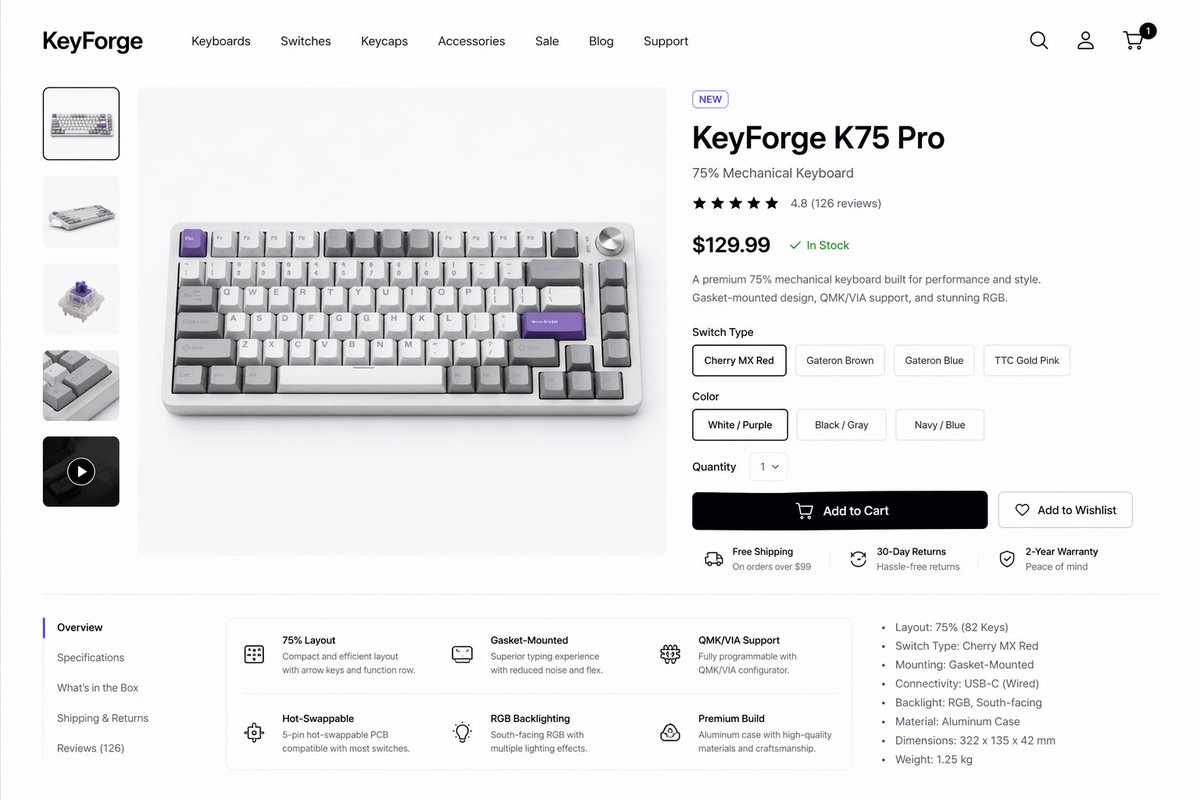
Mockup af produktside til mekanisk tastatur
Dette genererer en poleret e-handelsproduktside til et førsteklasses mekanisk tastatur, der er egnet til produktdesignudstillinger, butikskoncepter og brugergrænseflademockups.
Dette er et GPT Image 2 -eksempel på en prompt for Grafik og plakat . Brug den kopieringsklare prompt nedenfor til at generere lignende visuelle elementer, og gennemgå Awesome GPT Image 2 Prompts -kreditering samt kommercielle brugsrettigheder før genbrug.
Har du brug for det fulde promptsæt? Brug Grafik og plakat emnehub for flere relaterede eksempler, eller åbn GPT Image 2 hurtig katalog for det fulde eksempelindeks, genanvendelige strukturer og kildeattribution.
Free 1K preview
Generate one preview image instantly, no sign-up required.
3590/4000
Hurtig
Klar til kopiering
Create a clean modern e-commerce product detail page for a premium mechanical keyboard brand called {argument name="brand name" default="KeyForge"}, presented as a high-fidelity desktop website mockup on a white background with subtle light-gray dividers and generous spacing. The layout is a single unified storefront scene with a top navigation bar, a left product thumbnail rail, a large center product hero image, and a right-side purchase information panel. In the header, place the bold wordmark on the far left, then 7 navigation items reading “Keyboards”, “Switches”, “Keycaps”, “Accessories”, “Sale”, “Blog”, and “Support”, and on the far right 3 icons for search, account, and cart, with a small black notification badge showing “1” on the cart. The main product shown in the center is a compact 75% mechanical keyboard photographed from a slightly elevated front angle on a pale gray stage, with an aluminum case in silver, white and gray keycaps, several accent keys in lavender purple, and a silver volume knob at the top right. The left vertical gallery contains exactly 5 thumbnails: 1 selected front product shot, 1 angled keyboard view, 1 mechanical switch close-up, 1 keycap texture close-up, and 1 dark video thumbnail with a circular play icon. The right product panel includes a small pill badge reading “NEW”, a large bold product name {argument name="product name" default="KeyForge K75 Pro"}, a subtitle “75% Mechanical Keyboard”, a 5-star rating row with 4.8 and “(126 reviews)”, a large bold price {argument name="price" default="$129.99"} followed by a green “In Stock” status, and a short two-sentence description about premium performance, gasket-mounted design, QMK/VIA support, and RGB. Under that, include a “Switch Type” selector with exactly 4 pill buttons labeled “Cherry MX Red”, “Gateron Brown”, “Gateron Blue”, and “TTC Gold Pink”, with the first selected; a “Color” selector with exactly 3 pill buttons labeled “White / Purple”, “Black / Gray”, and “Navy / Blue”, with the first selected; a “Quantity” dropdown set to “1”; one large black primary button labeled “Add to Cart” with a cart icon; and one outlined secondary button labeled “Add to Wishlist” with a heart icon. Beneath the buttons, show exactly 3 horizontal service highlights with small icons: “Free Shipping” with subtext “On orders over $99”, “30-Day Returns” with subtext “Hassle-free returns”, and “2-Year Warranty” with subtext “Peace of mind”. In the lower content area, create a two-column section separated by light lines. On the left is a vertical tab list with exactly 5 items: “Overview” selected, then “Specifications”, “What’s in the Box”, “Shipping & Returns”, and “Reviews (126)”. To the right of the tabs, place a rounded white feature card grid with exactly 6 feature blocks in 2 rows of 3, each with a simple line icon, bold title, and short explanatory text: “75% Layout”, “Gasket-Mounted”, “QMK/VIA Support”, “Hot-Swappable”, “RGB Backlighting”, and “Premium Build”. On the far right of this lower area, add a specifications bullet list with exactly 7 bullets: “Layout: 75% (82 Keys)”, “Switch Type: Cherry MX Red”, “Mounting: Gasket-Mounted”, “Connectivity: USB-C (Wired)”, “Backlight: RGB, South-facing”, “Material: Aluminum Case”, and “Dimensions: 322 x 135 x 42 mm”, plus an additional final bullet “Weight: 1.25 kg”. Use a refined minimalist product-design aesthetic, realistic UI spacing, clean sans-serif typography similar to Inter or SF Pro, soft shadows, subtle rounded corners, monochrome icons, and polished startup-style consumer electronics presentation.Promptvariabler
Redigerbare argumentpladsholdere fundet i prompten med deres standardværdier.
Variabel
brand name
Misligholdelse
KeyForge
Variabel
product name
Misligholdelse
KeyForge K75 Pro
Variabel
price
Misligholdelse
$129.99
Best for
- - Grafik og plakat visual exploration
- - Image generation and reference-image edits
- - Reusable briefs that keep source attribution visible
Change these parts
- - Subject, product, character, or scene
- - Aspect ratio, camera, lighting, and background
- - Brand, text, color, and output constraints
Recommended model and settings
- - Model: gpt-image-2
- - Input mode: Tekst til billede
- - Aspect ratio: source
- - Commercial status: review original source
How to use this prompt
- 1. Copy the prompt and preserve its structure for the first test.
- 2. Replace the subject, context, and publishing channel.
- 3. Change one camera, lighting, or style variable per iteration.
- 4. Inspect the output, source, text, and rights before reuse.
Limitations, source, and reuse cautions
- - Generated output is an editable draft, not factual, legal, or rights evidence.
- - Review the linked source, people, brands, logos, text, and third-party media before commercial use.
Importeret fra Awesome GPT Image 2 Prompts . Kreditering er påkrævet. Status for kommerciel brug er allowed ; gennemgå kilderettighederne før betalt brug.
Flere sager i denne kategori
Prioriteret efter kategori, kompatibilitet med inputtilstande, kvalitet og lavere risiko.

Transparent Earbuds on Stone Pedestal
Tekst til billede

Surreal 3D Chess Match Artwork
Tekst til billede

Overhead Pepperoni Pizza Photo
Tekst til billede

Wet Transparent Earbud Macro
Tekst til billede

Grumpy Rhino Storybook Illustration
Tekst til billede

Martial Arts Legend Character Bible Sheet
Tekst til billede
Genbrug og kildenoter
Brug denne prompt sikkert efter at have gennemgået sagen.
- 1.Kopier prompten, eller åbn den direkte i Dovoo med genereringsknappen.
- 2.Juster variabler, billedformat og referencebilleder til din egen brug.
- 3.Før udgivelse eller betalt brug skal du verificere kilderettigheder, krav til kreditering og risici forbundet med branding eller lighed.