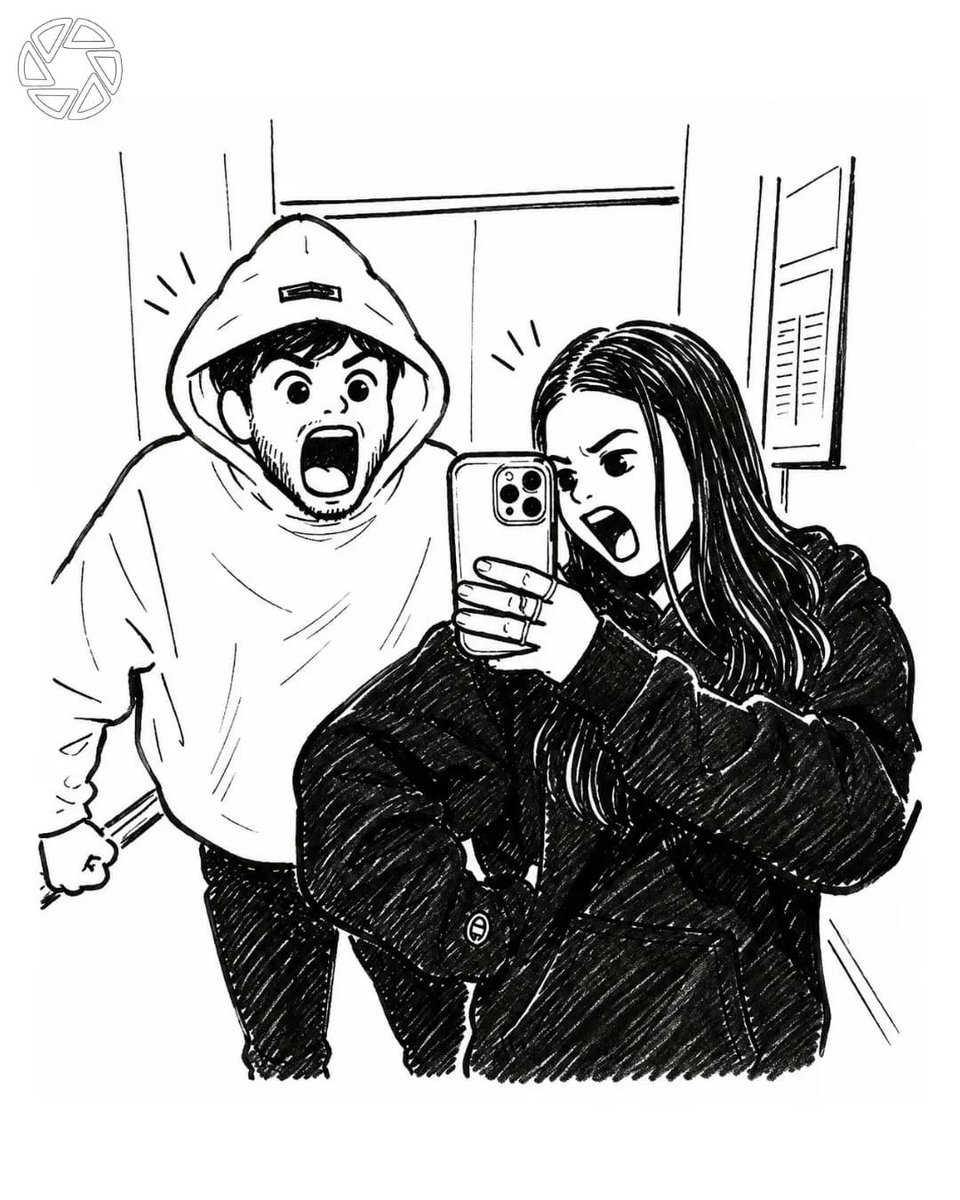
Manga Style Photo Transformation
A specialized prompt for transforming a realistic selfie into a detailed black-and-white manga illustration while maintaining exact proportions.
Dette er et GPT Image 2 -eksempel på en prompt for Anime og spil . Brug den kopieringsklare prompt nedenfor til at generere lignende visuelle elementer, og gennemgå Awesome GPT Image 2 Prompts -kreditering samt kommercielle brugsrettigheder før genbrug.
Har du brug for det fulde promptsæt? Brug Anime og spil emnehub for flere relaterede eksempler, eller åbn GPT Image 2 hurtig katalog for det fulde eksempelindeks, genanvendelige strukturer og kildeattribution.
Free 1K preview
Generate one preview image instantly, no sign-up required.
Free text preview doesn’t preserve reference-image consistency.
972/4000
Hurtig
Klar til kopiering
Create a highly detailed black-and-white manga illustration based on the uploaded photo while preserving the exact pose, composition, facial expressions, clothing, and camera angle. {argument name="subject" default="Two friends are taking a mirror selfie inside a modern elevator. The girl stands in the foreground holding a smartphone, wearing an oversized black hoodie, long dark hair, making an exaggerated screaming expression with one eye squinted. Behind her, the boy wears an oversized white hoodie with the hood up, also screaming dramatically with wide eyes and an open mouth, fists clenched in a playful pose."}

Illustrate everything using bold manga ink lines, clean contour work, expressive cross-hatching, fine pen strokes, subtle screentone shading, and dynamic comic-style line weight. Keep the elevator background minimal but recognizable with metallic panels and reflections. Add tiny manga emphasis lines around both heads to enhance the comedic energy.
Promptvariabler
Redigerbare argumentpladsholdere fundet i prompten med deres standardværdier.
Variabel
subject
Misligholdelse
Two friends are taking a mirror selfie inside a modern elevator. The girl stands in the foreground holding a smartphone, wearing an oversized black hoodie, long dark hair, making an exaggerated screaming expression with one eye squinted. Behind her, the boy wears an oversized white hoodie with the hood up, also screaming dramatically with wide eyes and an open mouth, fists clenched in a playful pose.
Best for
- - Anime og spil visual exploration
- - Image generation and reference-image edits
- - Reusable briefs that keep source attribution visible
Change these parts
- - Subject, product, character, or scene
- - Aspect ratio, camera, lighting, and background
- - Brand, text, color, and output constraints
Recommended model and settings
- - Model: gpt-image-2
- - Input mode: Billede til billede
- - Aspect ratio: source
- - Commercial status: review original source
How to use this prompt
- 1. Copy the prompt and preserve its structure for the first test.
- 2. Replace the subject, context, and publishing channel.
- 3. Change one camera, lighting, or style variable per iteration.
- 4. Inspect the output, source, text, and rights before reuse.
Limitations, source, and reuse cautions
- - Generated output is an editable draft, not factual, legal, or rights evidence.
- - Review the linked source, people, brands, logos, text, and third-party media before commercial use.
Importeret fra Awesome GPT Image 2 Prompts . Kreditering er påkrævet. Status for kommerciel brug er allowed ; gennemgå kilderettighederne før betalt brug.
Flere sager i denne kategori
Prioriteret efter kategori, kompatibilitet med inputtilstande, kvalitet og lavere risiko.

Oversized Head Cartoon Caricature Prompt
Billede til billedeMellem risiko

Anime Girl Heterochromia Portrait
Tekst til billede

Sci-Fi Cyan Lighting Effect
Billede til billede

Stylish Man Street Lamp Portrait
Billede til billede

Boisterous Shrimpers Entering Pub
Tekst til billede

Tuxedo Cat Photo and Line Art Diptych
Tekst til billede
Genbrug og kildenoter
Brug denne prompt sikkert efter at have gennemgået sagen.
- 1.Kopier prompten, eller åbn den direkte i Dovoo med genereringsknappen.
- 2.Juster variabler, billedformat og referencebilleder til din egen brug.
- 3.Før udgivelse eller betalt brug skal du verificere kilderettigheder, krav til kreditering og risici forbundet med branding eller lighed.