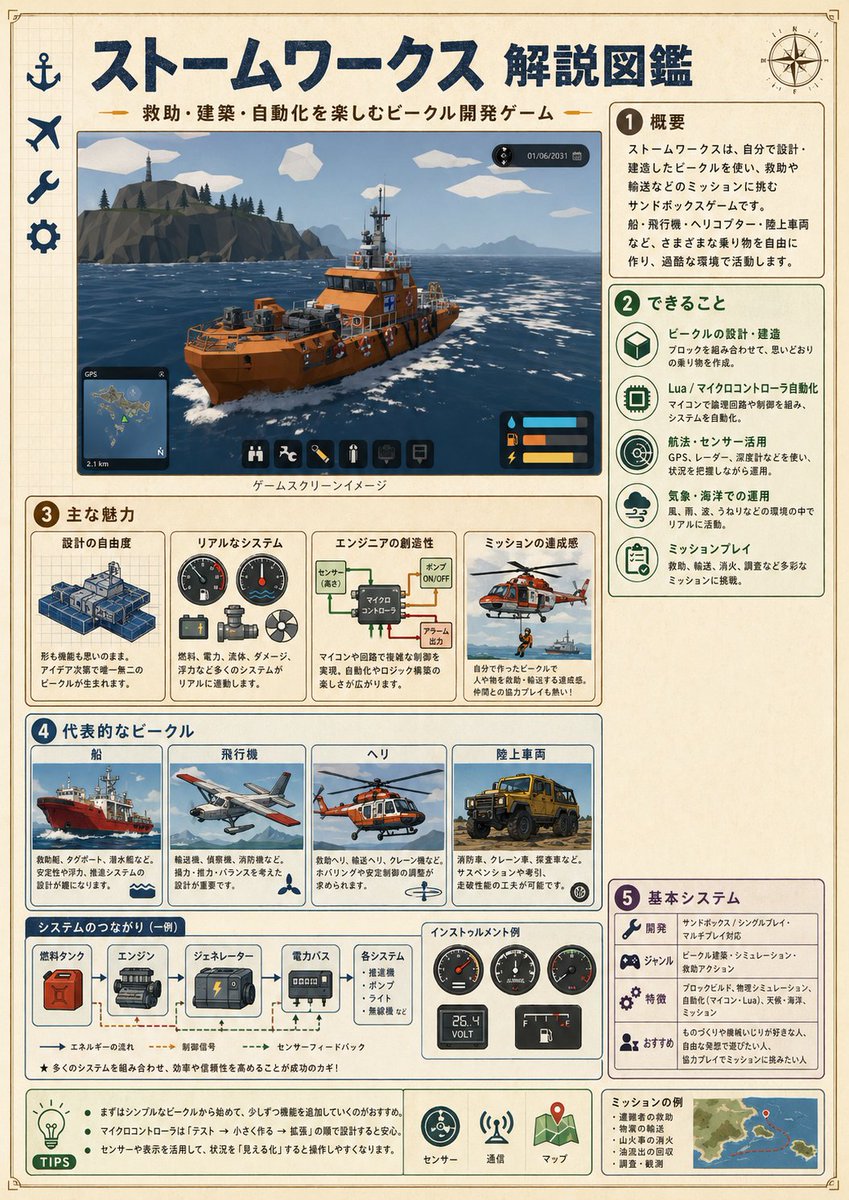
Infografik over japanske stormværker
En detaljeret japansk infografikplakat, der forklarer et redningsspil om køretøjsbygning, egnet til at skabe håndbogslignende spiloversigter eller forklarende billeder til sociale medier.
Dette er et GPT Image 2 -eksempel på en prompt for Grafik og plakat . Brug den kopieringsklare prompt nedenfor til at generere lignende visuelle elementer, og gennemgå Awesome GPT Image 2 Prompts -kreditering samt kommercielle brugsrettigheder før genbrug.
Har du brug for det fulde promptsæt? Brug Grafik og plakat emnehub for flere relaterede eksempler, eller åbn GPT Image 2 hurtig katalog for det fulde eksempelindeks, genanvendelige strukturer og kildeattribution.
Free 1K preview
Generate one preview image instantly, no sign-up required.
4000/4000
Hurtig
Klar til kopiering
{
  "type": "Japanese game explainer infographic poster",
  "topic": "{argument name=\"game title\" default=\"Stormworks\"}",
  "style": "clean illustrated infographic on aged cream paper with faint grid background, navy blue headings, rounded bordered panels, technical handbook meets playful game guide, crisp print layout, high readability, subtle weathered texture",
  "language": "Japanese",
  "format": "vertical poster",
  "layout": {
    "header": {
      "title": "{argument name=\"main title\" default=\"ストームワークス 解説図鑑\"}",
      "subtitle": "{argument name=\"subtitle text\" default=\"救助・建築・自動化を楽しむビークル開発ゲーム\"}",
      "left_icons_count": 4,
      "left_icons": [
        "anchor",
        "airplane",
        "wrench",
        "gear"
      ],
      "top_right_icon": "compass rose"
    },
    "sections": [
      {
        "title": "1 Overview",
        "position": "upper right",
        "count": 1,
        "labels": [
          "Overview"
        ],
        "content": "short Japanese paragraph explaining an engineering and rescue sandbox game where the player designs and builds vehicles, transports cargo, and completes missions in a harsh natural environment; mention ships, aircraft, helicopters, and land vehicles"
      },
      {
        "title": "2 できること",
        "position": "right middle",
        "count": 5,
        "labels": [
          "ビークルの設計・建造",
          "Lua / マイクロコントローラ自動化",
          "航法・センサー活用",
          "気象・海洋での運用",
          "ミッションプレイ"
        ],
        "icon_style": "green circular line icons",
        "content": "five vertically stacked feature cards with icon, bold heading, and two to three lines of Japanese explanatory text"
      },
      {
        "title": "3 主な魅力",
        "position": "middle wide panel",
        "count": 4,
        "labels": [
          "設計の自由度",
          "リアルなシステム",
          "エンジニアの創造性",
          "ミッションの達成感"
        ],
        "content": "four side-by-side cards with small illustrations and captions"
      },
      {
        "title": "4 代表的なビークル",
        "position": "lower middle large panel",
        "count": 4,
        "labels": [
          "Ship",
          "Airplane",
          "ヘリ",
          "Land Vehicle"
        ],
        "content": "top row contains four framed vehicle example cards, each with image and small Japanese description; bottom strip includes one systems-flow diagram and one instrument example"
      },
      {
        "title": "5 基本システム",
        "position": "lower right",
        "count": 4,
        "labels": [
          "Development",
          "ジャンル",
          "Features",
          "おすすめ"
        ],
        "content": "four compact rows with small icons and short Japanese descriptions"
      }
    ],
    "footer": {
      "left_box_title": "TIPS",
      "left_box_bullets_count": 2,
      "left_box_bullets": [
        "まずはシンプルなビークルから始めて、少しずつ機能を追加していくのがおすすめ。",
        "マイクロコントローラは『テスト→小さく作る→拡張』の順で扱うと安定。センサーや表示を活用して、状況を『見える化』すると操作しやすくなります。"
      ],
      "center_icons_count": 3,
      "center_icons": [
        "sensor",
        "communication tower",
        "map pin on folded map"
      ],
      "right_box_title": "ミッションの例",
      "right_box_items_count": 5,
      "right_box_items": [
        "遭難者の救助",
        "物資の輸送",
        "山火事の消火",
        "油漏れの回収",
        "調査・観測"
      ],
      "right_box_visual": "small island map"
    }
  },
  "main_image": {
    "position": "upper left large panel",
    "description": "a bright orange rescue workboat traveling through dark blue ocean with white foam, viewed three-quarters from the front, black railings and deck equipment, mountainous rocky island with pine trees and lighthouse in the background, pale blue sky with stylized white polygon clouds",
    "caption": "ゲームスクリーンイメージ",
    "overlay_ui_count": 4,
    "overlay_ui": [
      "top-right small dark date/time HUD",
      "bottom-left GPS minimap",
      "bottom-center row of 6 square toolbar icons",
      "bottom-right compact status panel with 3 colored bars"
    ]
  },
  "sub_panels": {
    "section_3_images_count": 4,
    "section_3_images": [
      "blueprint-like modular ship design blocks",
      "three round gauges with small mechanical parts",
      "logic diagram with labeled boxes and arrows",
      "orange rescue helicopter above sea and a small inset boat scene"
    ],
    "section_4_vehicle_images_count": 4,
    "section_4_vehicle_images": [
      "large red ship at sea",
      "single-engine propeller airplane in flight",
      "orange-white helicopter",
      "yellow off-road utility truck"
    ],
    "systems_flow": {
      "title": "システムのつながり(一例)",
      "count": 5,
      "labels": [
        "燃料タンク",
        "エンジン",
        "ジェネレーター",
        "電力バス",
        "各システム"
      ],
      "arrows": [
        "エネルギーの流れ",
        "Control signal",
        "センサーフィードバック"
      ]
    },
    "instrument_example": {
      "title": "インストゥルメント例",
      "gauges_count": 5,
      "gauges": [
        "tachometer-like dial",
        "speedometer-like dial",
        "pressure or temperature dial",
        "digital volt display 25.4 VOLT",
        "fuel gauge"
      ]
    }
  },
  "visual_requirements": {
    "aspect_ratio": "3:4",
    "rendering": "mix of flat infographic graphics and semi-realistic game screenshots/painted inserts",
    "color_palette": [
      "navy blue",
      "forest green",
      "orange",
      "cream",
      "light blue",
      "gray"
    ],
    "linework": "clean printed outlines",
    "typography": "bold Japanese display font for titles, neat sans-serif Japanese text for body",
    "overall_feel": "educational field guide, game manual poster, polished and friendly"
  }
}
Promptvariabler
Redigerbare argumentpladsholdere fundet i prompten med deres standardværdier.
Variabel
game title
Misligholdelse
Stormworks
Variabel
main title
Misligholdelse
ストームワークス 解説図鑑
Variabel
subtitle text
Misligholdelse
救助・建築・自動化を楽しむビークル開発ゲーム
Best for
- - Grafik og plakat visual exploration
- - Image generation and reference-image edits
- - Reusable briefs that keep source attribution visible
Change these parts
- - Subject, product, character, or scene
- - Aspect ratio, camera, lighting, and background
- - Brand, text, color, and output constraints
Recommended model and settings
- - Model: gpt-image-2
- - Input mode: Tekst til billede
- - Aspect ratio: source
- - Commercial status: review original source
How to use this prompt
- 1. Copy the prompt and preserve its structure for the first test.
- 2. Replace the subject, context, and publishing channel.
- 3. Change one camera, lighting, or style variable per iteration.
- 4. Inspect the output, source, text, and rights before reuse.
Limitations, source, and reuse cautions
- - Generated output is an editable draft, not factual, legal, or rights evidence.
- - Review the linked source, people, brands, logos, text, and third-party media before commercial use.
Importeret fra Awesome GPT Image 2 Prompts . Kreditering er påkrævet. Status for kommerciel brug er allowed ; gennemgå kilderettighederne før betalt brug.
Flere sager i denne kategori
Prioriteret efter kategori, kompatibilitet med inputtilstande, kvalitet og lavere risiko.

Grumpy Rhino Storybook Illustration
Tekst til billede

Martial Arts Legend Character Bible Sheet
Tekst til billede

Manga Desert Radio Telescope Road Trip
Tekst til billede

Android Quantum Lab Workstation
Tekst til billede

Surreal 3D Chess Match Artwork
Tekst til billede

Pink Hijab Mirror Selfie Portrait
Tekst til billede
Genbrug og kildenoter
Brug denne prompt sikkert efter at have gennemgået sagen.
- 1.Kopier prompten, eller åbn den direkte i Dovoo med genereringsknappen.
- 2.Juster variabler, billedformat og referencebilleder til din egen brug.
- 3.Før udgivelse eller betalt brug skal du verificere kilderettigheder, krav til kreditering og risici forbundet med branding eller lighed.