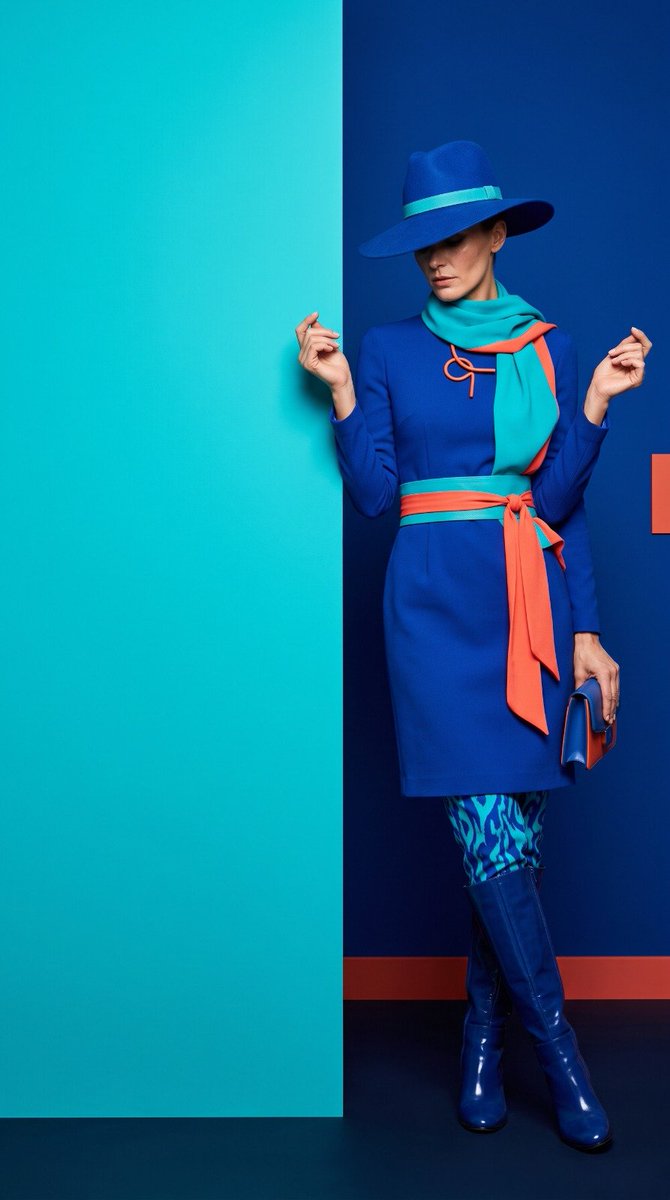
High-Fashion Color Block Editorial GPT Image 2
A structured JSON-style prompt for a high-fashion editorial photo with electric blue and turquoise color blocks, created with GPT Image 2.
Dette er et GPT Image 2 -eksempel på en prompt for Mode og skønhed . Brug den kopieringsklare prompt nedenfor til at generere lignende visuelle elementer, og gennemgå Awesome GPT Image 2 Prompts -kreditering samt kommercielle brugsrettigheder før genbrug.
Har du brug for det fulde promptsæt? Brug Mode og skønhed emnehub for flere relaterede eksempler, eller åbn GPT Image 2 hurtig katalog for det fulde eksempelindeks, genanvendelige strukturer og kildeattribution.
Free 1K preview
Generate one preview image instantly, no sign-up required.
2843/4000
Hurtig
Klar til kopiering
{
  "aspect_ratio": "9:16",
  "image_type": "high-fashion editorial photography",
  "composition": {
    "framing": "full-body vertical portrait",
    "camera_angle": "straight-on, slightly low fashion perspective",
    "subject_position": "right side of the frame",
    "negative_space": "large bold color-block area on the left",
    "vertical_division": "sharp architectural vertical boundary between two vibrant color fields",
    "subject_overlap": "model partially emerges from behind the vertical wall edge",
    "floor": "thin dark floor strip along the bottom"
  },
  "subject": {
    "type": "adult female fashion model",
    "pose": "confident unconventional fashion pose with one leg crossed forward and body slightly leaning from the wall edge",
    "arms": "relaxed but intentionally positioned, one hand slightly forward",
    "head": "slightly tilted downward",
    "face_visibility": "partially shadowed by the wide-brim hat",
    "expression": "mysterious, confident, editorial attitude"
  },
  "outfit": {
    "main_color": "electric cobalt blue",
    "secondary_color": "vivid turquoise",
    "accent_color": "hot coral orange",
    "dress": "structured knee-length cobalt blue fashion dress with a fitted waist",
    "sleeves": "long fitted sleeves",
    "waist_detail": "wide turquoise belt with a long flowing coral-orange fabric sash",
    "neck_detail": "dramatic turquoise scarf with small coral-orange decorative accents",
    "pants": "vivid cobalt and turquoise patterned fitted trousers",
    "shoes": "glossy deep cobalt knee-high fashion boots",
    "hat": "large sculptural cobalt blue wide-brim hat with a subtle turquoise band",
    "accessories": "minimal sculptural coral-orange fashion ornament near the neckline"
  },
  "background": {
    "left": "large solid electric turquoise wall or architectural panel",
    "right": "deep saturated cobalt blue studio wall",
    "color_relationship": "background colors directly echo the model's outfit, creating a unified monochromatic color-world",
    "accent": "small controlled coral-orange accents visually connect the outfit to the background palette",
    "floor": "deep navy-black matte floor",
    "style": "minimalist geometric color-block studio set"
  },
  "lighting": {
    "style": "dramatic premium fashion studio lighting",
    "direction": "strong soft directional light from upper front-left",
    "shadows": "clean controlled shadows",
    "contrast": "high contrast with rich saturated colors",
    "skin": "natural realistic skin texture without beauty-filter smoothing",
    "highlights": "subtle highlights on fabric and boots"
  },
  "color_palette": {
    "primary": "electric turquoise",
    "secondary": "saturated cobalt blue",
    "accent": "hot coral orange",
    "dark": "deep navy",
    "skin": "natural realistic skin tones"
  }
}
Best for
- - Mode og skønhed visual exploration
- - Image generation and reference-image edits
- - Reusable briefs that keep source attribution visible
Change these parts
- - Subject, product, character, or scene
- - Aspect ratio, camera, lighting, and background
- - Brand, text, color, and output constraints
Recommended model and settings
- - Model: gpt-image-2
- - Input mode: Tekst til billede
- - Aspect ratio: source
- - Commercial status: review original source
How to use this prompt
- 1. Copy the prompt and preserve its structure for the first test.
- 2. Replace the subject, context, and publishing channel.
- 3. Change one camera, lighting, or style variable per iteration.
- 4. Inspect the output, source, text, and rights before reuse.
Limitations, source, and reuse cautions
- - Generated output is an editable draft, not factual, legal, or rights evidence.
- - Review the linked source, people, brands, logos, text, and third-party media before commercial use.
Importeret fra Awesome GPT Image 2 Prompts . Kreditering er påkrævet. Status for kommerciel brug er allowed ; gennemgå kilderettighederne før betalt brug.
Flere sager i denne kategori
Prioriteret efter kategori, kompatibilitet med inputtilstande, kvalitet og lavere risiko.

Luxury Travel Fashion Portrait Prompt
Tekst til billede

Autumn Cozy Casual Outfit Prompt
Tekst til billede

Studio Portrait of Woman with Sunglasses
Tekst til billede

Orange Rooftop Fashion Photo Prompt
Tekst til billede

Gray Denim Lace-Up Top Prompt for GPT Image 2
Tekst til billede

Matte Black B.AI Keyboard Keycap
Tekst til billede
Genbrug og kildenoter
Brug denne prompt sikkert efter at have gennemgået sagen.
- 1.Kopier prompten, eller åbn den direkte i Dovoo med genereringsknappen.
- 2.Juster variabler, billedformat og referencebilleder til din egen brug.
- 3.Før udgivelse eller betalt brug skal du verificere kilderettigheder, krav til kreditering og risici forbundet med branding eller lighed.