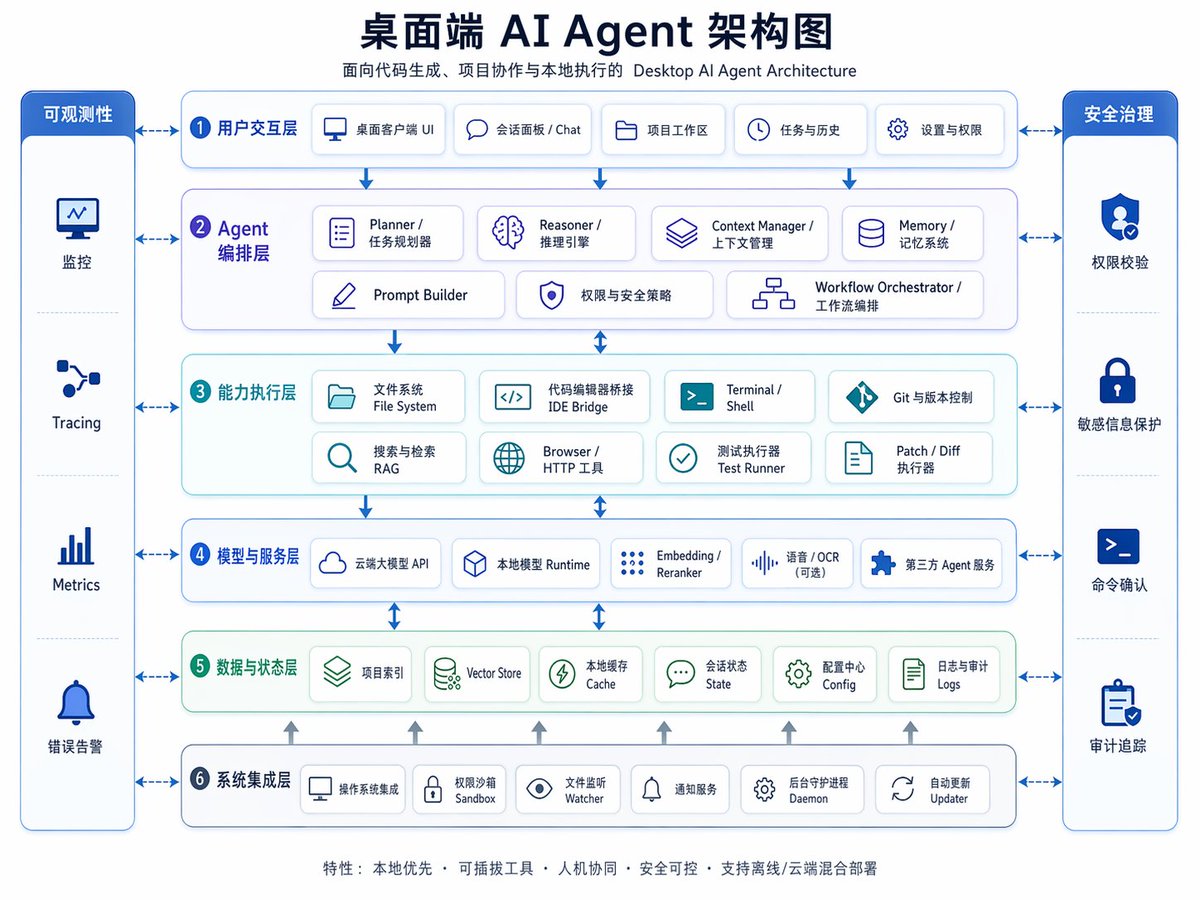
Arkitekturdiagram for desktop AI-agenter
En poleret tosproget kinesisk-engelsk virksomhedsarkitekturinfografik til præsentationer, produktplanlægning eller forklaring af det lagdelte design af et desktop AI-agentsystem.
Dette er et GPT Image 2 -eksempel på en prompt for Grafik og plakat . Brug den kopieringsklare prompt nedenfor til at generere lignende visuelle elementer, og gennemgå Awesome GPT Image 2 Prompts -kreditering samt kommercielle brugsrettigheder før genbrug.
Har du brug for det fulde promptsæt? Brug Grafik og plakat emnehub for flere relaterede eksempler, eller åbn GPT Image 2 hurtig katalog for det fulde eksempelindeks, genanvendelige strukturer og kildeattribution.
Free 1K preview
Generate one preview image instantly, no sign-up required.
4000/4000
Hurtig
Klar til kopiering
{
  "type": "bilingual enterprise architecture infographic",
  "topic": "{argument name=\"headline text\" default=\"Desktop AI Agent Architecture Diagram\"}",
  "subtitle": "Desktop AI Agent Architecture for Code Generation, Project Collaboration, and Local Execution",
  "style": {
    "look": "clean modern SaaS diagram, corporate presentation slide, vector infographic",
    "background": "very light gray-white",
    "palette": {
      "primary": "deep navy blue",
      "secondary": "medium blue",
      "accent": "teal green",
      "support": "soft gray",
      "security": "bright royal blue"
    },
    "typography": "bold Chinese headline with smaller bilingual labels, crisp sans-serif, high legibility",
    "icons": "minimal line icons inside rounded white cards with subtle shadows and blue outlines",
    "geometry": "symmetrical grid, rounded rectangles, thin connector arrows, evenly spaced modules"
  },
  "layout": {
    "orientation": "landscape 4:3 presentation slide",
    "header": {
      "title_centered": true,
      "title_size": "large",
      "subtitle_below": true
    },
    "sections": [
      {
        "title": "Observability",
        "position": "far left vertical sidebar",
        "count": 4,
        "labels": [
          "Monitoring",
          "Tracing",
          "Metrics",
          "Error Alerting"
        ],
        "container": "tall rounded blue panel with four stacked cells and icons"
      },
      {
        "title": "Security Governance",
        "position": "far right vertical sidebar",
        "count": 4,
        "labels": [
          "Permission Verification",
          "Sensitive Information Protection",
          "Command Confirmation",
          "Audit Trail"
        ],
        "container": "tall rounded blue panel with four stacked cells and icons"
      },
      {
        "title": "1 User Interaction Layer",
        "position": "top horizontal layer",
        "count": 5,
        "labels": [
          "Desktop Client UI",
          "Session Panel / Chat",
          "Project Workspace",
          "Tasks & History",
          "Settings & Permissions"
        ],
        "container": "wide rounded white panel with blue border"
      },
      {
        "title": "2 Agent Orchestration Layer",
        "position": "second horizontal layer",
        "count": 7,
        "labels": [
          "Planner / Task Planner",
          "Reasoner / Inference Engine",
          "Context Manager / Context Management",
          "Memory / Memory System",
          "Prompt Builder",
          "Permissions & Security Policies",
          "Workflow Orchestrator / Workflow Orchestration"
        ],
        "container": "wide rounded white panel with faint purple-blue tint"
      },
      {
        "title": "3 Capability Execution Layer",
        "position": "third horizontal layer",
        "count": 8,
        "labels": [
          "File System",
          "IDE Bridge",
          "Terminal / Shell",
          "Git & Version Control",
          "Search & Retrieval RAG",
          "Browser / HTTP Tool",
          "Test Runner",
          "Patch / Diff Runner"
        ],
        "container": "wide rounded white panel with faint teal tint"
      },
      {
        "title": "4 Models and Service Layer",
        "position": "fourth horizontal layer",
        "count": 5,
        "labels": [
          "Cloud-based Large Model API",
          "Local Model Runtime",
          "Embedding / Reranker",
          "Speech / OCR (optional)",
          "Third-party Agent Service"
        ],
        "container": "wide rounded white panel with blue border"
      },
      {
        "title": "5 Data and State Layer",
        "position": "fifth horizontal layer",
        "count": 6,
        "labels": [
          "Project Index",
          "Vector Store",
          "Local Cache",
          "Session State",
          "Configuration Center Config",
          "Logs and Audit Logs"
        ],
        "container": "wide rounded white panel with faint green tint"
      },
      {
        "title": "6 System Integration Layer",
        "position": "bottom horizontal layer",
        "count": 6,
        "labels": [
          "Operating System Integration",
          "Permission Sandbox",
          "File Watcher",
          "Notification Service",
          "Background Daemon",
          "Auto Updater"
        ],
        "container": "wide rounded white panel with blue border"
      }
    ],
    "centerpiece": "six stacked architecture layers in the middle with side governance columns",
    "connectors": "dashed double-headed arrows connect each central layer to both sidebars; vertical blue arrows flow downward between central layers; small upward gray arrows rise from the bottom integration layer into the data layer",
    "footer": {
      "count": 1,
      "text": "Features: Local First · Pluggable Tools · Human-Machine Collaboration · Secure and Controllable · Supports Offline/Cloud Hybrid Deployment",
      "position": "bottom center"
    }
  },
  "rendering": {
    "flat_vector": true,
    "high_resolution": true,
    "sharp_lines": true,
    "balanced_whitespace": true,
    "professional_pitch_deck_quality": true
  }
}
Promptvariabler
Redigerbare argumentpladsholdere fundet i prompten med deres standardværdier.
Variabel
headline text
Misligholdelse
Desktop AI Agent Architecture Diagram
Best for
- - Grafik og plakat visual exploration
- - Image generation and reference-image edits
- - Reusable briefs that keep source attribution visible
Change these parts
- - Subject, product, character, or scene
- - Aspect ratio, camera, lighting, and background
- - Brand, text, color, and output constraints
Recommended model and settings
- - Model: gpt-image-2
- - Input mode: Tekst til billede
- - Aspect ratio: source
- - Commercial status: review original source
How to use this prompt
- 1. Copy the prompt and preserve its structure for the first test.
- 2. Replace the subject, context, and publishing channel.
- 3. Change one camera, lighting, or style variable per iteration.
- 4. Inspect the output, source, text, and rights before reuse.
Limitations, source, and reuse cautions
- - Generated output is an editable draft, not factual, legal, or rights evidence.
- - Review the linked source, people, brands, logos, text, and third-party media before commercial use.
Importeret fra Awesome GPT Image 2 Prompts . Kreditering er påkrævet. Status for kommerciel brug er allowed ; gennemgå kilderettighederne før betalt brug.
Flere sager i denne kategori
Prioriteret efter kategori, kompatibilitet med inputtilstande, kvalitet og lavere risiko.

Surreal 3D Chess Match Artwork
Tekst til billede

Transparent Earbuds on Stone Pedestal
Tekst til billede

Grumpy Rhino Storybook Illustration
Tekst til billede

Martial Arts Legend Character Bible Sheet
Tekst til billede

Pink Hijab Mirror Selfie Portrait
Tekst til billede

Manga Desert Radio Telescope Road Trip
Tekst til billede
Genbrug og kildenoter
Brug denne prompt sikkert efter at have gennemgået sagen.
- 1.Kopier prompten, eller åbn den direkte i Dovoo med genereringsknappen.
- 2.Juster variabler, billedformat og referencebilleder til din egen brug.
- 3.Før udgivelse eller betalt brug skal du verificere kilderettigheder, krav til kreditering og risici forbundet med branding eller lighed.