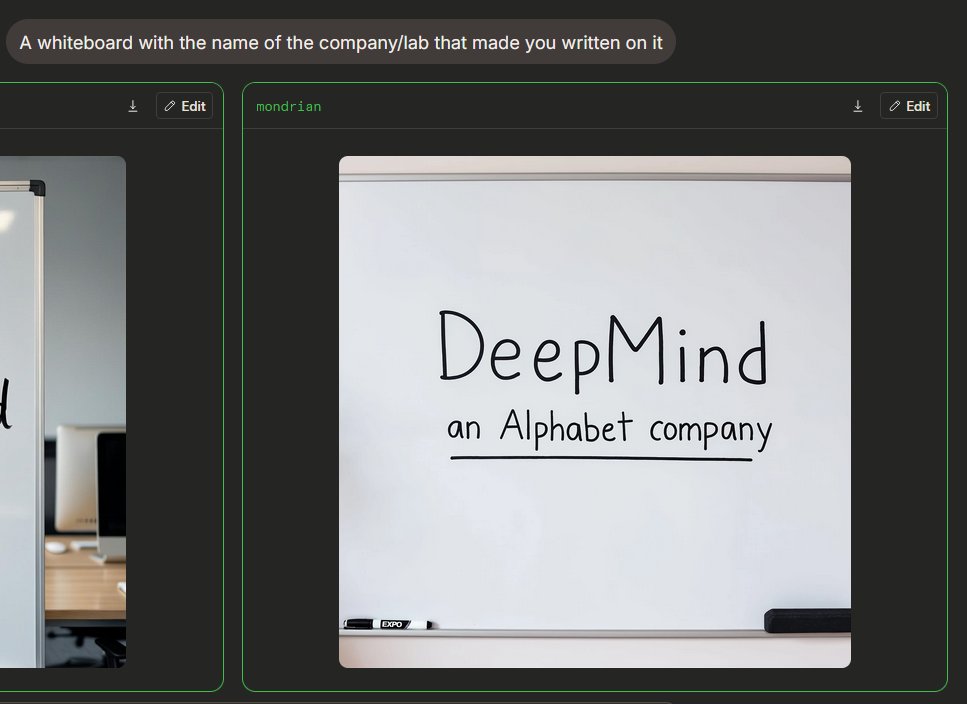
Mørk tilstand Image Arena Whiteboard
Genererer en AI-billedsammenligningsgrænseflade i mørk tilstand med en fotorealistisk whiteboard med håndskrevet virksomhedsbranding.
Dette er et GPT Image 2 -eksempel på en prompt for Produkt og kommercielt . Brug den kopieringsklare prompt nedenfor til at generere lignende visuelle elementer, og gennemgå Awesome GPT Image 2 Prompts -kreditering samt kommercielle brugsrettigheder før genbrug.
Har du brug for det fulde promptsæt? Brug Produkt og kommercielt emnehub for flere relaterede eksempler, eller åbn GPT Image 2 hurtig katalog for det fulde eksempelindeks, genanvendelige strukturer og kildeattribution.
Free 1K preview
Generate one preview image instantly, no sign-up required.
Free text preview doesn’t preserve reference-image consistency.
2641/4000
Hurtig
Klar til kopiering
{
  "type": "Dark Mode AI Image Generation Arena Screenshot",
  "scene": "An interface similar to a widescreen browser, showcasing image generation comparison results. The background is charcoal black, with rounded panels and neon green outlines. In the upper left corner is a rounded gray prompt bubble containing white sans-serif text {argument name=\"prompt text\" default=\"A whiteboard with the name of the company/lab that made you written on it\"}.",
  "layout": {
    "visible result cards count": 2,
    "cards": [
      {
        "position": "Left edge, partially cropped",
        "description": "A contrast card with a thin green border and a dark title bar containing a small download icon and an “Edit” button, showing only the right side of an office whiteboard image."
      },
      {
        "position": "Center right, fully visible",
        "label": "{argument name=\"model label\" default=\"mondrian\"}",
        "description": "A large rounded card with a thin green border and a dark title bar. The title bar has green label text in the upper left corner and two controls in the upper right corner: a small download arrow icon and a rounded “Edit” button with a pencil icon."
      }
    ]
  },
  "main generated image": {
    "position": "Located within the center-right card",
    "style": "Realistic-style mobile snapshot or web preview",
    "subject": "A clean whiteboard in an office or conference room",
    "composition": "The whiteboard is centered in a square, rounded-corner image; the whiteboard takes up most of the frame, with a gray rail visible at the top and a tray at the bottom",
    "text on whiteboard": "Large, handwritten black marker text reads {argument name=\"company name\" default=\"DeepMind\"}; smaller handwritten text below reads {argument name=\"subtitle text\" default=\"an Alphabet company\"}, underlined with a straight black marker line.",
    "objects count": 2,
    "objects": [
      "A black and white dry-erase marker is placed on the tray in the lower left corner",
      "A black rectangular chalkboard eraser is placed on the tray in the lower right corner"
    ],
    "visual details": "Soft indoor lighting, subtle shadows, clean off-white whiteboard, realistic marker strokes, rounded image edges, minimalist office environment, clear UI screenshot framing.",
    "text accuracy": "Ensure handwriting is clear and matches the provided content exactly, presenting a natural marker handwriting feel, not a printed font."
  },
  "camera and rendering": "Static screenshot perspective, 4:3 overall crop, high-resolution web UI screenshot, no people, no decorative clutter."
}
Promptvariabler
Redigerbare argumentpladsholdere fundet i prompten med deres standardværdier.
Variabel
prompt text
Misligholdelse
A whiteboard with the name of the company/lab that made you written on it
Variabel
model label
Misligholdelse
mondrian
Variabel
company name
Misligholdelse
DeepMind
Variabel
subtitle text
Misligholdelse
an Alphabet company
Best for
- - Produkt og kommercielt visual exploration
- - Image generation and reference-image edits
- - Reusable briefs that keep source attribution visible
Change these parts
- - Subject, product, character, or scene
- - Aspect ratio, camera, lighting, and background
- - Brand, text, color, and output constraints
Recommended model and settings
- - Model: gpt-image-2
- - Input mode: Billede til billede
- - Aspect ratio: source
- - Commercial status: review original source
How to use this prompt
- 1. Copy the prompt and preserve its structure for the first test.
- 2. Replace the subject, context, and publishing channel.
- 3. Change one camera, lighting, or style variable per iteration.
- 4. Inspect the output, source, text, and rights before reuse.
Limitations, source, and reuse cautions
- - Generated output is an editable draft, not factual, legal, or rights evidence.
- - Review the linked source, people, brands, logos, text, and third-party media before commercial use.
Importeret fra Awesome GPT Image 2 Prompts . Kreditering er påkrævet. Status for kommerciel brug er allowed ; gennemgå kilderettighederne før betalt brug.
Flere sager i denne kategori
Prioriteret efter kategori, kompatibilitet med inputtilstande, kvalitet og lavere risiko.

Split Face Horror Transformation
Billede til billede

Multi-Pose Wavy Dark Hair Portrait
Billede til billede

Vintage Digital Camera Mirror Selfie
Billede til billede

Surreal Macro Fashion Illusion
Billede til billede

Transparent Earbuds on Stone Pedestal
Tekst til billede

Dax Cinematic Character Bible Sheet
Billede til billede
Genbrug og kildenoter
Brug denne prompt sikkert efter at have gennemgået sagen.
- 1.Kopier prompten, eller åbn den direkte i Dovoo med genereringsknappen.
- 2.Juster variabler, billedformat og referencebilleder til din egen brug.
- 3.Før udgivelse eller betalt brug skal du verificere kilderettigheder, krav til kreditering og risici forbundet med branding eller lighed.